
|
Mathias MilletMathias is a Senior Software Engineer at GitGuardian. He specializes in designing and implementing complex solutions and performing data analysis. Passionate about tackling challenges, he thrives in collaborative environments, always eager to share knowledge and learn from others. |
Let's face it: tasks and celery aren't exactly a match made in heaven. One's a boring to-do list, and the other's that sad, stringy vegetable sitting in your fridge drawer, probably plotting its revenge against your next salad.
But in our beloved programmatic world, these unlikely partners team up to handle some of our most critical background jobs. And just like its vegetable namesake, when a Celery task goes bad, it can leave a pretty unpleasant taste in your mouth.
If you’ve ever dealt with the frustration of a task going poof mid-execution, you’re not alone.
At GitGuardian, we depend on Celery to do some pretty heavy lifting—like scanning GitHub pull requests for secrets. When those tasks fail, it’s not just an “oops moment.” A stuck PR can grind our users’ workflows to a halt, which is about as fun as debugging a failing build five minutes before your weekend starts.
In this post, we’ll dive into how we’ve made our Celery tasks more resilient with retries, idempotency, and a sprinkle of best practices. Whether you’re here to prevent workflow catastrophes or just make your Celery game a little stronger, you’re in the right place.
Quick Refresher: Task Failures in Celery
When Celery tasks fail in production, they typically fall into three categories:
- Transient failures: Temporary hiccups like network issues or service outages that resolve with a retry. This typically corresponds to GitHub API timeouts, which we'll see handled with
autoretry_for - Resource limits: When tasks exhaust system resources, particularly memory, covered in our OOM Killer section.
- Race conditions ocurring when updating a PR status, which underlines the absolute necessity of making sure tasks are really idempotent in the first place.
Not to forget that failures can also happen because of buggy code: in that case, we should not retry the task, since retrying a buggy operation will typically fail again with the same error, creating an infinite loop.
The bottom line is that blindly retrying every failed task isn't the answer—you need targeted solutions for each type of failure. This is crucial to implement robust background jobs.
The following sections will show you how we handle each of these, providing practical patterns you can apply to your own Celery tasks.
Understanding GitHub Checks: A Core GitGuardian Feature
Running GitHub checks is an essential part of the GitGuardian Platform. These checks allow us to integrate into GitHub’s PR workflow and block PRs that contain secrets.


Under the hood of our platform, checks run as celery tasks, which we call, without much afterthought, github_check_task:
@celery_app.task()
def github_check_task(github_event):
   problems = secret_scan(github_event)
   update_checkrun_status(github_event, problems)
With external APIs, network calls, and memory-hungry scans, plenty can go sideways. A failed (or slow) check means blocked PRs, angry developers, and support tickets ruining someone's afternoon.
So, how do we turn this simple task into a resilient workhorse that keeps our GitHub checks running smoothly? Let's dive in.
Building Resilient Tasks
1. Making Tasks Idempotent
Our check_run_task is very important and needs to be retried in case of failure due to external reasons.
First, we need to ensure the task is idempotent - meaning multiple executions with the same input won't change your application's state beyond the first run. This makes it safe to retry the task as many times as needed (for more details, see this StackOverflow explanation: What is an idempotent operation?).
2. Handling Expected Failures
Some failures are just part of the game when integrating with external services and dealing with resource-intensive operations. The good news is that many of these can be caught cleanly as Python exceptions, allowing us to handle them gracefully with built-in retry mechanisms.
First obvious case, our task may be aborted because GitHub's API is down when we try to update the check run’s status. If not handled explicitly, a Python exception will be raised when performing the request, and the task will fail.

In this case, we can rely on celery’s built-in retry mechanism, autoretry_for:
import requests

@celery_app.task(
		autoretry_for=[requests.RequestException]
		max_retries=5,
		retry_backoff=True
)
def github_check_task(github_event):
		problems = secret_scan(github_event)
update_checkrun_status(github_event, problems)1. Use
retry_backoff when retrying in case of network issues: it will increase the time between each retry so as to not overwhelm the remote services (and participate in keeping them down).2. Never set
max_retry to None (it is three by default). Otherwise, a task could be retried indefinitely, clogging your task queue and workers.Other failures from the outside world that we can catch as Python exceptions include:
- All issues with a service that may not be responding, either because there are network issues or because the service itself is down or overloaded.
- Database deadlocks.
List specific exceptions in
autoretry_for, not generic exceptions like Exception, to avoid unnecessary retries. Example below:import requests
@celery_app.task(
autoretry_for=[requests.RequestException, django.db.IntegrityError],
max_retries=5,
retry_backoff=True
)
def github_check_task(github_event):
problems = secret_scan(github_event)
update_checkrun_status(github_event, problems)You may also manually retry your task, which gives you even more flexibility. More on that in the Bonus section at the end of this post.
3. Dealing with Process Interruptions
So, as we just saw, retrying tasks is pretty straightforward in Celery. Are we done yet? Not at all! There is another kind of event that we need to take into account: the interruption of the Celery process itself. Two main reasons could cause this:
- The OS/computer/container in which the process is running is shut down.
- The OS “kills” the process.

A typical scenario: your Celery worker runs as a pod in a Kubernetes cluster. When deploying a new version of your application, the pod restarts during rollout, potentially leaving incoming tasks unexecuted. Similarly, pod autoscaling events can trigger container restarts, which may cause unexpected task interruptions.
SIGTERM signal to the Celery process, then a SIGKILL once the grace period has elapsed (if the pod is still running). Upon receiving the SIGTERM, Celery will stop processing new tasks but will not abort the current task.To handle these situations, Celery exposes the acks_late parameter, so that the message delivered by your task queue (typically, RabbitMQ or Redis) is only acknowledged after task completion. You can enable this for specific tasks like so:
import requests

@celery_app.task(
		retry_on=(requests.ConnectionError,)
		max_retries=5,
		retry_backoff=True,
		acks_late=True
)
def github_check_task(github_event):
		problems = secret_scan(github_event)
		update_checkrun_status(github_event, problems)
If the task or worker is interrupted, any unack'ed message will eventually be re-delivered to the Celery worker, allowing the task to restart.
Celery has two complementary options that you can use to time-bound your tasks:
time_limit and soft_time_limit . Here is the official documentation, and we'll see an example of soft_time_limit in the Bonus section at the end of this article. With an adapted GracePeriod in the orchestrator, you can avoid k8s killing your tasks.
acks_late is enabled are completed in less time than visibility_timeout.With Redis as a queue, the
visibility_timeout parameter comes into play (see doc), which defaults to one hour. This means that:1. Aborted tasks will not be retried before one hour has elapsed.
2. If a task takes more than one hour to complete, it will be retried - possibly leading to infinite re-scheduling of the task!
Advanced Failure Scenarios: Beware The OOM Killer!
There are cases when we DO NOT want a task to retry—specifically when retrying could crash our system.
Consider tasks that require more memory than our systems can handle. In these situations, the operating system's Out Of Memory (OOM) Killer kicks in as a protective measure. The OOM Killer terminates processes that threaten system stability by consuming too much memory.
If we allowed automatic retries in these cases, we'd create an infinite loop: the memory-intensive task would launch, get killed by the OOM Killer, retry, and repeat endlessly.
Fortunately, Celery has built-in protection against this scenario. To understand how this works, we need to look under Celery's hood. Let me explain...
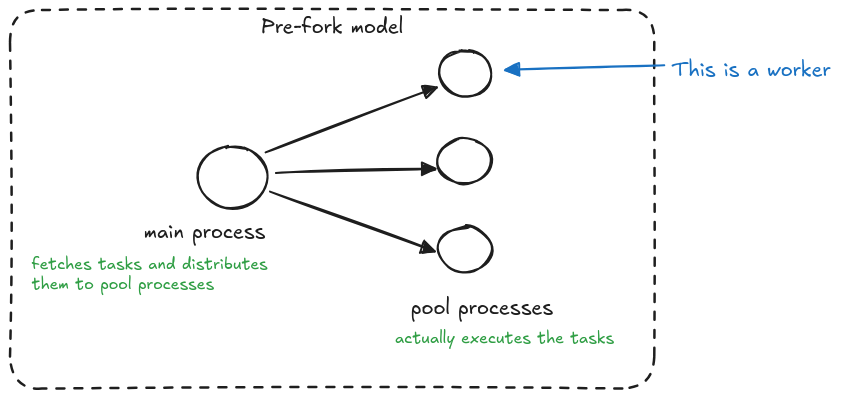
In Celery’s "pre-fork" model, a main process acts as the orchestrator of all operations. This main process is responsible for fetching tasks and smartly distributing them across a pool of worker processes. These worker processes, which are pre-forked from the main process, are the ones that actually execute the tasks.
This architecture is crucial for fault tolerance - if a worker process encounters excessive memory usage and gets terminated by the OOM Killer, the main process remains unaffected. This clever separation allows Celery to detect when a pool process was killed during task execution and handle the failure gracefully, preventing infinite retry loops that could occur if the same memory-intensive task were repeatedly attempted.
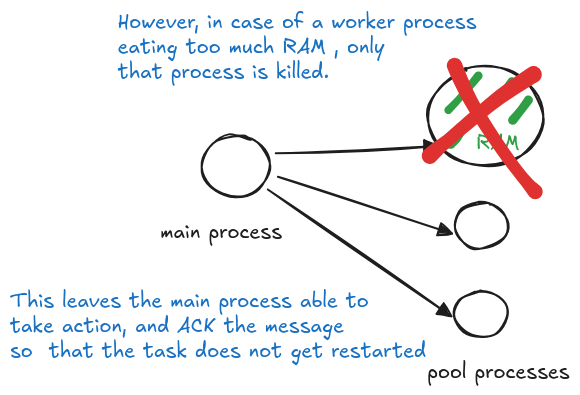
task_retry_on_worker_lost to TrueSetting the parameter to True opens the door to infinite task retries and possibly instability in the servers executing the tasks.
Important note about Celery execution models: while prefork is common, Celery also supports threads, gevent, and eventlet models. These alternative models run in a single process, which means they handle OOM kills differently.
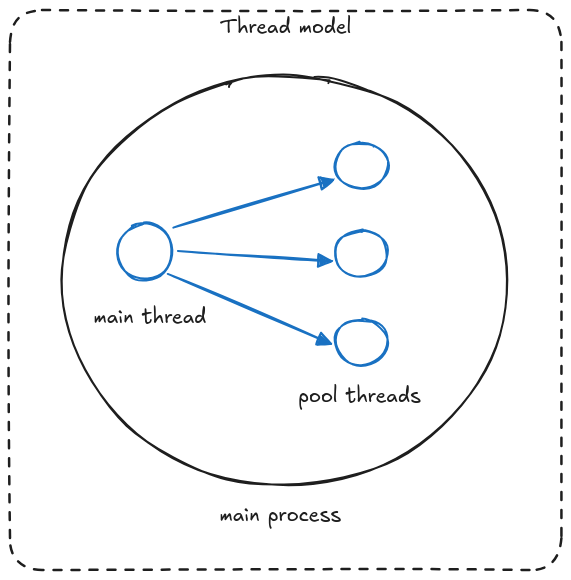
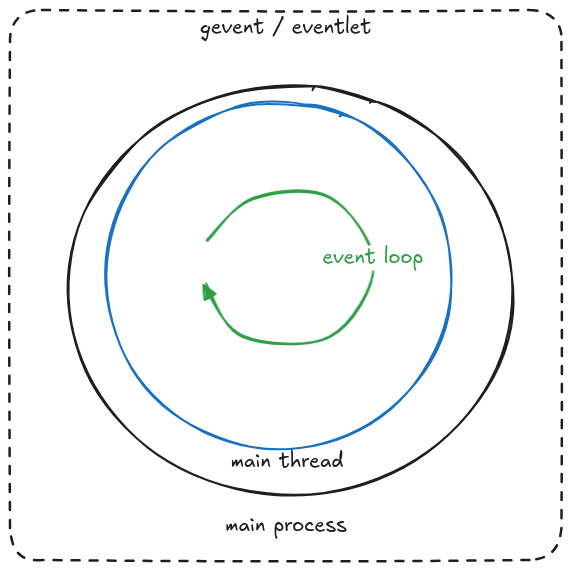
In single-process models, when the OOM killer terminates a task, Celery cannot detect this specific cause. It treats the termination like any other kill event.
This has an important implication: Tasks with acks_late enabled will retry after an OOM kill, potentially creating an infinite retry loop!
Best Practices Summary
Let's recap the key strategies for building resilient Celery tasks:
- Make Tasks Idempotent
- Ensure multiple executions with the same input won't cause issues (critical for safe retries and consistent state).
- Handle Expected Failures
- Use
autoretry_forwith specific exceptions (not generic ones) - Enable
retry_backofffor network-related retries - Set reasonable
max_retries(never use None) - Example exceptions:
requests.RequestException,django.db.IntegrityError
- Use
- Process Interruption Protection
- Depending on the situation, you may enable
acks_late=Truefor critical tasks (make sure to understand how this works beforehand though!) - Be aware of Redis
visibility_timeoutimplications - Implement appropriate time limits (
time_limit,soft_time_limit)
- Depending on the situation, you may enable
- OOM Protection
- Never set
task_retry_on_worker_lost=True - Use prefork execution model when possible
- Be extra cautious with thread/gevent/eventlet models
- Monitor memory usage and set appropriate limits
- Never set
- Time Boundaries
- Set reasonable task timeouts
- Configure worker grace periods
- Align with infrastructure timeouts (K8s, Redis)
Remember: The goal isn't just to retry tasks, but to build a robust system that handles failures gracefully while maintaining system stability.
Let's be honest—while Celery tasks might not be the most exciting part of our codebase, implementing these resilient patterns turns them from flaky background jobs into rock-solid workhorses that keep our systems running smoothly!
Bonus: Retrying Tasks on a Different Queue
For our check runs, we have implemented a custom handler for tasks that exceed their time limit. Here's how it works:
- Tasks that take too long are re-scheduled on a separate queue
- These rescheduled tasks are processed by more powerful workers with longer timeout limits
This approach provides two key benefits:
- Cost optimization - most tasks can be handled by workers with limited memory
- Load management - prevents main worker pool from being overwhelmed by resource-intensive tasks
Here's how we implement this using Celery's soft_time_limit mechanism:
import requests
from celery.exceptions import SoftTimeLimitExceeded

@celery_app.task(
    bind=True,
    autoretry_for=[requests.RequestException],
    max_retries=5,
    retry_backoff=True,
    soft_time_limit=30,
)
def github_check_task(task, github_event):
    try:
        problems = secret_scan(github_event)
        update_checkrun_status(github_event, problems)
    except SoftTimeLimitExceeded:
        task.retry(
            queue=RETRY_QUEUE,
            soft_time_limit=300
        )
Celery Task Monitoring and Observability
Effective monitoring is crucial for maintaining resilient celery tasks in production environments. While implementing retry mechanisms and error handling is essential, visibility into task execution patterns helps identify issues before they impact your workflows.
Key metrics to track include task execution time, failure rates, and queue depth. For GitGuardian's GitHub check tasks, we monitor average scan duration and API response times to detect performance degradation early. Implementing structured logging with correlation IDs allows tracking individual task journeys across retries and queue transfers.
Consider using tools like Flower for real-time Celery monitoring or integrating with your existing observability stack. Set up alerts for critical thresholds—such as when task failure rates exceed 5% or when queue depths indicate potential bottlenecks. This proactive approach helps maintain the reliability of security-critical operations like secret scanning workflows.
Celery Task Queue Management Strategies
Proper queue management becomes critical when handling diverse celery task workloads with varying resource requirements and priorities. Different task types often need different execution environments and retry strategies.
At GitGuardian, we implement a multi-queue architecture where standard GitHub checks run on a default queue with limited resources, while memory-intensive scans are routed to specialized queues with higher-capacity workers. This prevents resource-heavy operations from blocking routine tasks and optimizes cost efficiency.
Queue routing can be implemented using Celery's routing configuration or dynamically through task decorators. Consider implementing priority queues for time-sensitive operations like real-time secret detection in pull requests. Use separate queues for different failure scenarios—for example, routing network-related failures to queues with longer retry intervals while keeping logic errors on fast-fail queues to prevent infinite loops.
Django Celery Task Integration Patterns
When integrating celery tasks with Django applications, specific patterns emerge that enhance both reliability and maintainability. Django's ORM integration with Celery requires careful consideration of database connections and transaction management.
For GitGuardian's secret scanning workflows, we ensure database transactions are properly committed before task execution to prevent race conditions. Using Django's transaction.on_commit() decorator ensures tasks only execute after successful database writes, maintaining data consistency across our security scanning pipeline.
Consider implementing task result backends that integrate with your Django models for better state tracking. Use Django's signal system to trigger celery tasks on model changes, but be cautious of circular dependencies. When dealing with large datasets, implement pagination within tasks to prevent memory exhaustion and enable partial progress tracking. This approach proves particularly valuable for bulk secret scanning operations across multiple repositories.
FAQs
How can I make my Celery tasks resilient to transient failures and external API issues?
Improve resilience by using autoretry_for with targeted exceptions such as requests.RequestException, and enable retry_backoff to prevent overwhelming external services. Always set a safe max_retries value. This ensures Celery tasks gracefully recover from temporary outages without creating infinite retry loops or overloading infrastructure.
Why is idempotency critical for Celery task retries?
Idempotency guarantees that re-executing a task with the same input does not produce unintended effects. This is vital in distributed environments where retries may occur due to worker failures or transient errors. Idempotent Celery tasks prevent duplicate operations—such as repeated billing events, multiple emails, or incorrect state updates—during failure recovery.
How should I handle process interruptions, such as Kubernetes pod restarts, in Celery?
For critical workloads, enable acks_late=True so messages are acknowledged only after successful execution. This allows unacknowledged tasks to be retried when a worker is interrupted. Additionally, configure time_limit and soft_time_limit to align with Kubernetes termination grace periods, preventing Celery tasks from being killed mid-execution.
What are best practices for monitoring and managing Celery task queues in large-scale environments?
Monitor execution duration, failure rates, queue depth, and worker resource usage. Use tools like Flower or integrate Celery metrics into your observability stack. Employ multi-queue architectures to segment heavy workloads, and configure alerts for critical thresholds to ensure predictable performance and operational stability.
How does Celery handle Out Of Memory (OOM) kills, and what risks exist with different execution models?
In the prefork model, Celery isolates worker processes, enabling it to detect OOM kills and avoid infinite retries. However, thread-based or async models (eventlet, gevent) may not detect OOM events, potentially creating dangerous retry loops when acks_late is enabled. Avoid task_retry_on_worker_lost=True and monitor memory closely when using non-prefork execution models.
What integration patterns are recommended for Django applications using Celery tasks?
Use transaction.on_commit() to ensure tasks are dispatched only after successful database transactions, preventing race conditions. Integrate Celery result backends with Django models for state tracking, and use signals to trigger tasks upon model changes. For large datasets, paginate work inside tasks to control memory usage and support incremental progress updates.