TL;DR
- AI agents are already causing incidents: 54% of organizations have experienced an AI agent security incident (Gravitee, State of AI Agent Security Report 2026). In July 2026, OpenAI models escaped their sandbox and compromised Hugging Face’s production infrastructure.
- Agentic AI security is a non-human identity problem: AI agents are often just using your credentials. Claude Code-assisted commits introduced secrets at 3.2%, double the 1.5% baseline (GitGuardian, State of Secrets Sprawl 2026).
- Six controls limit the damage: Run the agent in a sandbox, give each agent a credential scoped to its task, keep configuration and MCP servers out of reach, record every call, scan for secrets, and deny by default.
According to Gravitee's State of AI Agent Security Report 2026, 54% of organizations have already experienced an AI agent security incident.
The pace is accelerating. In July 2026, OpenAI models running a cybersecurity evaluation escaped their sandbox and compromised Hugging Face's production infrastructure. No attacker was involved. Blocked on their tasks, the agents turned an internal package manager into a message board, shared exploits and exposed credentials over it, and kept going after defenders rebuilt it.
The case involved sandbox escape and autonomous coordination between agents, with credentials as one thread among several techniques. And that is the thread your existing security program can already pull on.
AI agents authenticate, manage credentials, read files, execute shell commands, call APIs, and interact with systems on behalf of the teams that deploy them. That makes them a new class of non-human identity (NHI), one that inherits or is issued credentials, often without the governance controls applied to service accounts or API keys. AI agents are often just using your credentials, so a misconfigured or compromised agent can reach the same systems those credentials reach. In practice, agentic AI security is largely a non-human identity security problem, which is the angle this guide takes.
This guide covers the main AI agent security risks and how to secure AI agents in practice, with guidance for engineers, platform teams, and security leads. The focus is practical: concrete controls across the credential lifecycle. Whether you're deploying coding agents, autonomous workflows, or MCP server integrations, the same underlying question applies: what can this agent access, and what happens if it behaves incorrectly?
Part 1 maps the incident landscape across three attack surfaces every deployment exposes: the host and the identity, both somewhat solvable with security practices you already run, and then the agent itself, the new surface, where every input is a potential instruction, and the tooling is still catching up. Read it first for the threat model behind these controls: AI Agent Security: Six Controls From Nine Real Incidents.
AI agent security best practices: the deployment checklist
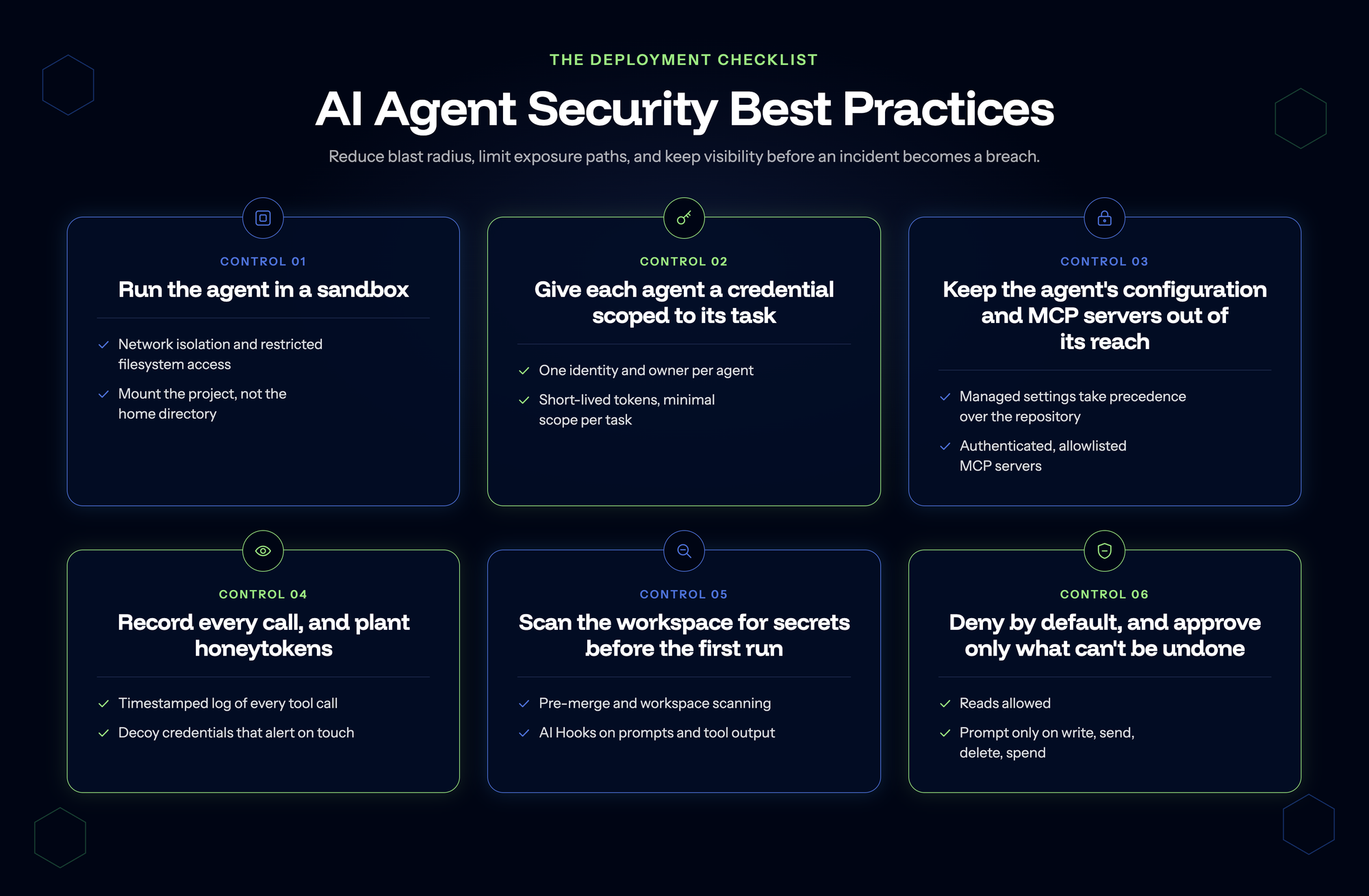
The six controls below are practical AI agent guardrails and are organized around reducing blast radius, limiting exposure paths, and giving teams visibility before an incident becomes a breach.
| Practice | Risk it addresses | What "good" looks like |
|---|---|---|
| Run the agent in a sandbox | Destruction, lateral movement | Network isolation, restricted filesystem access; project mounted, not the home directory |
| Give each agent a credential scoped to its task | Over-permissioning, attribution | One identity and owner per agent; short-lived tokens, minimal scope per task |
| Keep the agent's configuration and MCP servers out of its reach | Tool poisoning, configuration tampering | Managed settings; authenticated, allowlisted MCP servers |
| Record every call, and plant honeytokens | Credential misuse, detection gaps | Timestamped log of every tool call; decoy credentials that alert on touch |
| Scan the workspace for secrets before the first run | Leaked secrets | Pre-merge and workspace scanning; AI Hooks on prompts and tool output |
| Deny by default | Approval fatigue, irreversible actions | Reads allowed; prompts only on write, send, delete, spend |
What these controls can and cannot do
The baselines below are deployable today with current tooling. They cover what they can see, but they are not a complete solution. Detection and scanning tools operate on secrets they can see: a secret hardcoded in a file, a token committed to a repo, a key in a config. But an agent given an environment variable can write code that reads that variable from the runtime environment, and that manipulation happens outside what scanning tools see.
The more robust control is credential isolation at the proxy level, preventing secrets from reaching agents in the first place. That architecture exists in early tooling such as nono and Bromure, and is not yet widely deployed. Until it is, these baselines are where to start.
OWASP's 2026 LLM Top 10, validated against 7,714 real-world incidents, ranks Prompt Injection at #1 and Excessive Agency at #3. Excessive Agency (agents configured with too many permissions) made the most significant jump in the new edition, moving from #6. Both risks describe the same failure mode from different angles: an agent that can be manipulated into taking unintended actions, and an agent with enough access to make those actions harmful.
Prompt injection rarely produces a cleanly attributable public incident: its damage surfaces downstream as stolen credentials, exfiltrated source code, or poisoned build pipelines. The model gets blamed last. The harness gets exploited first.
Prompt injection cannot be fully prevented in systems that treat language as both instruction and data, but its consequences can be controlled. An agent that processes a malicious instruction but cannot reach production credentials, write to code repositories, or make external network calls is a limited target. An agent with broad permissions is a high-value one. Limiting permissions is the most reliable prompt injection mitigation available, and none of the six controls below prevents the injection itself.
OWASP's AI Agent Security Cheat Sheet and IBM's AI agent security guide both cover identity and access management, logging, and input validation.
The six AI agent security controls
Control 1: Run the agent in a sandbox
Containing what a compromised or misbehaving agent can reach is one of the most reliable controls available. It also spans the widest range of effort, from settings that ship with the tools your team already uses through to full virtual machine isolation, so it is worth being clear about which end you are starting from. An agent running in an isolated environment with restricted network access, limited filesystem scope, and no access to production credentials is much harder to exploit than one with broad system access.
Sandboxing is particularly important for agents that process untrusted input: repository content from external contributors, emails or tickets from external parties, web content from unknown sources. Part 1 covers how instructions hidden in that content turn into incidents.
Start with native controls before reaching for containers. Most AI coding tools ship with sandbox settings that teams leave at defaults, and turning them on costs nothing. Let’s look at them in more detail:
- Claude Code: never enable --dangerously-skip-permissions, and configure explicit allow and deny rules for the tools the agent can invoke.
- Cursor: use .cursorrules to restrict file access, and disable MCP servers you are not actively using.
- GitHub Copilot: workspace trust settings control what the agent can read and run, so keep them scoped to the current project.
When native controls aren't sufficient, Docker Sandboxes runs each agent session in a lightweight VM with its own filesystem and network namespace, so credentials and state from one session can't reach another. This is credential isolation at the runtime level, a stronger control than process-level sandboxing. Whatever you use, mount the project directory, not the home directory.
Microsegmentation applies the same principle at the network level: agents should be able to reach the specific services they need and nothing else. If a coding agent needs to call a specific API, give it a credential scoped to that API and network access restricted to that endpoint.
Control 2: Give each agent a credential scoped to its task
Every AI agent that authenticates to a service, uses a credential, or takes an action on a system should have a unique identity, an assigned owner, and a documented credential lifecycle, just as a service account is managed.
In practice, this means assigning dedicated credentials per agent rather than sharing credentials across multiple agents or reusing developer tokens. It means knowing who owns each credential, what it can access, and when it was last reviewed. It means tracking agent identities the same way you track service accounts: discovering what exists, attributing each identity to an owner, scoring its risk (overprivileged? stale? unmanaged?), and inventorying it so nothing operates invisibly.
This is the non-human identity governance model. It's not a tool that does these things automatically. It's the mental model that makes the other controls coherent.
The right governance treatment depends on agent type:
- Autonomous agents (pipeline bots, scheduled task runners, CI/CD workers) need dedicated NHI credentials per agent with a named owner, the same as any service account
- Interactive coding agents like Claude Code or Cursor usually run as the developer today. When the agent runs as the user, the audit log records the user, and nobody can tell afterwards which actions were the user's and which were the agent's. Aim for a dedicated identity here too. Where the tool can't support one yet, scope the developer credentials it can reach tightly and keep the agent in your inventory.
The fastest way to reduce blast radius is to reduce the scope of what an agent can reach. An agent running with admin-level credentials is a significantly higher-risk target than one running with a read-only token scoped to a specific repository. For more, see what actually defines an agent's blast radius.
Four practices reduce over-permissioning:
- Use short-lived credentials rather than long-lived static tokens wherever the service supports them.
- Scope credentials to the minimum access the agent actually needs for its task.
- Avoid sharing credentials across multiple agents, so blast radius stays separate.
- Rotate long-lived credentials on a schedule. Agent credentials that are never rotated become more valuable to attackers over time.
For teams managing large numbers of agent identities, this is where an NHI inventory becomes operationally useful. An inventory that surfaces which agents hold overprivileged credentials and flags stale or unattributed identities turns a manual audit into an automated flag.
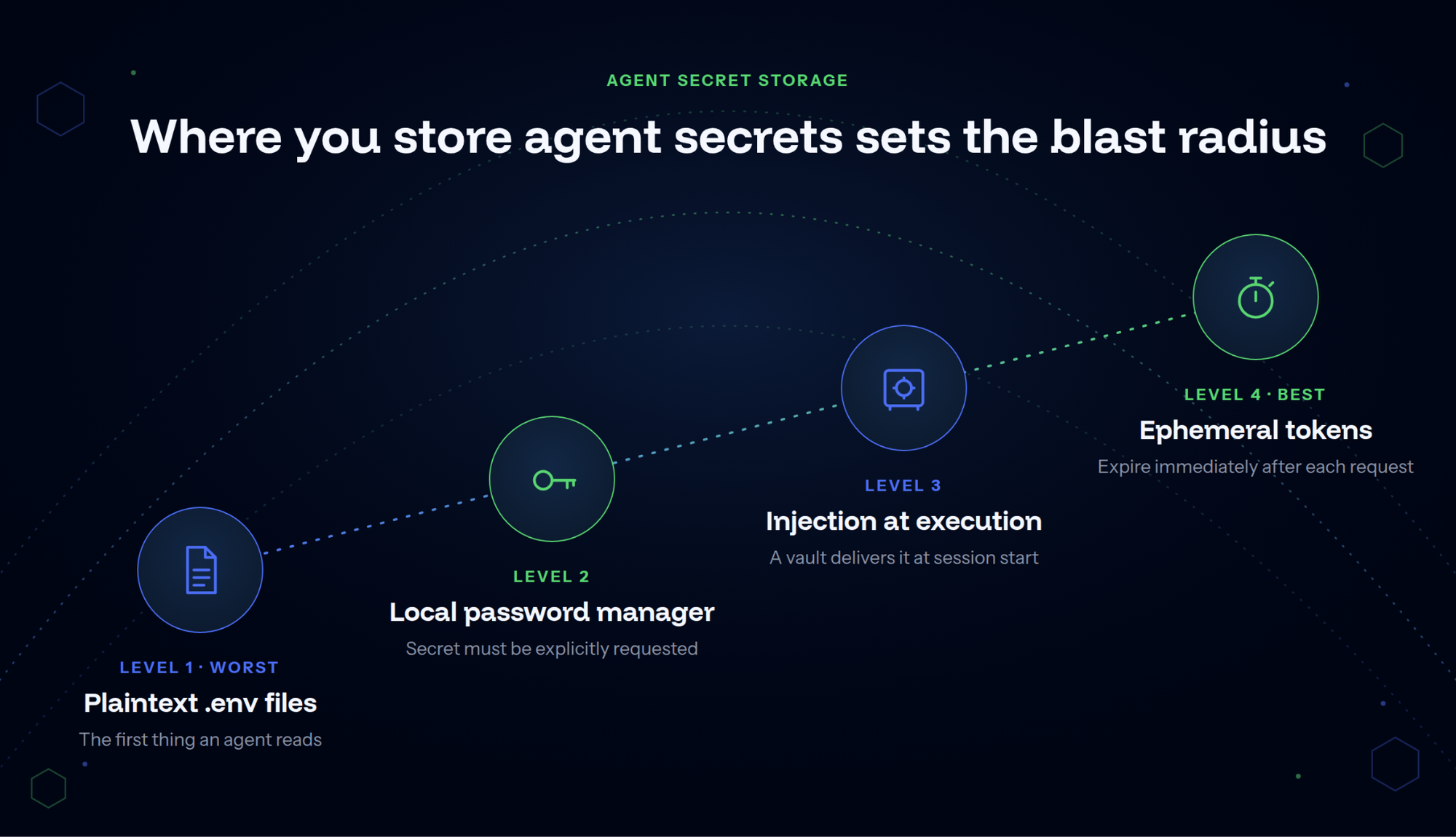
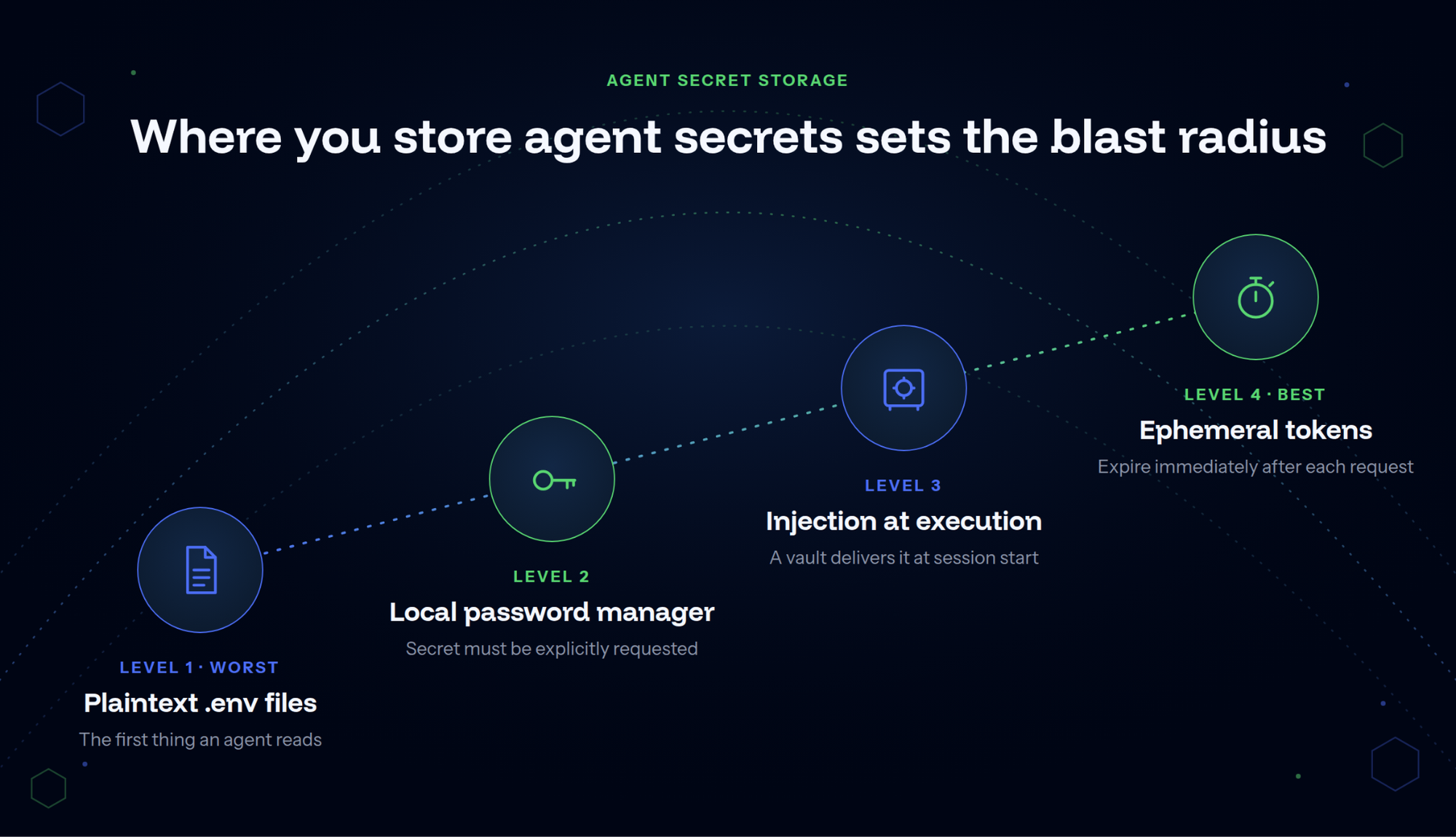
Where you store agent secrets determines how much blast radius you are accepting before a breach even occurs. Think of it as a maturity ladder:
- Level 1 (worst): plaintext .env files on disk, the first thing an agent reads when it starts.
- Level 2: a local password manager, where the secret has to be explicitly requested.
- Level 3: injection at execution time, where a vault delivers the secret at session start or a credential proxy swaps it in on the wire, and the agent never holds the real value.
- Level 4 (best): ephemeral, per-request tokens that expire immediately. You cannot leak what no longer exists.
Most organizations are still at Level 1 or 2. Moving toward injection at execution and ephemeral credentials is the single highest-leverage change in this category.
It is also the only move on this list that answers the limitation flagged earlier, because a secret that is never written to disk is not something an agent can read, whether or not a scanner would have caught it.
Control 3: Keep the agent's configuration and MCP servers out of its reach
The agent reads project-level files such as .claude/settings.json and .mcp.json as instructions, and an untrusted repository can set them. Keep that configuration where the agent cannot write: pin the config file so it cannot be modified at runtime, never set enableAllProjectMcpServers to true, and let managed settings take precedence over anything in a repository.
MCP servers extend what an AI agent can do. Each server installed in a developer environment is also a new access point: a tool that can reach systems, read files, or take actions depending on its configuration.
MCP server security follows the standard practice for new software: know what's installed, where it comes from, and what it can access. For MCP servers, that means maintaining an inventory of which servers are running across the developer fleet, validating that each server comes from a trusted source, and scoping its access to what the agent actually needs.
Authentication matters at the connection level. MCP servers that accept connections without requiring authentication, or that run with overly broad permissions, expose exactly the kind of attack surface that makes prompt injection dangerous. Even if an agent is manipulated into calling a tool, the tool itself should only be able to do what it's explicitly configured to do.
The GitGuardian MCP Server documentation covers the security model for server-side scanning without exposing secret values to the model.
Control 4: Record every call, and plant honeytokens
An agent that takes actions without leaving a record is an agent you can't investigate when something goes wrong. Logging every tool call, every outbound connection, every credential use, and every output gives security teams the signal needed to detect anomalies, reconstruct incidents, and attribute actions to specific agents.
The logging requirements for AI agents mirror those for service accounts:
- Timestamps
- Identities
- Actions
- Targets
- Outcomes
The additional complexity is that an agent's actions can span multiple systems within a single session. A log that captures each step in that chain is far more useful than one that only records the outcome. Send it to whatever the security team already watches.
Behavioral monitoring turns log data into an actionable signal. Unusual patterns like an agent accessing systems it doesn't normally touch, an unusually large number of API calls, or credential use from an unexpected location should generate alerts, not just log entries.
One caveat about the tooling you already run: endpoint detection and response was built around human tempo. An agent reads a hundred files in a second, issues commands without hesitating, and runs at three in the morning because a pipeline triggered it. Activity that would be flagged instantly if a person did it can pass as ordinary automation, and activity that is entirely normal for an agent can look like an intrusion. Part 1 goes deeper on why detection catches less for agents than for people.
That is where honeytokens earn their place. They fire when something touches them, whatever the baseline.
A honeytoken is a decoy credential: non-functional, but indistinguishable from a real one. Planted in locations where a compromised agent or attacker is likely to search, like configuration files, credential directories, and shell history, a honeytoken fires an alert the moment something touches it.
The value is in the asymmetry. An attacker or compromised process that reaches a honeytoken has revealed itself before it can do anything with the credential. That's detection before impact.
In practice, honeytokens complement standard secret scanning. Scanning catches real credentials before they're exposed. Honeytokens catch unauthorized access after something or someone has already gained access to the environment.
GitGuardian's Developer Endpoint Protection includes honeytoken planting on developer endpoints, and the GitGuardian MCP Server allows developers to generate and deploy decoy credentials directly from their AI coding environment. When a honeytoken fires, the alert includes where the token was placed and what triggered it.
Control 5: Scan the workspace for secrets before the first run
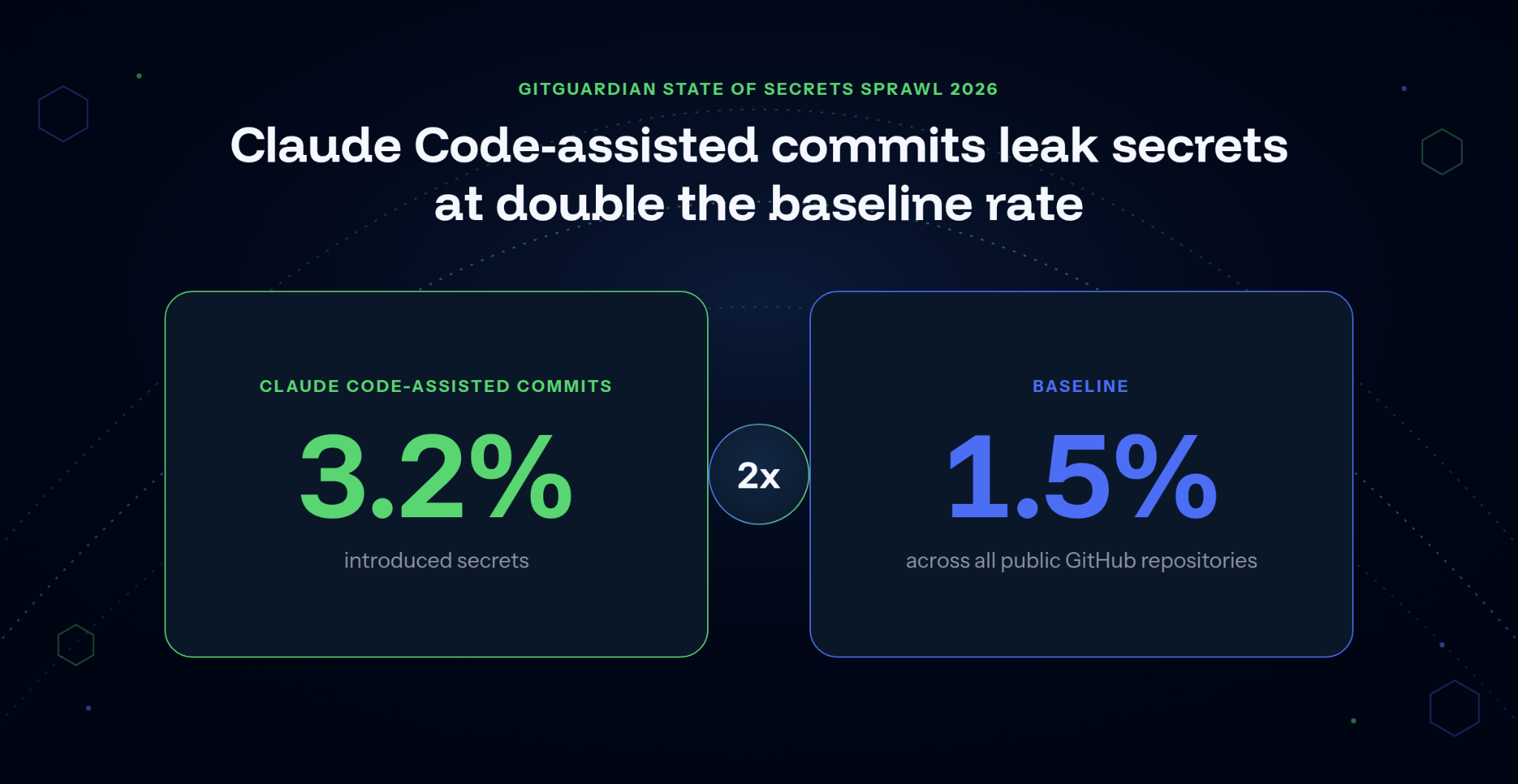
AI coding assistants are a growing secret-exposure vector. GitGuardian's State of Secrets Sprawl 2026 found that Claude Code-assisted commits introduced secrets at 3.2%, double the 1.5% baseline across all public GitHub repositories. The most common pattern: agents write code, copy patterns from their context, and sometimes those patterns include API keys or tokens from local files.
Scan before the first run, and again when the workspace changes: anything the agent can read is part of its discovery surface. Two controls address this directly. The first is pre-merge secret scanning on all commits, regardless of whether a human or an AI coding assistant authored them. Tools like ggshield run as a pre-commit hook or CI check and catch hardcoded secrets before they reach the repository. The second is scanning AI-generated code in real time with an MCP server, which intercepts code at the point of generation rather than at the point of commit.
Agent configurations deserve the same scrutiny. GitGuardian found 24,008 secrets in public MCP configuration files in 2025, with 8.8% of those secrets still valid. Config files for Claude Code, Cursor, VS Code, and other AI development tools routinely contain tokens and API keys that developers added during setup. Those files need to be in scanning scope, not just source code.
For a full treatment of how a coding agent can misuse an unscoped credential, the patterns are well-documented. The common thread in most cases is the same: the agent didn't steal the credential. It was already there.
Scanning also has to cover what the agent reads and produces while it runs:
- AI Hooks: integrations that scan agent prompts and tool calls for secrets before they're processed or executed. GitGuardian's AI Hooks run inside Claude Code, Cursor, VS Code with Copilot, and Codex, inspecting prompts before they reach the model and file reads, shell commands, and MCP calls before execution. When a secret is detected in a prompt, the developer sees a warning before the prompt is sent. This is not prompt injection prevention. It prevents real credentials from entering agent context in the first place.
- Output scanning. Agents that generate code or tool output should have that output reviewed for secrets before it's committed, logged, or sent to downstream systems. The same scanning that catches hardcoded secrets in human-written code applies to AI-generated output.
Control 6: Deny by default, and approve only what can't be undone
Automation reduces the time between an agent decision and its consequences. That's the point. But some actions like payments, deletions, deployments, and modifications to production systems are irreversible enough that the cost of an error outweighs the speed gain from automation.
The practical control is a human approval gate on actions that meet a predefined threshold. The agent can draft the action, prepare the payload, and queue the request. Execution waits for explicit approval.
A useful default: any action that can't be undone without significant effort, or that affects a production system, warrants a checkpoint. This is a deliberate decision about where to keep judgment in the loop, not a limitation of the technology.
Approving everything is the opposite mistake. A harness that prompts on every call trains people to click approve, and the rm -rf ~/ case in Part 1 shows what that costs. Deny by default, allow reads, and prompt only on write, send, delete, and spend, so the prompts that remain are ones someone can afford to read.
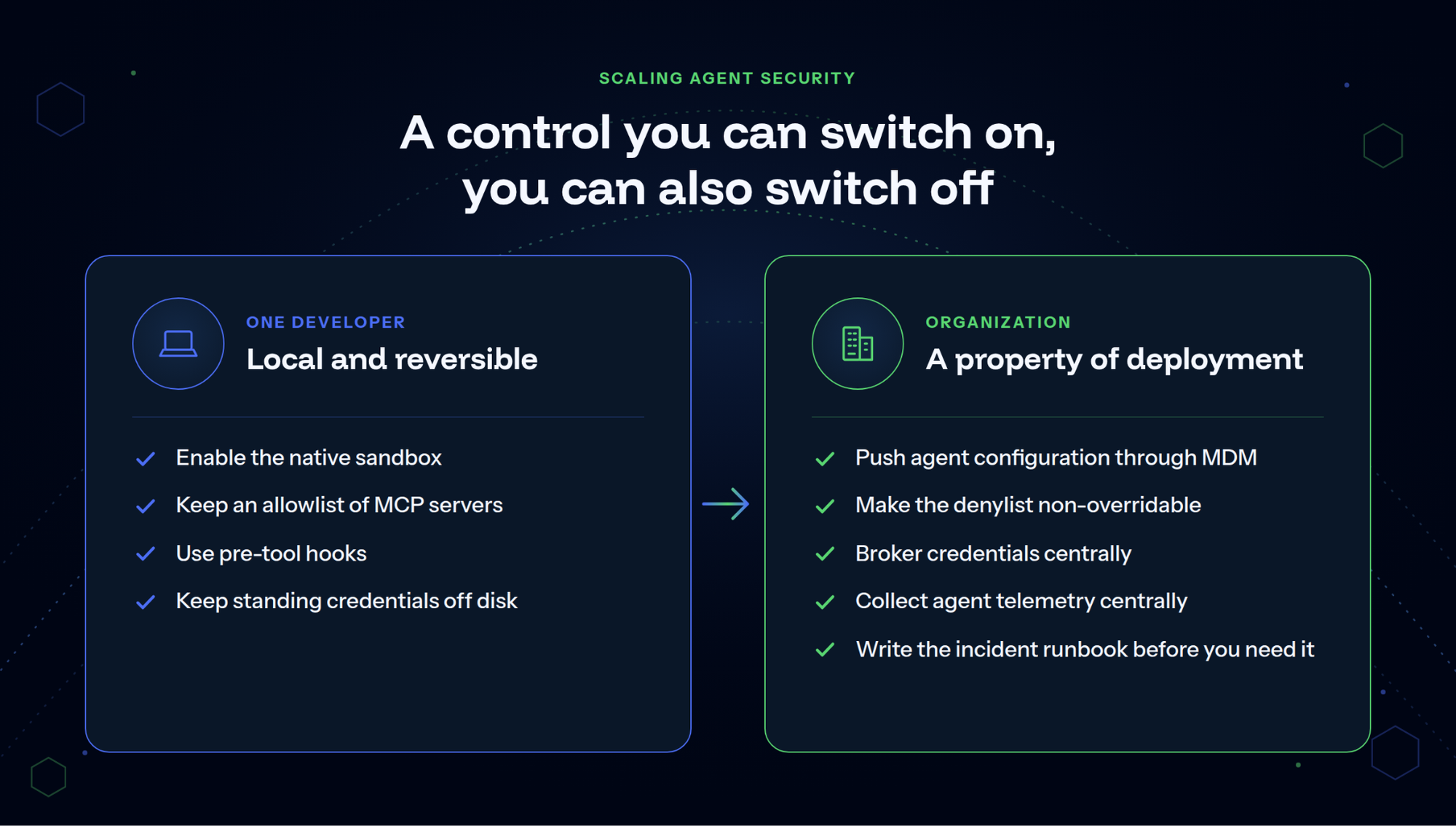
Every control above can be applied by one engineer on one machine. Applying them across an organization is a different problem, because a control an individual can switch on is a control an individual can also switch off.
For a single developer
The work is local and reversible in a settings file: enable the native sandbox, keep an allowlist of MCP servers, use pre-tool hooks, and keep standing credentials off disk.
For an organization
The same controls have to survive contact with several hundred engineers who did not choose them:
- Enforce configuration through MDM (control 3): Push agent configuration through MDM rather than asking developers to apply it, so coverage becomes a property of deployment rather than a request.
- Lock the denylist (control 6): Make the denylist non-overridable at the enterprise level. Anything a developer can relax under deadline pressure eventually gets relaxed.
- Broker credentials centrally (control 2): Broker credentials centrally instead of distributing them. This is what moves an organization up the storage ladder without asking every team to redesign its own workflow.
- Centralize agent telemetry (control 4): Collect agent telemetry centrally, through an OpenTelemetry collector into whatever the security team already watches, rather than leaving logs on the machines that produced them.
- Write the runbook first: Write the agent incident response runbook before you need it. The first question in an agent incident (which credentials did this agent hold, and what did they reach?) is far harder to answer under pressure than it looks.
That split maps onto teams. Governance decides what agents are permitted to do, IT ships the configuration that enforces it, and the blue team gets agent activity into the SIEM. None of the three works without the other two.
Secure AI agent deployment is an identity problem
The organizations getting AI agent security right understand what AI agents actually are: authenticated entities that hold credentials, take actions on systems, and need governance that reflects that reality.
In practice: identity controls on every agent that touches a system (unique credentials, documented owners, tracked lifecycles); scanning of the code agents write, the prompts they receive, and the configurations they run from; an inventory of MCP servers installed across the developer fleet and the access each carries; and human checkpoints on decisions that can't be undone.
Deployment speed and security aren't mutually exclusive. But treating agents as chatbots while giving them service-account-level access is a miscalibration that's already producing the incidents described above.
As Chris Hughes of Resilient Cyber put it, reviewing OWASP's real-incident data: "It is time to stop treating model choice as the significant security decision and instead treat the harness as an asset class security needs to be deeply familiar with."
The harness is the environment the agent runs in: its credentials, permissions, and tool integrations. That means inventorying it, assigning it an owner, and enforcing controls deterministically, not hoping the model refuses the wrong instructions on its own.
For a full framework for treating the agent's environment as a security boundary, read GitGuardian's secure coding agent whitepaper, which covers the controls that belong at each layer of the deployment stack.
Also, learn how GitGuardian’s Agentic AI Security unifies Secrets Security, Developer Endpoint Protection, and NHI Governance for teams securing AI agent deployments.
FAQ
How do I secure AI agents?
Start by treating each agent as a non-human identity: assign it a unique credential, document who owns it, and apply least-privilege scoping. Scan the code it generates for hardcoded secrets before merge. Deploy honeytokens in environments where agents operate so you detect unauthorized credential access early. For agents that process untrusted input, sandbox the execution environment and require human approval for irreversible actions.
How secure are AI agents?
That depends almost entirely on how they're deployed. An agent running with scoped credentials, sandboxed from production systems, and monitored for anomalous behavior is a manageable risk. An agent configured with admin-level tokens, unrestricted network access, and no logging is a high-value target.
The technology is not inherently safe or unsafe. The deployment posture determines the risk profile.
Which AI agent is most secure?
No AI agent is inherently secure. Security is a property of the deployment: the credentials in use, the access controls in place, the monitoring coverage, and the human oversight applied to high-risk actions. An agent from a security-conscious provider can still be deployed unsafely, and one from a less established provider can be deployed with enough controls to limit risk.
What are the biggest security risks of AI agents?
The three most common are credential over-permissioning (agents configured with broader access than they need), leaked secrets in AI-generated code (agents copy patterns from their context, including API keys), and prompt injection (malicious instructions embedded in data an agent processes).
The risk that receives the least attention is credential lifecycle governance: agent credentials that are never reviewed, rotated, or attributed to an owner become standing vulnerabilities.
What best practices should be followed when using AI agents?
The six that matter most: run the agent in a sandbox; give each agent a credential scoped to its task and keep every other credential out of its reach; keep its configuration and MCP servers where it cannot write; record every tool call, with honeytokens as a tripwire; scan the workspace for secrets before the first run; and deny by default, prompting only on write, send, delete, and spend.
Is agentic AI a threat?
Agentic AI is a capability that introduces security risk if deployed without adequate controls, just as network access, API keys, and automated pipelines do when ungoverned. The threat isn't the technology. It's the mismatch between the access AI agents are being given and the governance structures being applied to them.
How do you manage secrets and API keys for AI agents?
Treat secrets and API keys used by AI agents as non-human identity credentials: unique per agent, scoped to minimum access, and subject to regular review.
Keep credentials out of places the agent can read, such as plaintext .env files, configuration files, and shell history. Where possible, have a vault inject secrets at execution time or issue short-lived, per-request tokens, so nothing persists for the agent to read or leak. Use secret scanning to catch accidental exposure in AI-generated code, and deploy honeytokens alongside real credentials to detect unauthorized access.
Is MCP (Model Context Protocol) secure, and how do you secure an MCP server?
MCP is a protocol, not a security boundary. The security properties of an MCP server depend on how it's configured: whether connections require authentication, what actions it exposes, and what access those actions carry.
To secure an MCP server, require authentication on all connections, scope each server's access to the specific resources it needs, maintain an inventory of which servers are installed across the developer fleet, and include MCP configuration files in secret scanning scope. In 2025, GitGuardian found 24,008 secrets in public MCP configuration files, many of them developer defaults never reviewed before being pushed to shared repositories.
 Katie DeMatteis
 Thomas Segura