Git, from a certain perspective, is a time machine that works across parallel branches of reality. It lets teams jump to any point in the past and preserves every change ever made to a codebase. That power is also what makes secrets leaks in code so persistent and dangerous. Every commit is a permanent record. When a secret enters a commit, it lives in that record forever, regardless of what comes after it.
Human developers have been learning this the hard way for decades. Now there is a new kind of user making the same mistakes: AI coding agents.
Assistants like Cursor, Claude Code, and Codex write a lot of code, very fast. They can catch obvious errors and ship fixes at dizzying speed. They also commit secrets sometimes. When told to clean up the codebase, agents often apply the same partial remediation that generations of human developers have applied before them: They make a new commit that removes the secret from the latest version of the code. The prior commit, with the secret in it, stays exactly where it is.
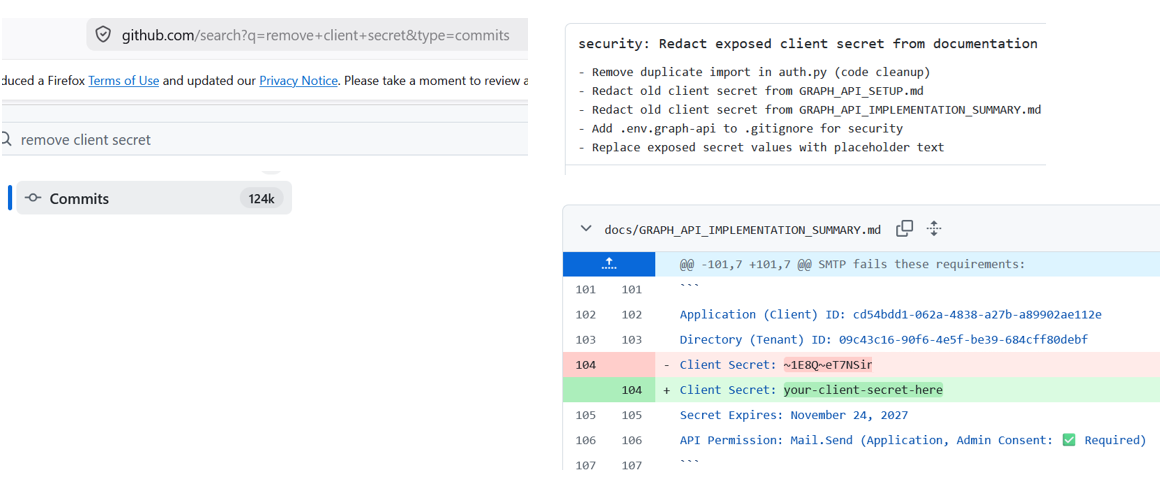
Security researchers at CYPFER ran a simple GitHub search for commits containing phrases such as "redact exposed client secret" and "remove credentials from documentation." The query returned approximately 124,000 results, where the secret was easily found one commit earlier in the chained history.
That is tens of thousands of attempts at remediation that stopped one step short. Their research found structured commit messages, rapid follow-up fixes, and timing signatures that point to AI agents handling both the introduction and the attempted cleanup.
How Models Were Taught To Use Git
AI agents learn to use tools the same way they learn everything else: from training data. They are not deriving tool use from first principles. They are reproducing patterns that worked in other scenarios where the goal was to "remove a secret."
The practical reality of version control for most developers comes down to a small set of commands. git add, git commit, and git push cover the vast majority of daily work. That workflow treats Git as a linear series of changes, with the latest commit reflecting the current truth. That model is correct for reading the codebase. It is incomplete for understanding what is stored and exposed across branches and commit history.
Git appends commits to a historical log. New changes do not delete prior history. When a commit introduces a secret and a later commit removes it, both commits remain in the repository's history as permanent, addressable objects. Anyone with access to the repository can inspect earlier revisions and retrieve values that were "removed" in a later commit. A commit message like "remove client secret" does not clean up the exposure. It advertises where to look.
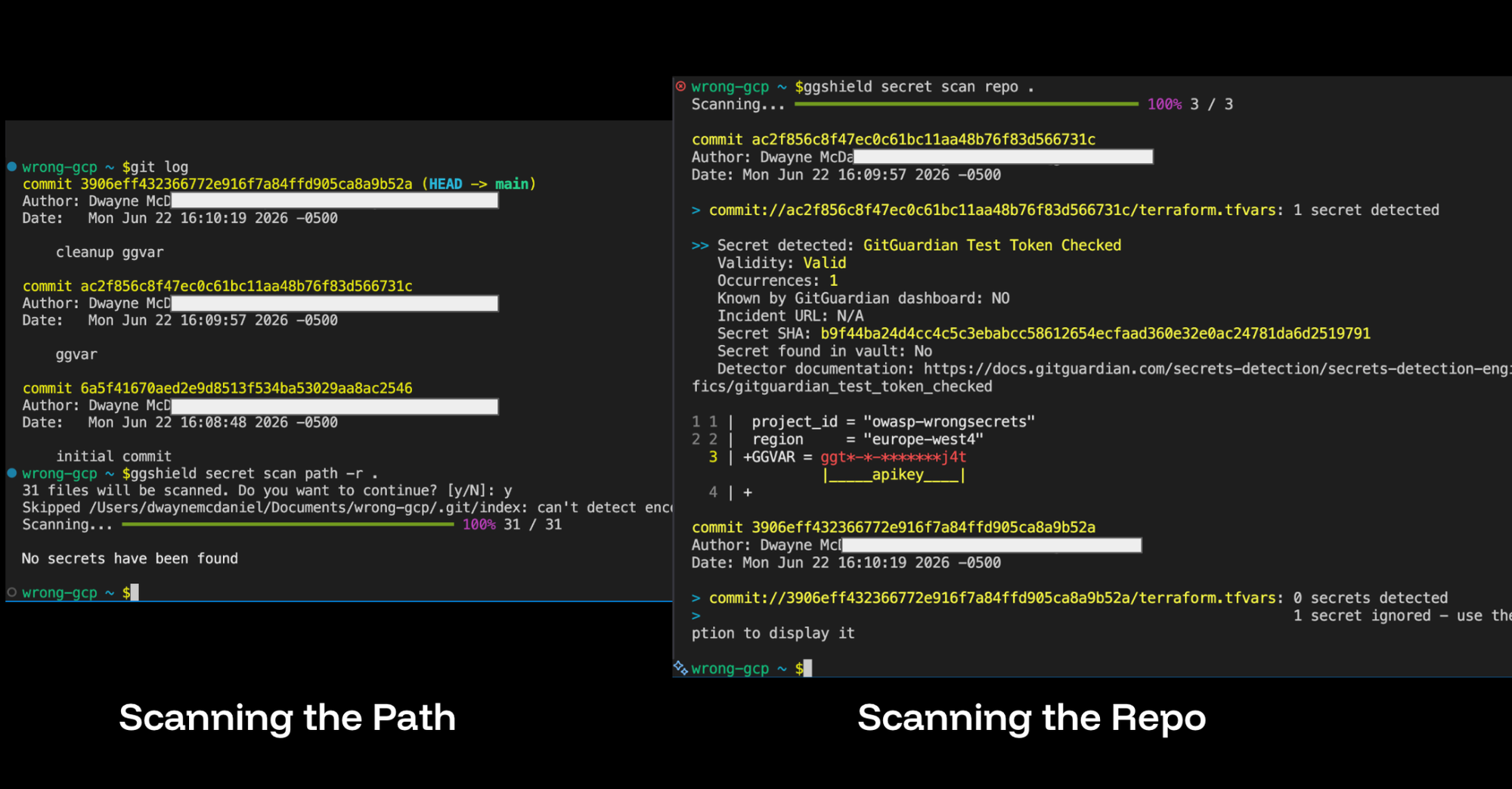
An agent that detects a hardcoded credential and commits a fix is doing exactly what it was trained to do. The fix is correct at the code level. The credential disappears from HEAD. The agent has no built-in mechanism to understand git history as a security boundary, or to treat prior commits as part of the exposure surface that needs to be addressed.
What Remediation Actually Requires
When a secret ends up in history, the remediation sequence needs to go beyond a follow-up commit. Rotate or revoke the credential first. A secret that no longer works cannot be abused even if an attacker finds it in history.
Then identify which branches and tags contain the affected commit, and check whether any forks or clones are in play. Forks, cached views, and collaborator machines can preserve the sensitive value after the central repository is cleaned.
The cleanup of a Git history manually is possible but requires pretty deep CLi knowledge. Fortunately, we can use open source tools like git-filter-repo to remove the secret from every commit where a secret appeared. GitGuardian rewriting git history guide covers multiple scenarios in detail, from secrets in the most recent commit to secrets embedded further back. After the rewrite, a coordinated force-push updates the remote, and every affected collaborator needs to re-clone or rebase onto the new history.
Scanning The History You Actually Have
The first step toward securing a codebase is understanding what is already in its history. ggshield secret scan repo does this locally, walking every commit across every branch. It surfaces secrets that were introduced years ago, removed in more recent commits, and never revisited since. A secret committed to a feature branch that was never merged to main is still accessible to anyone who can clone the repository.
Where possible, GitGuardian checks the validity of detected secrets with non-intrusive calls to the relevant platforms. The output distinguishes between a secret that is still live and one that has already been rotated. A valid credential found in a three-year-old commit is an active incident. An invalid one may still require cleanup, but it does not carry the same immediate risk.
For teams that have already connected their codebases to the GitGuardian platform, this picture is already waiting in the dashboard. The platform scans the repository's full history on connection and continuously monitors all new contributions. Every incident is recorded and tagged with the originating commit. Each finding is enriched with the secret's type and validity, scored by priority, and routed to the developer responsible. Security teams do not have to reconstruct the exposure history manually.
Knowing a secret exists in history is the starting point. Knowing it is still valid, that it grants access to a production system, and that it was committed by an automated agent six days ago requires a very different response than finding an expired test key from three years prior.
Skills Can Teach An Agent How To Approach Git
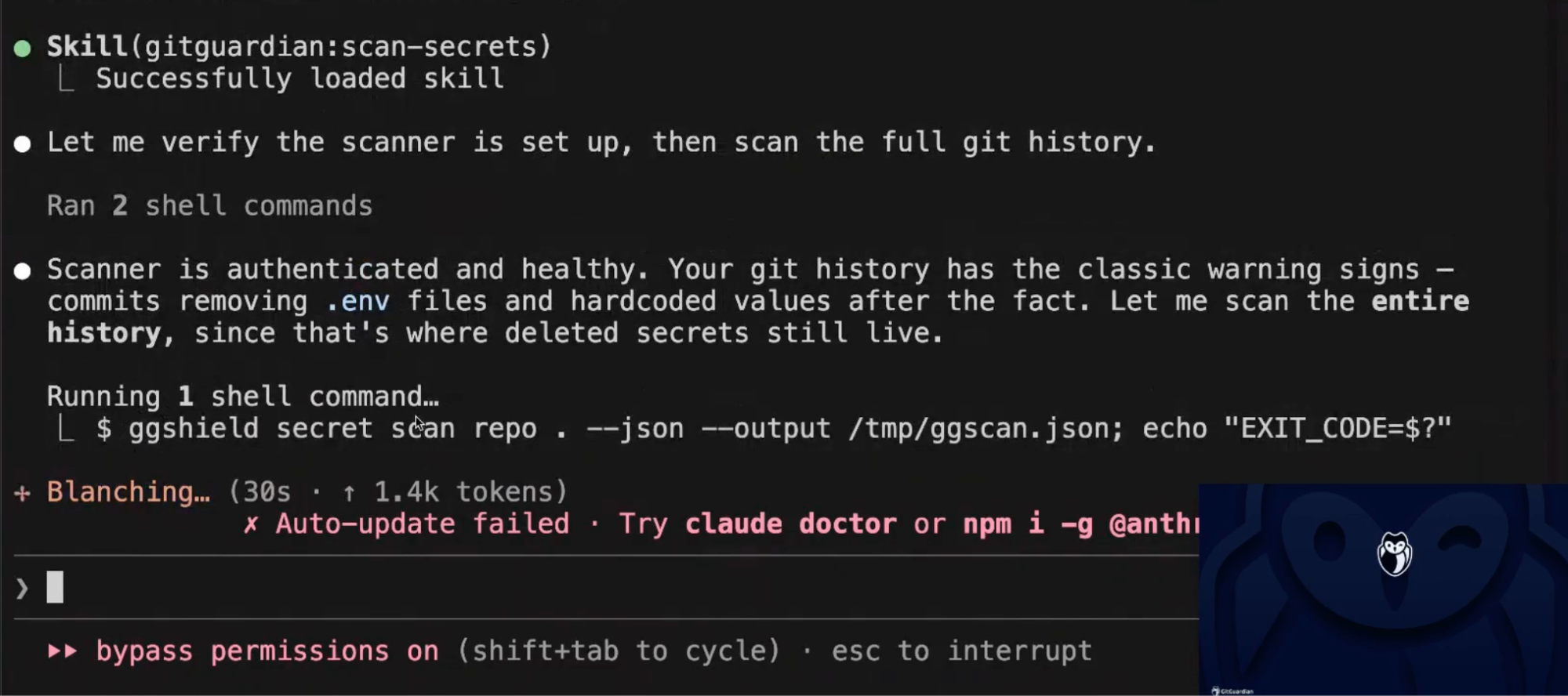
Giving an agent access to ggshield without guidance is not enough. Like any other tool, it requires structured instructions that produce a correct and repeatable workflow. That is exactly what GitGuardian Agent Skills are designed to do.
Agent Skills install into Claude Code, Cursor, and Codex. They teach the agent when to scan, what to scan, and how to interpret findings.
The /gitguardian:scan-secrets command instructs the agent to use ggshield across repos, staged changes, and full commit history. The key rule baked into the skill is "scan first, then remediate from structured findings." An agent following this skill will not just check whether the latest version of the code is clean. It will scan the full history for secrets introduced and removed in prior commits.
The /gitguardian:install-git-hooks command installs ggshield as a pre-commit or pre-push hook, blocking secrets before they enter history at all. The skill notes explicitly that hooks protect future work, while existing history still needs to be scanned. Prevention and remediation are separate problems requiring separate steps.
Depending on your AI assistant, you can likely use ggshield to install AI hooks to guard the conversation itself. You can now build checks into the native hook systems of Cursor, Claude Code, and VS Code with GitHub Copilot to scan AI workflows in real time. Before a prompt reaches the model, ggshield checks it for credentials. Before a tool call executes, ggshield checks the command. After a tool runs, ggshield checks the output. AI hooks catch sensitive material at that handoff point.
AI Skills Account For Context When Remedating Secret Leaks
That same incident context exposed through the GitGuardian platform is also available directly to agents via the GitGuardian MCP server. An agent will use the MCP server to list open incidents for the current project, check validity status, and review exactly where in the codebase a secret appears. From there, it can build multi-step remediation workflows without leaving the IDE. The platform has already scanned history, scored severity, and tracked remediation state.
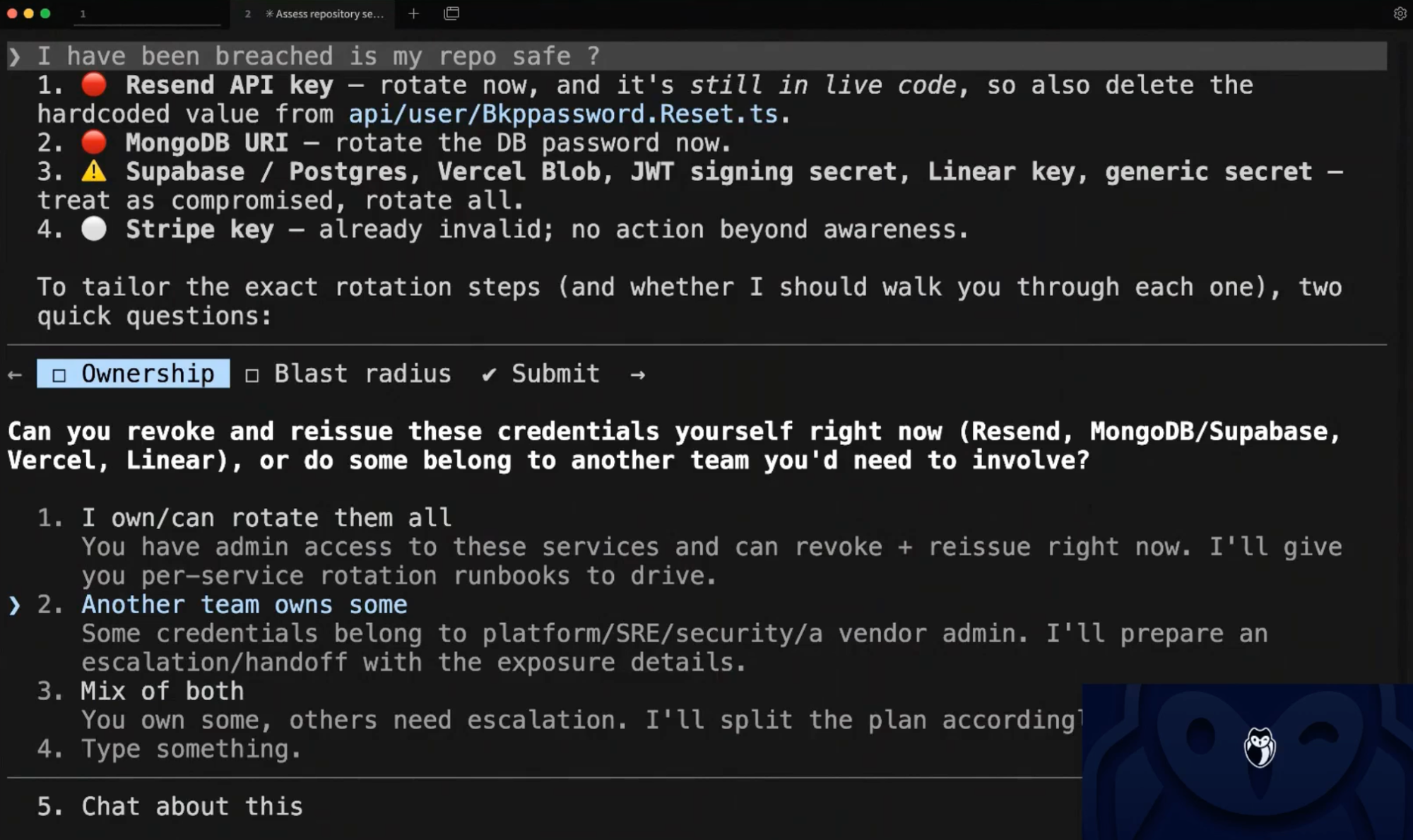
An agent without ggshield will improvise. It might flag obvious patterns and miss subtler ones, and it almost certainly will not distinguish between scanning HEAD and scanning full history. An agent with the skill installed operates from tested guidance. A generic agent may also jump straight to rewriting git history, which creates extra work while leaving the live credentials exposed.
Agentic Remediation Without Guardrails Is (Probably) A Ticking Time Bombs
AI coding agents are operating from the same incomplete model of Git that has caught human developers for decades. And just like humans, they are probabilistically likely to keep committing secrets and misunderstand how to clean secrets from a Git history. An agent writing a structured commit message declaring the danger is removed makes each exposure easier for attackers to find, not harder.
We need to arm our agents with skills to follow security best practices that we can audit and update. Tell agents to start from tested guidance, calls proven tooling, and follow a remediation sequence that accounts for history. Installing GitGuardian Agent Skills takes a single command. From that moment on, the agent has a clear operating plan around secrets. That is the difference between an agent that fixes the latest version of the file and one that understands what it means to actually close an exposure.
Git remembers everything. Agents need to work with that model and not just the secrets at the surface level.