AI coding assistants are now a very common part of developer workflows. Almost everyone writing code now uses AI to write logic, explain unfamiliar projects, and eliminate repetitive work. Those same agents also work where secrets tend to live, the laptop.
Secrets appear in .env files, CI configurations, and deployment scripts. They also appear in local repositories, shell history, and cloud credential files. AI coding assistants increasingly read, edit, and summarize those same materials as part of normal development work.
This creates a new requirement for developer security. Agents need to know how to use the same security workflows that developers should already be relying on. They need to know when to scan for secrets, which tool to use, and how to interpret the results. They also need guidance that keeps remediation focused on the real risk.
GitGuardian Agent Skills are built for that shift. Our new open-source project teaches AI coding assistants to use GitGuardian in multiple ways: via ggshield, our command line interface, and the GitGuardian MCP server where appropriate. The skills explain when to scan, which flags to use, and how to walk the developer through remediation.
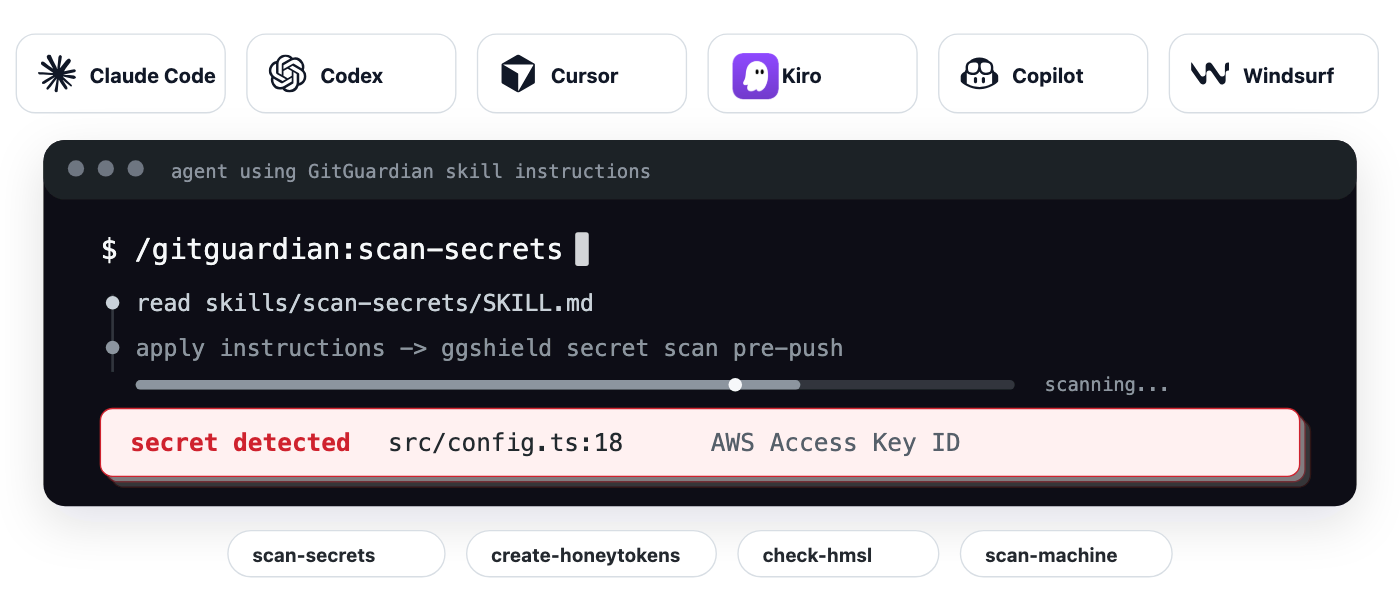
For AI-assisted development, security needs to show up where the work is happening. We are helping teams realize a security workflow that starts inside the developer conversation, where a developer can ask whether a repository is safe before the attackers act.
Agents Need Playbooks
A skill is a human-readable instruction file, stored in markdown, that an agent can load when it needs to perform a specific task. It gives the agent a playbook before it starts acting. The GitGuardian Agent Skills playbook teaches the agent how to use ggshield safely and efficiently.
Developers rarely describe security tasks in product or marketing terminology. They usually describe the concern in plain language, drawing on their day-to-day experience. A coder might not say, "I think I have fallen victim to Shai-Hulud mini due to updating an NPM package recently," but they may say, “I think I have an issue. Is my code safe?” The agent needs to translate that concern into the right sequence of actions.
That translation is the point of the skill. The agent can connect the developer’s concern to secret scanning. It can decide whether the repository needs a current-path scan or a full git history scan. It also means the agent can explain what it found in terms that the developer can act on.
The developer, using the skill, does not need to stop and search for installation instructions for the needed tools. They do not need to know the exact command before asking for help. The agent uses the skill to get from concern to action.
Importantly, the skill helps the agent follow a known workflow each time. That gives security teams a better path for delivering guidance into the developer environment.
Instructions Shaped By Human Experience
GitGuardian Agent Skills are driven by five "slash commands" that cover several practical workflows developers already encounter.
A slash command is an explicit, human-initiated shortcut that is invoked as part of a path, following a / character, used to trigger specific, repeatable tasks or instructions on demand. The agent does not need to derive a new plan to address the request; it simply follows the prebuilt instructions, built on real-world expertise and experience, to efficiently and reliably get the job done.
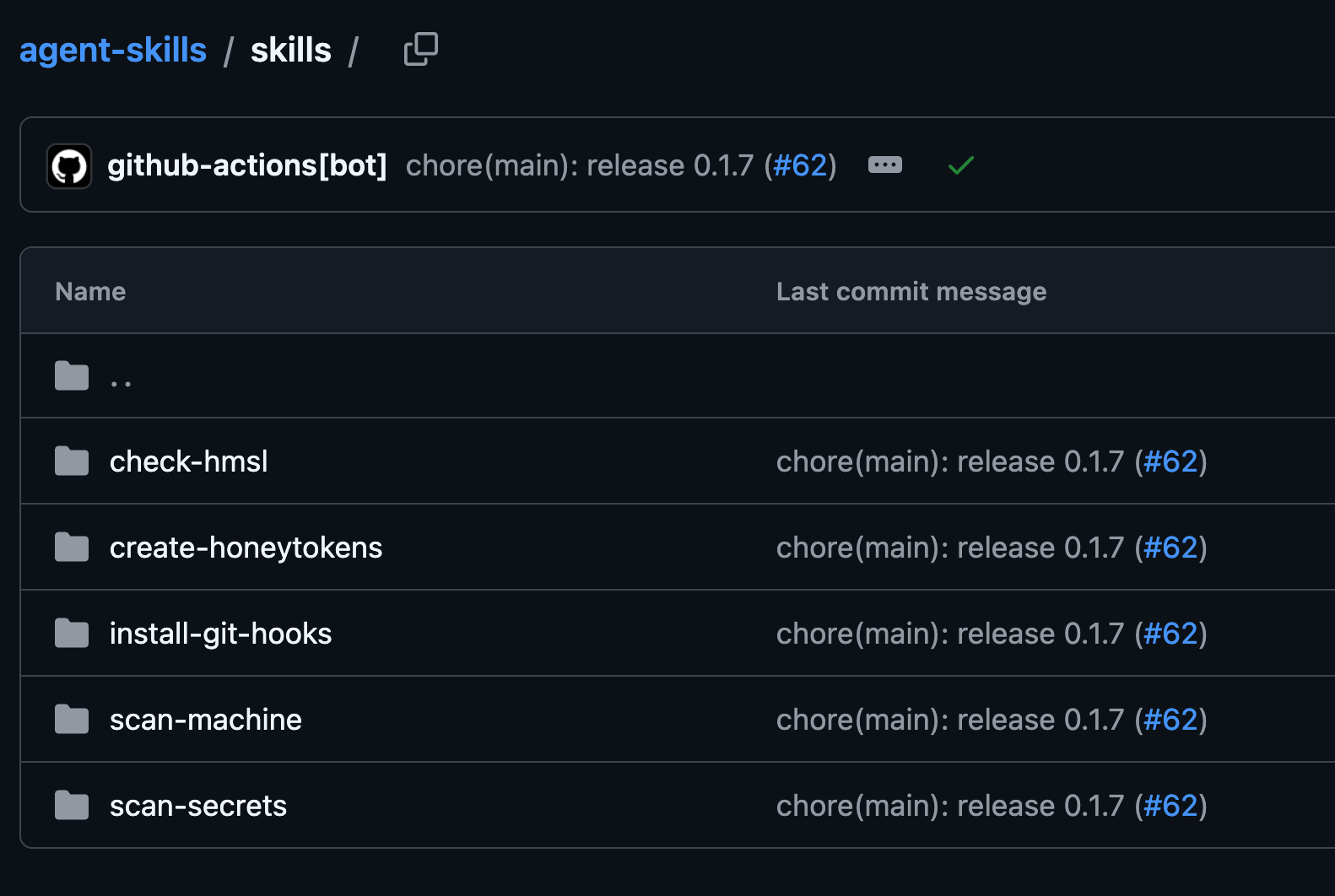
Let's take a closer look at the slash commands currently available.
The /gitguardian:scan-secrets command instructs agents to use the GitGuardian CLI, ggshield, to perform the scan for secrets in paths, staged changes, and commits. It also supports deeper scans across full history, Docker images, and packages. This is the first command to be invoked, as its key rule from the skill is "scan first, then remediate from structured findings." Aside from specific prompts, the skill teaches the agent to invoke the command when handling credentials, editing .env or CI files, preparing a commit or push, or auditing a repo.
The /gitguardian:create-honeytokens command helps agents generate and place decoy AWS credentials. Honeytokens are most useful when they appear in places attackers are likely to search after gaining access, including .env.example files, internal docs, and runbooks. The core rule is simple: "plant where attackers look, not where engineers import."
The /gitguardian:scan-machine command expands the scope from a repository or folder to the whole developer machine. This skill helps audit local repositories, dotfiles, and cloud CLI configs. It also covers shell history, AI agent caches, and abandoned project trees. That makes it useful when a machine is investigated after a suspected compromise. The skill tells the agent that endpoint scanning must be enabled in the GitGuardian workspace in order to use this command.
The /gitguardian:check-hmsl command tells agents how to use HasMySecretLeaked checks without exposing plaintext secrets to the platform. This skill is designed for moments when a developer already has a token, key, or inherited credential list and needs to know whether that secret has already appeared in indexed public leaks. Importantly, the skill invokes this on user-run handoff only. The agent can prepare the command and interpret sanitized output, but it must not read or run against the credential file itself.
The /gitguardian:install-git-hooks command helps agents install ggshield as a git pre-commit or pre-push hook. These hooks block secrets before they enter the repo's history and give developers a guardrail at the moment of commit or push. The agent is told that these hooks protect future work, and existing code and history still need to be scanned. Before setting any global hooks that affect the entire developer machine rather than just the current working directory, the agent will seek human approval.
These commands are automatically triggered from context. The developer does not know the exact GitGuardian command to invoke.
These commands turn real security experience into repeatable agent behavior. The agent can still adapt to the user's environment, but the workflow starts from tested security guidance instead of improvisation.
ggshield As Part Of The Agent Workflow
As mentioned before, GitGuardian Agent Skills explicitly tells the agent to use ggshield.
Before it runs ggshield, though, it instructs the agent to check whether the CLI is already installed. If not available, it installs ggshield automatically, leveraging OAuth out-of-band (oob) login method when needed. Once installed, the full power of the CLI is available to the agent and the developer moving ahead. AI coding assistants use ggshield the same way a developer would, making the workflow familiar and consistent.
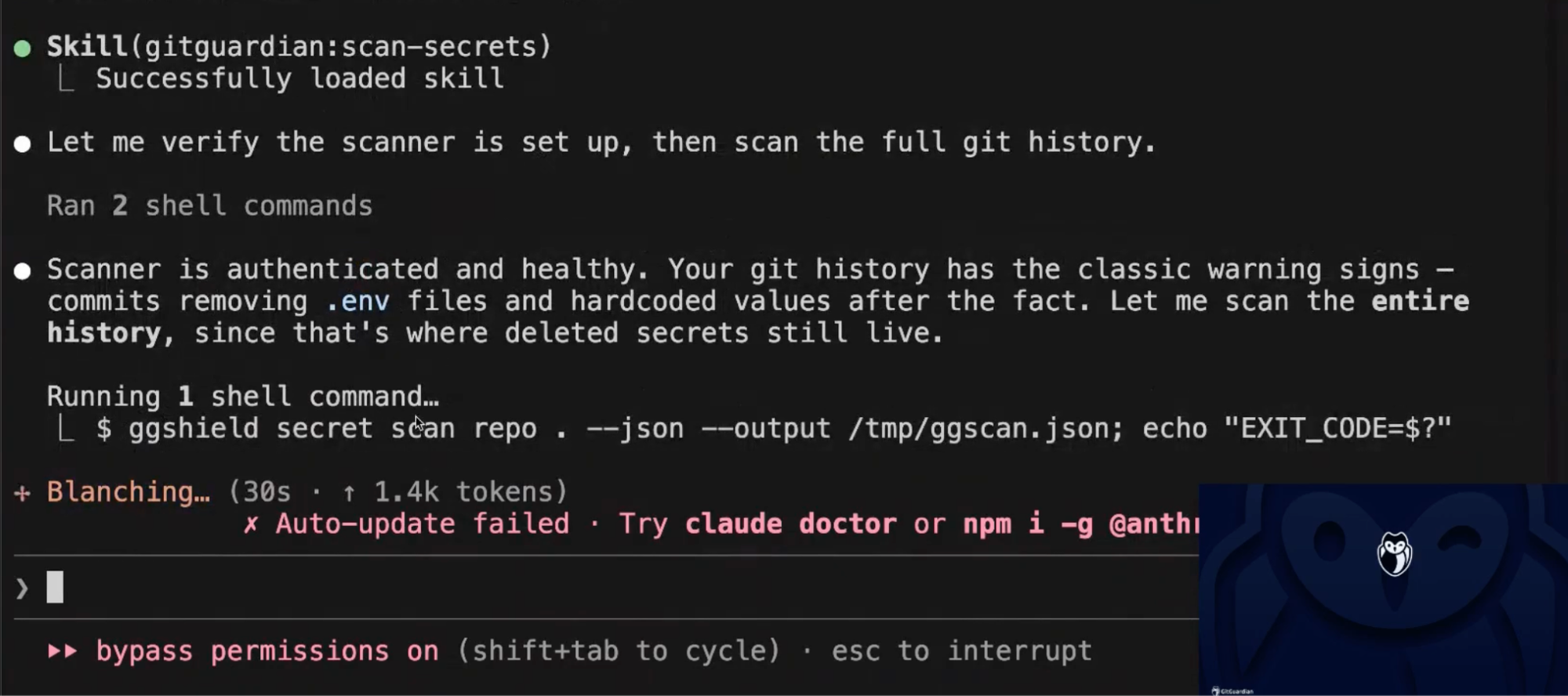
It is worth noting here that the agent uses ggshield instead of inventing its own secret scanning logic. GitGuardian’s secrets detection engine is designed to detect and validate secrets in any text file, repo, or system where secrets could potentially be found. Secret detection should come from a proven scanner, not from whatever pattern-matching an agent happens to generate during a chat session.
The agent does not need to reason from scratch about what counts as a secret, which files to inspect, or which git boundary matters most. It can call the tool built for that job and then work from structured findings.
This also creates a better trust model for AI-assisted security. The agent becomes the orchestrator, while ggshield remains the detection engine. That keeps the agent focused on setup, command selection, interpretation, and remediation planning. It also gives security teams a workflow they can audit, document, and reproduce.
Finding a secret is only the start of the work. Remediation depends on who owns the secret, what it can access, and where it leaked. That is what the skill handles next.
Remediation Needs Context
AI assistants can give bad advice when they lack security context. A generic answer may jump straight to rewriting git history. That recommendation can create extra work while leaving the live credential exposed.
GitGuardian Agent Skills guide the agent toward better remediation steps. The agent can ask who owns the secret. It can ask what systems the credential can reach. It can ask whether the affected system is production, staging, or development.
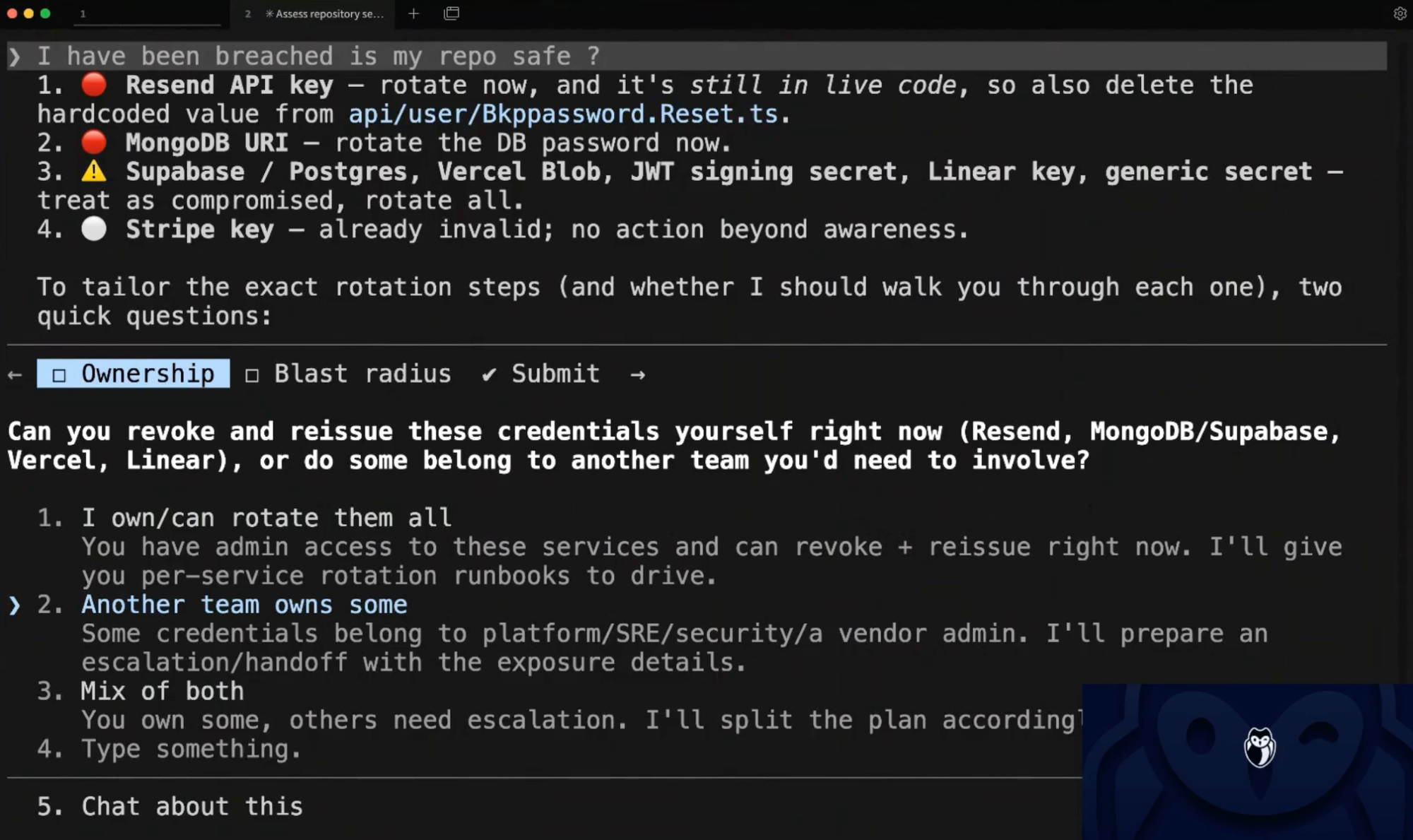
Those questions help build a practical plan. A developer may own one secret and need another team to rotate a second one. The agent can help draft Jira or Linear tickets for that handoff. It can also summarize the findings in language that the owning team can act on.
Good remediation has a sequence. Scan first. Confirm validity. Identify ownership, if possible. Rotate or revoke. Finally, add prevention so the same pattern does not repeat. Fortunately, the skill also provides agents with access to the GitGuardian platform beyond the CLI.
Skills and MCP Work Together
GitGuardian’s Developer MCP server and Agent Skills give AI coding assistants two related, but different kinds of help. Skills tell the agent how to approach the work. MCP gives the agent a structured way to gather GitGuardian context and take action through approved tools.
Agents need more than a local scan result to determine how much risk a repo with exposed secrets poses. ggshield can tell the agent what was found, while MCP can help the agent understand the broader security picture around that finding. The agent can use GitGuardian workspace context to understand incident state, severity, assignment, source, and remediation status.
This turns the agent into a better security partner. A secret finding becomes part of an investigation instead of a standalone CLI result. The agent can look for related incidents, understand whether a finding is already known, and help the developer avoid duplicate work. It can also help connect the local evidence to the team workflow already happening inside GitGuardian.
Skills provide the sequence. ggshield provides the scan. MCP provides the context.
This division of labor means the agent does not need to invent a response from scratch. The developer gets a more complete answer without leaving the AI-assisted workflow.
Cross-Agent Support Matches How Developers Work
GitGuardian Agent Skills are packaged for the reality that every dev has their preferred flavor of agent. We are proud to support any assistant that can leverage skills. Claude Code users can add the repository as a plugin marketplace. Codex users can install the GitGuardian plugin from the plugin browser. VS Code users can install the plugin from source. Cursor and many other agents can use the skills.sh CLI.
That broad packaging helps security follow the developer workflow. The same core guidance can show up across multiple agent environments. Developers can use the assistant they prefer while still getting a consistent GitGuardian workflow.
We are also proud to release this skill as open source software. The repository is public and MIT-licensed. Teams can inspect the instructions, review the behavior, and contribute improvements. That transparency is important when agents begin taking more action inside development environments, especially for security teams that demand workflows they can inspect and audit.
With Skills, Security Becomes Part Of The Conversation
Security tools often lose adoption when they require developers to leave the flow of work. AI coding assistants give security teams a new interface. The developer can stay in the conversation and ask for the desired outcome.
The developer does not need to memorize commands before asking for help. They can describe the security concern in plain language. The agent handles the mechanics with guidance from the skill.
This is how developer-first security should evolve in the AI era. The control should move closer to the moment of risk. The guidance should appear while the developer still has context. Any prevention steps should be easy or automatic to implement before the next commit.
AI Coding Assistants Need Security Skills
Hardcoded secrets remain persistent because they live in the normal places developers work. They appear in code, config, and history. AI coding assistants now operate in those same spaces. The speed gains that developers experience need to be balanced with security guidance built into the workflow.
GitGuardian Agent Skills brings the best of what GitGuardian can offer into the AI coding session. They give agents a practical way to use ggshield and GitGuardian workflows without making the developer translate a security concern into a command sequence.
AI coding assistants are part of how software gets built. Now, GitGuardian Agent Skills help ensure they also become part of how software is built securely. GitGuardian Agent Skills are available now, for free, for all users on all plan levels. Some specific features, like Honeytokens and Developer Endpoint Protection, are subject to plan-level requirements.
Secret scanning with ggshield, through the skill or manually, will always be available to all. We are committed to helping everyone stay safe and fight secret sprawl.