TL;DR
- 81% jump in AI-service leaks: GitGuardian detected over 1.27 million leaked secrets tied to AI services in 2025, an 81% jump from the previous year, with AI-assisted code leaking secrets at roughly twice the GitHub-wide rate.
- Hundreds of incidents in weeks: One customer deployed GitGuardian behind their internal AI gateway and surfaced hundreds of secret incidents within weeks, a significant share valid at detection, none of which ever touched a git repository.
- Four-step scan via Custom Source: The AI gateway forwards each payload to GitGuardian's scan API tagged with a Custom Source UUID, scans it in memory through 600+ detectors, and creates incidents without storing the content.
- Two-week non-blocking test: Non-blocking mode lets a request through and logs the incident so revoking valid findings and measuring real exposure over two weeks is possible, while blocking rejects the request before the provider is called, skipping rotation.
One customer deployed GitGuardian behind their internal AI gateway. Within weeks, we had surfaced hundreds of secret incidents flowing through it, a significant share of them valid at the time of detection.
None of them ever touched a git repository. They went straight from a developer's terminal or IDE into a prompt or a tool call, and out to a third-party model provider.
This tracks with what we see at scale. Across 2025, secrets leaked from AI-assisted code at roughly twice the GitHub-wide rate, and GitGuardian detected over 1.27 million leaked secrets tied to AI services, an 81% jump from the previous year. Those figures come from code we can see. Prompt traffic is the part nobody is counting.
The channel nobody scans
The behavior that creates the exposure is mundane. A developer debugs a failing request and pastes the whole curl command, headers included. Someone drops a .env file into a chat window and asks the model to explain a variable. An agent reads a config file and forwards it as context on a tool call. Nobody is being careless on purpose. They are pasting a hundred lines and not reading all hundred.
Secrets detection matured around code. Repositories, CI logs, container images, ticketing tools. Prompts are newer ground, and coverage is uneven.
Part of it is already solved at the source ggshield AI Hooks scan prompts, tool calls, and tool output inside Cursor, Claude Code, Codex, and VS Code with Copilot, and block the action before it reaches the model. Deploy them across your fleet. It is the earliest and cleanest place to catch a secret.
The two controls do different jobs, and the parallel with git will be familiar. AI Hooks are your pre-commit: closest to where the mistake happens, best remediation experience, scoped to the tools and machines you deploy them on. The AI gateway is your pre-receive: further from the developer, but it sees every request that crosses it. The agent running in CI. The batch job calling a model API. The internal app nobody classified as an AI tool, classic shadow AI territory. You want both.
Three things make this worse than the equivalent paste into a Slack thread:
- The content leaves your perimeter immediately. It goes to a third party, under that provider's retention terms, not yours.
- Nothing persists on your side by default. A commit sits in a repo you own and can scan retroactively. Prompt traffic is gone the moment it is sent, unless you capture it in flight.
- Agent traffic carries more. An agent turns ships whole files as context. A human question ships a sentence.
Why your AI gateway is the right place to catch it
A growing number of engineering organizations already route LLM traffic through a single internal AI gateway, sometimes called a LLM proxy or LLM gateway. They do it for cost attribution, rate limiting, model routing, and to avoid handing provider API keys to every developer. The AI gateway gives their developers one service with a single base URL regardless of which provider serves the request.
That AI gateway also sees every prompt, every tool call, and every response. It is the one place where this traffic is already in cleartext and already yours.
One detail makes the idea practical: latency matters far less here. A model call already takes seconds. A scan on top is noise against that baseline. Put the same approach on a standard network proxy, and the delay becomes unacceptable. On an AI gateway, the budget is already there.
How it works
The pattern is four steps.
- Your AI gateway receives a request headed for a model provider.
- The AI gateway forwards the payload to GitGuardian's scan API, tagged with your Custom Source UUID. We scan in memory and return findings. The content is not stored.
- GitGuardian runs it through 600+ detectors and creates incidents in your dashboard.
- The AI gateway either forwards the request or blocks it, depending on the mode you choose.
Blocking or non-blocking
Both work. The trade-off is real, so decide deliberately.
Non-blocking. The request goes through, and you get the incident. The credential reached the provider, so revoke every valid finding. In exchange, you get measurement: two weeks tells you how much you are actually leaking.
Blocking. The AI gateway rejects the request and never calls the provider. The developer removes the credential and retries. That costs a minute and saves you a rotation. Settle one thing first: how a developer reports a false positive.
Start non-blocking to size the problem, then switch once you trust the signal.
Implementation
Prerequisites
- A GitGuardian account with Custom Sources (BYOS) enabled
- An AI gateway you control
- A service account with
scanandscan:create-incidentspermissions
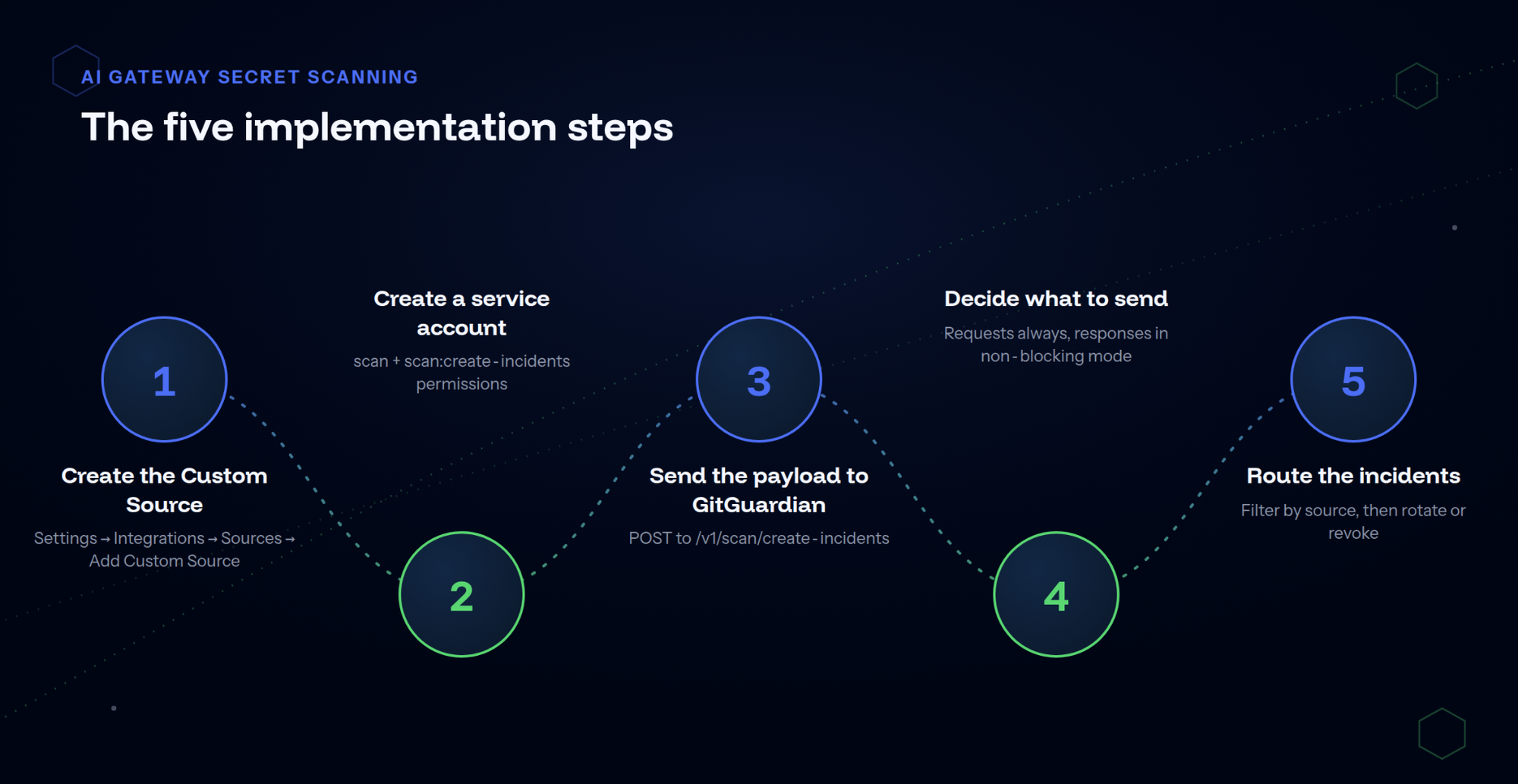
Step 1: Create the Custom Source
In your GitGuardian dashboard, go to Settings → Integrations → Sources, then Secrets scanning → Add Custom Source. Name it something like "AI Gateway". Copy the UUID it generates.
Step 2: Create a service account
Create a dedicated service account with the scan and scan:create-incidents permissions. Store the token in your secrets manager, not in the AI gateway config.
Step 3: Send the payload to GitGuardian
Post the content to /v1/scan/create-incidents. The body takes your source UUID and a list of documents:
{
  "source_uuid": "YOUR_SOURCE_UUID",
  "documents": [
    {
      "filename": "prompt.txt",
      "document": "<content to scan>",
      "location": { "url": "https://ai-gateway.internal/v1/models/<model>/invoke" }
    }
  ]
}
location.url is optional and worth setting. It points back to your AI gateway log entry, so whoever triages the incident can find the request that produced it.
From inside the AI gateway, that is one call:
import requests
response = requests.post(
    f"{GITGUARDIAN_API_URL}/v1/scan/create-incidents",
    headers={"Authorization": f"Bearer {GITGUARDIAN_API_KEY}"},
    json={
        "source_uuid": GITGUARDIAN_SOURCE_UUID,
        "documents": [
            {
                "filename": "prompt.txt",
                "document": prompt_payload,
                "location": {"url": request_log_url},
            }
        ],
    },
    timeout=5,
)
Set GITGUARDIAN_API_URL to:
https://api.gitguardian.comfor SaaS UShttps://api.eu1.gitguardian.comfor SaaS EUhttps://gitguardian.example.com/exposed if you self-host.
Two limits shape your batching: 20 documents per call, and a maximum scan size that depends on your plan.
Step 4: Decide what to send
Start with the request: the prompt itself, plus the arguments of any tool call. That is where credentials show up.
Model responses are worth scanning too, because an agent that reads a config file and summarizes it back will happily repeat the credential. This only applies in non-blocking mode. If you block, you reject the request before the provider is ever called, so there is no response to look at.
Step 5: Route the incidents
Filter your dashboard by the Custom Source name to isolate AI gateway findings, and set up a dedicated notification rule.
Remediation is more contained here. There is no artifact of your own to clean up, because the copy that matters now sits with a third party. Assess the blast radius of the credential first, then rotate it, or revoke it and issue a new one if the provider does not support rotation in one step.
Check out this example implementation.
What this costs you
Be honest about the hard part. The scan integration is a few hours of work. Getting all LLM traffic through the AI gateway in the first place is a network and IT project.
You need provider endpoints resolved through your gateway, enforced across the fleet via MDM or VPN policy. And you need to accept that a developer who disconnects from the VPN can bypass the whole thing. This is coverage, not containment. It still beats zero visibility.
The pattern generalizes
An AI gateway is one instance of a broader idea. Anywhere content passes through a chokepoint you own, on its way somewhere you do not control, you can scan it. File-sharing services can scan an upload before generating the public link. Outbound mail gateways can bounce a message carrying a credential back to the sender. Diagnostic bundle generators can flag secrets before the file reaches a support ticket.
Same shape every time: a chokepoint, an acceptable latency budget, and content leaving your control. More on these in a future post.
Where to start
Pick a chokepoint you already own where text leaves for a third party. For most engineering organizations today, the AI gateway is the obvious one. Create a Custom Source, wire it in non-blocking mode, and run it for two weeks to size the problem. Then turn on blocking.
Book a demo | BYOS documentation
This is the fifth post in our "Bring Your Own Source" series. The previous ones covered n8n workflow integration, Salesforce, GitLab CI, and GitHub Gists.
This article was written by Romain Jouhannet, Product Manager at GitGuardian.
FAQ
What is an AI gateway?
An AI gateway is an internal proxy or control layer that engineering teams place between their applications and AI model providers. Instead of every application calling OpenAI, Anthropic, or another provider directly, model traffic can flow through a common endpoint. Teams use AI gateways for capabilities such as centralized credential management, cost attribution, rate limiting, observability, and model routing. In this post, we use AI gateway and LLM proxy broadly to describe this same architectural pattern, although some platforms distinguish between a lightweight proxy and a more feature-rich gateway.
What is an LLM proxy?
An LLM proxy is an endpoint that sits between applications, agents, or CI jobs and the model providers they call. When model traffic passes through the proxy, it can inspect prompts and responses before forwarding them upstream, making it a practical enforcement point for detecting exposed secrets. GitGuardian's Bring Your Own Source integration can be used to send this traffic to GitGuardian's secrets detection engine for scanning.
What is generative AI security?
Generative AI security includes protecting credentials and other sensitive data from leaking through the ways developers, applications, and agents interact with generative AI systems, for example through pasted commands, configuration files, prompts, or model API calls. Complementary controls can operate at different points in that flow: developer-side protections can catch secrets before they reach a model, while an AI gateway or LLM proxy can inspect model traffic further downstream across applications, agents, and automated workflows.
 Andy Rea