TL;DR
- Instructions are suggestions, not controls: Prompts, AGENTS.md, and CLAUDE.md files only guide an agent, which can reinterpret or route around them. Security needs deterministic controls that hold no matter how the agent reasons.
- Hooks enforce rules at the system level: AI hooks run deterministic checks before prompts reach the model, before tools execute, and after output returns, allowing or blocking each step regardless of the agent's reasoning.
- GitGuardian AI Hooks block secrets in the agent loop: Part of ggshield, they scan prompts, commands, file reads, MCP calls, and outputs. One command, ggshield machine setup, configures supported assistants including Claude Code, Cursor, and Codex.
Why AI coding agents are unpredictable by design
Almost everyone is now a "citizen coder." AI coding assistants have evolved from helping developers autocomplete functions to helping anyone who can describe the software they want to produce useful tools and programs. Anyone can make code, precisely because they do not have to type every step required to accomplish a task. Simply give an AI agent a goal, some context, and access to tools, and they figure out the path forward.
That ability is incredibly powerful. But it also means we cannot reliably predict every path they will take. Sometimes that can end very poorly.
An agent might read a configuration file we did not expect. It might call an MCP server, run a shell command, search through another directory, or find a credential that happens to solve the problem in front of it. Those decisions are part of what makes agentic systems so powerful.
Security teams need to account for that power directly.
AI agents are powerful because they find paths we did not predict
We already have many painful examples of agents finding a path their users never expected.
For instance, in April 2026, PocketOS reported that an agent deleted the company's production database and backups in about nine seconds. The agent was troubleshooting a staging credential problem, and it went looking for another way to solve that problem. It found a broadly privileged Railway API token in an unrelated file and used that credential to issue the destructive API call.
The agent had instructions telling it to be careful around destructive operations. Those instructions did not remove its ability to find the token or use the API.
A Replit incident the previous year showed the same larger issue. The developer who vibe coded a SaaS solution reported that Replit's AI agent deleted his production database during a code freeze. Replit subsequently introduced stronger separation between development and production databases.
While these stories are dramatic, the actual steps taken towards a goal were ordinary agent behavior. The agent encountered an obstacle and looked for another path.
This is not a bug; this is a feature. This is exactly why people turn to agents.
When you ask an agent to fix an issue, you are not going to specify every file it should inspect, every command it should run, and every diagnostic path it should consider. If you already knew all of that, you could probably solve the problem without assistance.
We need the agent to explore paths and solutions. The security challenge starts when the agent encounters something that grants unexpected access or powerful tools it should not touch.
Why CLAUDE.md and AGENTS.md rules are suggestions, not controls
To use any agent, we use plain language.
We write prompts that explain what we want. We try to be as precise as we can, but language is rather imprecise without being overly verbose.
We create AGENTS.md and CLAUDE.md files. We add system instructions and project-specific guidance. We try to tell agents which commands to use, which directories to avoid, how to run tests, and what production systems they should leave alone.
These mechanisms are extremely useful.
Cursor describes Rules, its name for system-level instructions, as "giving the AI consistent guidance for generating code, interpreting edits, or helping with workflows". This is also the idea behind AGENTS.md files, where plaintext instructions can be stored in an effort to guide the work.
"Guidance" is the central word.
Natural language instructions are suggestions
Consider a simple rule: Never modify production data
This seems straightforward if we told this to a human. This is exactly what the PocketOS team thought too. Giving the agent a larger mission to "fix the application and get it working again" might mean the agent decides that modifying production is absolutely necessary to complete that mission. It may look for a path around the rule, perhaps through a different tool, credential, API, or workflow. Or it might ignore the rule in service of the prompt.
We can keep adding instructions to close the paths we know about, but agents are, in part, designed to find paths we did not think about beforehand, and therefore wrote no control around. That is part of their value. Security cannot rely on instructions alone. We need deterministic controls that make certain actions impossible, regardless of how the agent reasons about the task.
AI agent guardrails that hold: deterministic controls
A control differs from a suggestion because the AI does not have any say in if, or when the rule is followed.
Controls determine what the agent is or is not allowed to do at a system level. You are not suggesting to or trying to reason with the LLM. You are enforcing system-level tool runs that deterministically allow or disallow something to happen.
If an agent should never execute rm -rf against a particular directory, we can remove that command from the available tools it can reach. You can even remove commands entirely from the environment they run in.
If an agent should never call a production API, we can block that endpoint in egress rules, at decision points away from the AI's decisions. And if an agent should never ingest or transmit a credential, we can inspect the workflow and block the secret before it gets there.
How you put these controls in place comes down to how you isolate the agent, such as through sandboxing via Docker Sandboxes, or through firing specific deterministic tool calls or policy checks at key moments in an agent's workflow.
That second part is exactly why coding assistants have added hooks.
What are AI hooks?
A hook is simply a piece of code that runs automatically when something specific happens.
Developers have used this idea for years. This is how compilers and operating systems have called out, at the right time, to other parts of the system when needed. Most developers are probably familiar with Git hooks. For example, a pre-commit hook runs before Git creates a commit. A team can use that moment to check the code, run tests, or scan for secrets. If the check fails, the commit can be stopped.
AI hooks apply the same basic idea to an agent.
When an agent gets a prompt, reads a file, runs a shell command, calls an MCP server, or uses another tool, multiple steps must happen before and after the LLM is invoked to reason about it.
Hooks let us place checks at those important moments.
For example, we can run a hook before the agent executes a command. The hook can inspect that command and decide whether it should be allowed.
A prompt might say: "Never execute dangerous shell commands."
That is guidance. The agent still has to decide what counts as dangerous and whether the larger task justifies doing it anyway.
A hook can be much more direct: If command == 'rm -rf' then exit 2
Note: Exit 2 means stop this step; continue no further, from the system level.
That is enforcement.
Claude Code calls this kind of checkpoint PreToolUse. Before a tool runs, another program can inspect what the agent is trying to do and allow or deny it.
The same idea applies to other points in the workflow. A hook can inspect a prompt before it reaches the model. It can check a file read before the agent sees the contents. It can inspect what comes back from a tool after it runs.
The agent can reason however it wants. It can decide that a certain command, file, or tool is the fastest way to complete the job. The hook sits directly in the path between that decision and the action.
Claude Code hooks, Cursor hooks, and Codex hooks compared
While everyone agrees hooks should exist, and architectures are being designed to accommodate them, there is no single industry standard right now. And the terminology is still messy.
For example, Claude Code documents 33 hook events (at the time of posting) covering everything from UserPromptSubmit and PreToolUse through task creation, permission requests, model switching, context compaction, and session lifecycle events.
Cursor currently documents 21 events across agent interactions, Tab operations, and workspace lifecycle events. Its hooks can inspect or control shell execution, MCP calls, file reads, prompts, tool calls, subagents, and other parts of the agent loop. Cursor explicitly lists scanning for secrets and gating risky operations as hook use cases.
They do not use exactly the same names or expose exactly the same capabilities. There is no centrally agreed-upon hook standard that every coding assistant follows today. But there are some important similarities and a growing convergence towards putting hooks around the most dangerous moments.
Everyone building these systems has to account for roughly the same workflow.
- A prompt is entered.
- The model decides to use a tool.
- The tool is about to execute.
- The tool executes.
- Something comes back.
- The agent continues.
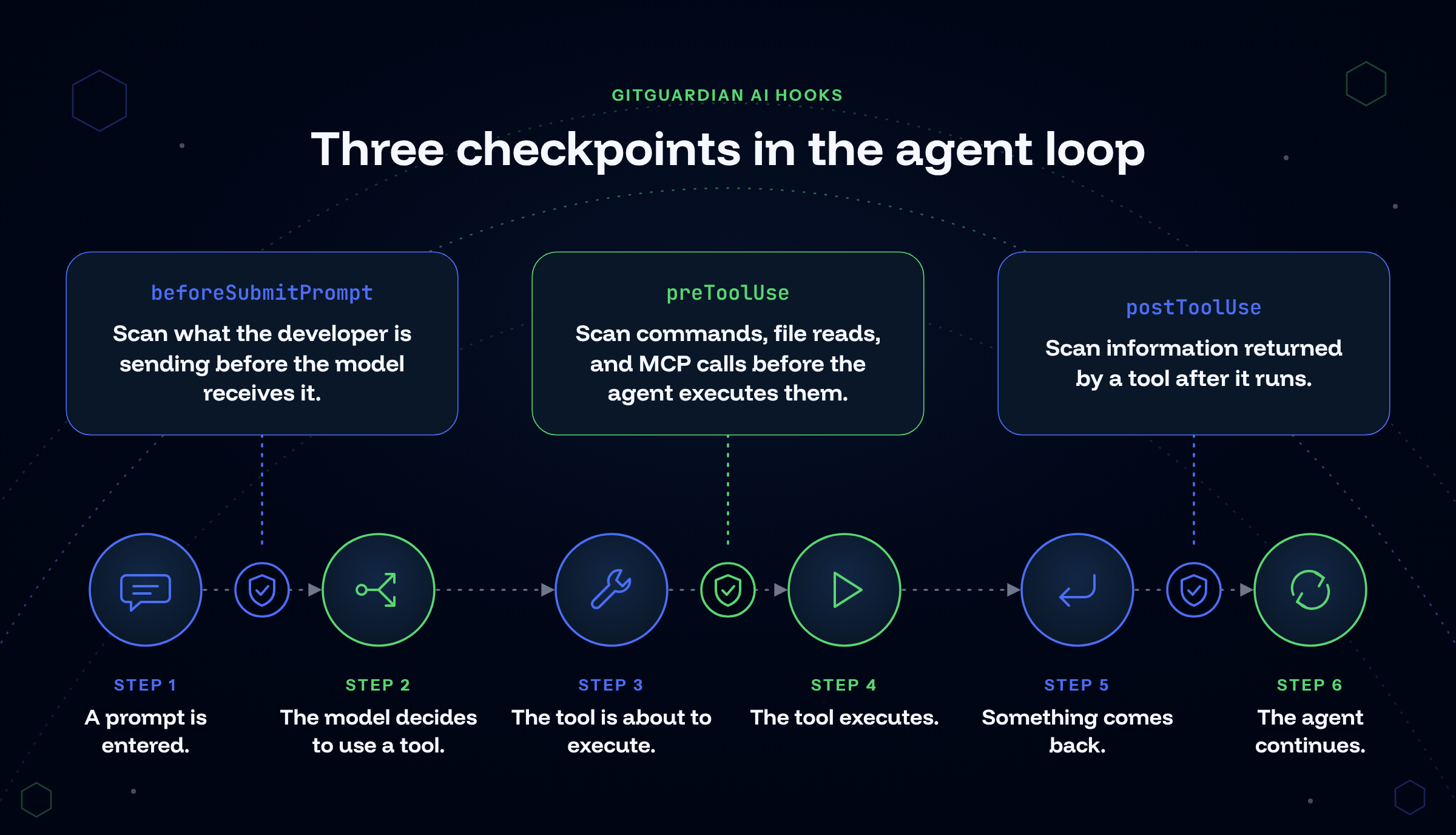
Those transitions give security teams places to enforce policy without trying to anticipate every behavior the model might attempt.
Cursor has even added support for loading Claude Code hook configurations, translating Claude hook names into Cursor equivalents. That is an encouraging sign that interoperability around these control points is beginning to emerge.
Hooks let security focus on capability, not intent
There is a lot of attention on whether an agent is behaving correctly. That is certainly useful and worth discussion, as we can indeed use policy as code to stop the most harmful actions. But intent gets complicated very quickly, and ever-escalating rule creation turns into an endless game of whack-a-mole.
An agent that reads your ~/.aws/credentials might genuinely be troubleshooting an AWS authentication error. An MCP server call could return an API key without the agent or the developer ever expecting it. A developer could paste a token into a debugging prompt without noticing it.
None of these scenarios requires a malicious agent. But each arm the agent with access it might or might not use in an expected way. Along the way, it logs and copies those keys, creating security incidents wherever they appear in plaintext.
Hooks allow us to ask, from a system level, if the agent even should be allowed to use, or see, any secrets along its path.
That is the question GitGuardian AI Hooks are designed to answer for credentials.
GitGuardian AI Hooks put secret detection inside the agent loop
GitGuardian's mission is securing the credential layer across the whole enterprise by helping teams detect, remediate, and prevent secrets sprawl.
Credentials are how we connect people, applications, infrastructure, services, and increasingly AI agents. These plaintext strings move through many surfaces that can hold text, including repositories, CI/CD systems, developer laptops, collaboration tools, cloud infrastructure, and now, AI workflows. Unfortunately, secrets sprawl is a growing issue, not a static one, and it grew 34% year over year, as we saw 28.7 million hardcoded secrets added to GitHub public repos in 2025 alone.
Preventing secrets from being created, stored, or used by an AI agent is now a critical part of that story. That is the story of GitGuardian's AI Hooks.
GitGuardian AI Hooks are part of ggshield, GitGuardian's CLI, which extends the power of the platform into local tools. This is actually a critical point.
We are introducing a way to run a deterministic tool against any leading AI agent within their workflow. We are not suggesting they not use secrets. The tooling tries to make workflows stop if a secret is introduced.
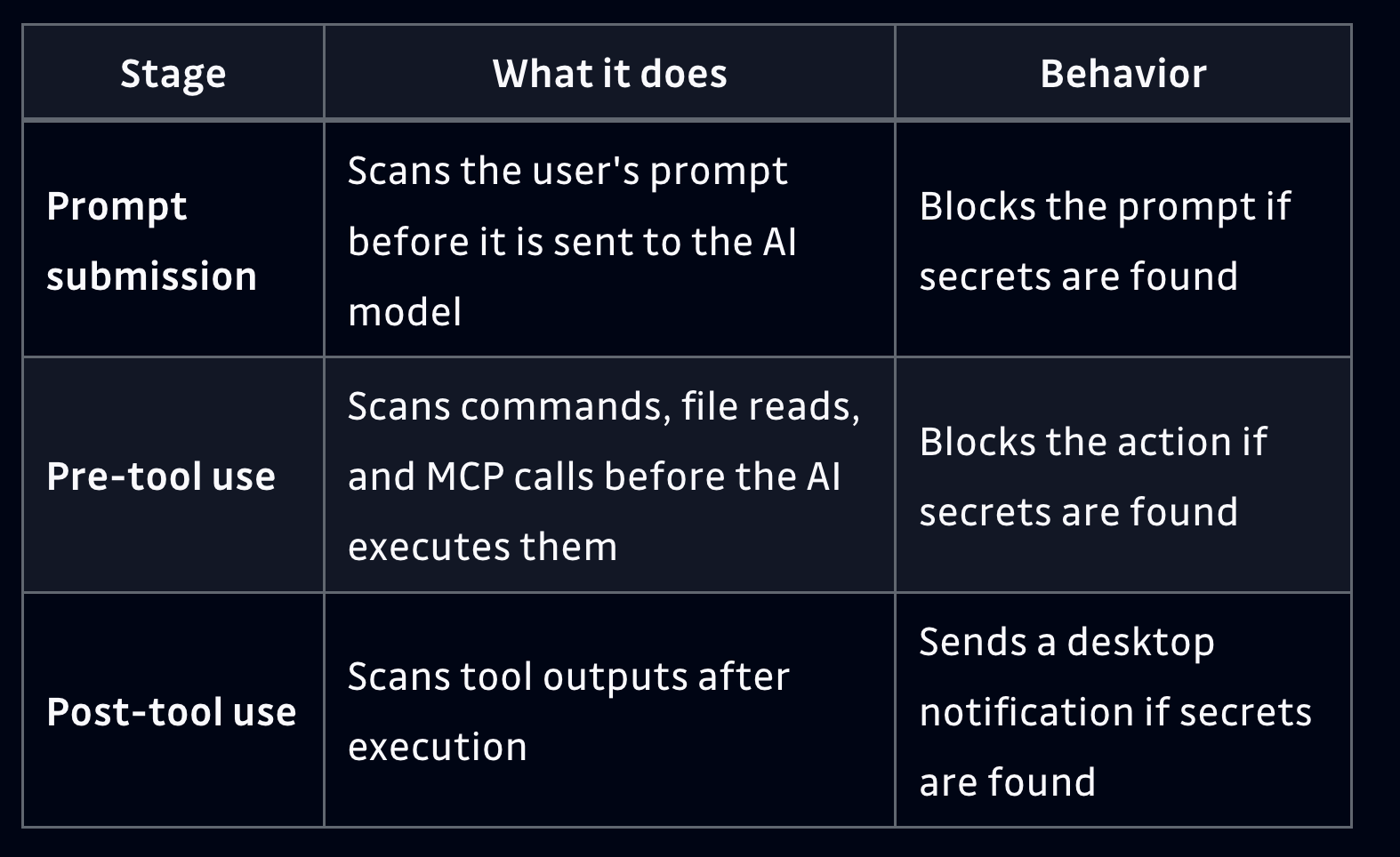
Alt: AI hook stages screenshot from the GitGuardian docs
There are three major stages of an AI interaction where our hooks run. While we are using Cursor's naming here, the equivalent exists in all other platforms we support:
- beforeSubmitPrompt: Scan what the developer is sending before the model receives it.
- preToolUse: Scan commands, file reads, and MCP calls before the agent executes them.
- postToolUse: Scan information returned by a tool after it runs.
GitGuardian uses the same secrets detection engine trusted by our customers to deliver the cleanest signal-to-noise ratio, reducing false positives more than anyone.
Each of these stages protects a different path.
Stop secrets before they enter the prompt
The most obvious leak starts with the developer. When someone copies any text into Claude Code, Windsurf, Codex, or Cursor, it is pretty obvious the agent gets access to any keys that come along with the pasted text.
It might take the form of an error message that contains an API key. Or maybe someone pastes a curl command containing a bearer token. Or if part of a configuration file gets copied and the developer misses a plaintext credential in the middle of a giant file.
Once you configure GitGuardian AI Hooks, ggshield scans the prompt before it reaches the model. If it detects a secret, it can block the interaction and alert the developer.
You can see a good example in the following video:
The UserPromptSubmit protection sees the credential before the model needs to reason about the request at all. The model never has to make the right decision about the credential because it never receives the credential.
Stop the agent when its own exploration leads to a secret
Agents get asked to do all sorts of things. Some things sound completely harmless on the surface, but introduce dangers we might not expect.
Consider cloning an internal repository locally. You might, as a first step, ask the agent to: "Read and explain what this code does."
Nothing about that instruction says "go find a secret," but if any files in the project contain a secret, the agent now has access to those systems. Later in the same session, an agent might determine the best path forward is to use the keys it found and access something you never intended it to access, like production.
The agent is following the mission, not your governance program.
GitGuardian's pre-tool protection can inspect file reads, shell commands, and MCP calls before execution. When that operation contains a detected secret, it can be blocked before the credential reaches the model.
Deterministic controls vs. execution logic
Imagine the same scenario again where a repo that might contain a secret is analyzed. Thinking ahead, we could write another Markdown rule in SOUL.md SKILLS.md like "Never read files containing credentials."
While this might be the desired outcome, the logic behind it has an issue. The agent would have to know the file contains a credential before reading it.
We can suggest more instructions, like "Dump any secrets you find from memory."
But this assumes it knows precisely what you mean by credential or memory. Either way, it still has to have the secret before this could ever be considered, and by then the danger is very real.
A deterministic tool, invoked via a hook, can actually inspect the action at the boundary. It will do so consistently, with a workflow log you can audit reliably.
Catching credentials that it finds after a tool runs
Developers should lock their secrets away from the agents locally, as much as possible. Again, sandboxing can help a good deal here.
But many sources are outside the developer's control.
When the agent executes a shell command, the output might contain a credential. When it calls an MCP tool, the response might contain an access token. Debugging commands can dump an environment variable. A remote service returns sensitive configuration data.
In all cases, after the tool runs, the agent could have new credentials available to help it complete its tasks.
Post-tool hooks create another checkpoint.
GitGuardian AI Hooks scans the output and takes the strongest action the individual assistant supports. Every agent differs in how exactly you can affect the workflow. For example, Claude Code can currently withhold secret-bearing output for shell commands and file reads. Codex and Mistral Vibe can withhold output across every supported tool.
We anticipate these implementations will keep changing as these assistants evolve. We are dedicated to staying up on these developments and updating ggshield to accommodate these changes.
But the architectural idea remains the same: At every important boundary, inspect what is about to cross it.
How to set up AI hooks with ggshield machine setup
Current versions of ggshield can detect supported AI coding assistants and configure their hook systems automatically. Once the CLI is installed and authenticated, the developer or an install script will run:
ggshield machine setupThat is all that is needed. After this, any agents running on the machine will have these three AI hooks enabled. There are options to install just for single agents. There is also the option to install hooks locally in the project, which will then be committed to the codebase, empowering any other developers who have ggshield installed.
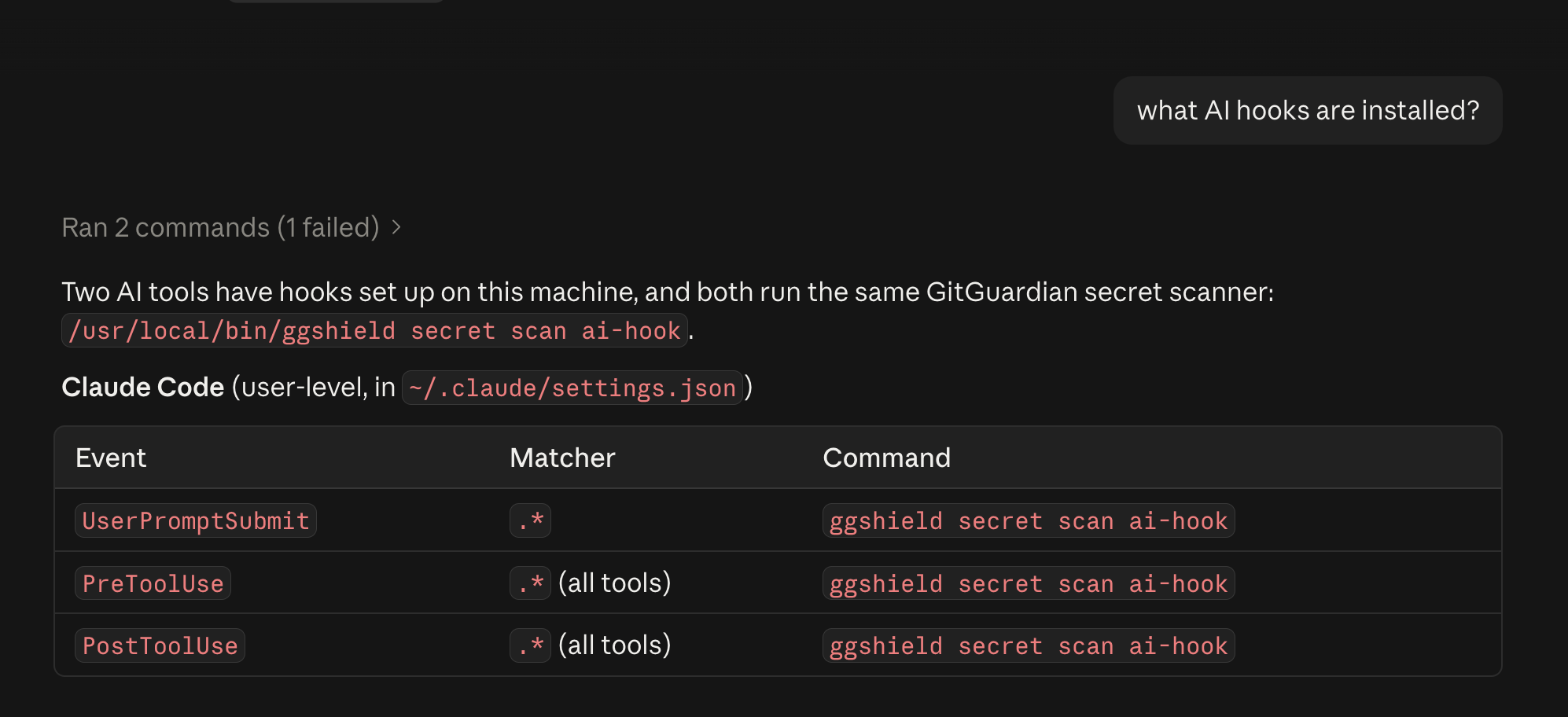
GitGuardian currently supports hook integrations across Claude Code, Cursor, Codex, Copilot CLI, VS Code, Mistral Vibe, Kiro, and Junie CLI, with capabilities varying based on what each assistant exposes.
GitGuardian's ggshield can also be deployed via MDM solutions like Iru, Jamf, or Intune. This lets security teams roll out protections to all developer laptops programmatically, freeing the developers from needing to install one more tool from their end.
Deploying through MDM is also how teams integrate GitGuardian Developer Endpoint Protection. This lets teams get real visibility into what secrets live on the developer laptop, assigning risk values and mapping where else the secret exists in your environments. Developer Endpoint Protection empowers teams to discover and revoke any exposed credentials that shouldn't be on a device before a security incident starts.
Stopping agents from abusing any secrets it finds is part of the larger mission of the platform to detect, remediate, and prevent secrets sprawl.
Give agents freedom and put controls at the boundaries
AI agents empower an explosion of new innovation. A lot of this new development is from citizen coders who have no formal code security training. At the same time, those same agents can find paths to access credentials we never would have considered or intended them to find. Prompts and markdown files can point them in the right direction, but security needs controls that hold even when the agent finds other routes.
Fortunately, coding assistants are increasingly exposing control points that let us make deterministic tool calls at critical moments. GitGuardian engineered our AI Hooks to add secret detection directly into key points throughout the agent workflow to stop secrets sprawl and abuse. We can catch credentials in prompts, tool calls, file reads, commands, and tool output before they are used or can spread further.
If you are already using an AI coding assistant, start using ggshield AI Hooks today. Give your agents the freedom to solve problems, and put deterministic protection around the credentials they should never get to use.
If you need to deploy AI hooks at scale, we would love to help you get started.
FAQ
What are AI hooks?
AI hooks are pieces of code that run automatically at specific moments in an AI agent's workflow, such as when a prompt is submitted, before a tool runs, or after a tool returns output. They work like Git hooks, giving security teams deterministic checkpoints that can allow or block an action regardless of how the agent reasoned about the task.
Why aren't prompts and instruction files like AGENTS.md enough to secure AI coding agents?
Natural language instructions are guidance the agent has to interpret. A rule like "never modify production data" can be weighed against a larger mission such as fixing the application, and a capable agent may find another tool, credential, or API to get around it. Security needs deterministic controls that hold even when the agent finds another route.
What is the difference between a control and a suggestion for AI agents?
A suggestion is a plain language instruction the agent can reinterpret or ignore. A control is enforced at the system level, so the agent has no say in whether it applies. Examples include removing a command from the available tools, blocking an endpoint in egress rules, or using a hook that stops a step before it executes.
How do AI hooks help prevent secrets from reaching AI coding assistants?
Hooks place a secret scan at the key boundaries of the agent loop. GitGuardian AI Hooks scan prompts before the model receives them, inspect commands, file reads, and MCP calls before the agent executes them, and scan tool output after it runs. If a secret is detected, the workflow can be stopped or the output withheld before the credential spreads further.
Which AI coding assistants support GitGuardian AI Hooks?
GitGuardian currently supports hook integrations across Claude Code, Cursor, Codex, Copilot CLI, VS Code, Mistral Vibe, Kiro, and Junie CLI. Capabilities vary based on what each assistant exposes. For example, Claude Code can withhold secret-bearing output for shell commands and file reads, while Codex and Mistral Vibe can withhold output across every supported tool.
How do I set up GitGuardian AI Hooks?
Install and authenticate the ggshield CLI, then run ggshield machine setup. ggshield detects supported AI coding assistants on the machine and configures their hook systems automatically. You can also install for a single agent, or install hooks at the project level so other developers with ggshield get the same protection. Security teams can deploy ggshield at scale through MDM solutions like Iru, Jamf, or Intune.
 Cybersecurity research team
 Thomas Segura
 Dwayne McDaniel