The laptop is the origin point: where credentials first land, where they dwell unrotated for months, and where infostealer malware goes looking. This article maps every location, explains why traditional scanning misses them, and lays out how to bring that hidden credential plane under the same discipline you apply to code.
The perimeter moved to the laptop
Security has spent a decade hardening repositories, pipelines, and vaults. The machine where developers actually work, installing CLIs, authenticating to clouds, running AI assistants, is still treated as trusted ground. But it isn't.
A single laptop accumulates dozens of long-lived credentials across a dozen or more locations over months of normal work. No standard secrets scanner inspects any of them. Modern infostealers are written specifically to harvest the credential files that accumulate through ordinary development workflows. The laptop is not a new attack surface. It's one the industry has under-measured for years.
Why your repo and CI scanners never see this
Pre-commit and CI secret scanning inspect what reaches the repository or the pipeline. That is exactly why they miss the laptop.
A credential sitting in ~/.aws/credentials or shell history never gets committed, so a repo scanner never sees it. Most of those credentials are long-lived and rarely rotated, dwelling on the machine for months. AI tooling accelerates the problem: more agents, more integrations, and more local config files mean more credentials in more places than manual hygiene can track.
Structurally, the laptop is where every credential originates before it reaches a repository, a pipeline, or an attacker. Local secret scanning guardrails address the code-file part of this, not the broader landscape mapped below.
Where credentials hide on a developer's machine
What follows is a scan surface map for a developer endpoint. For each location: what lives there, why it ends up there, and why a Git-only scanner misses it.
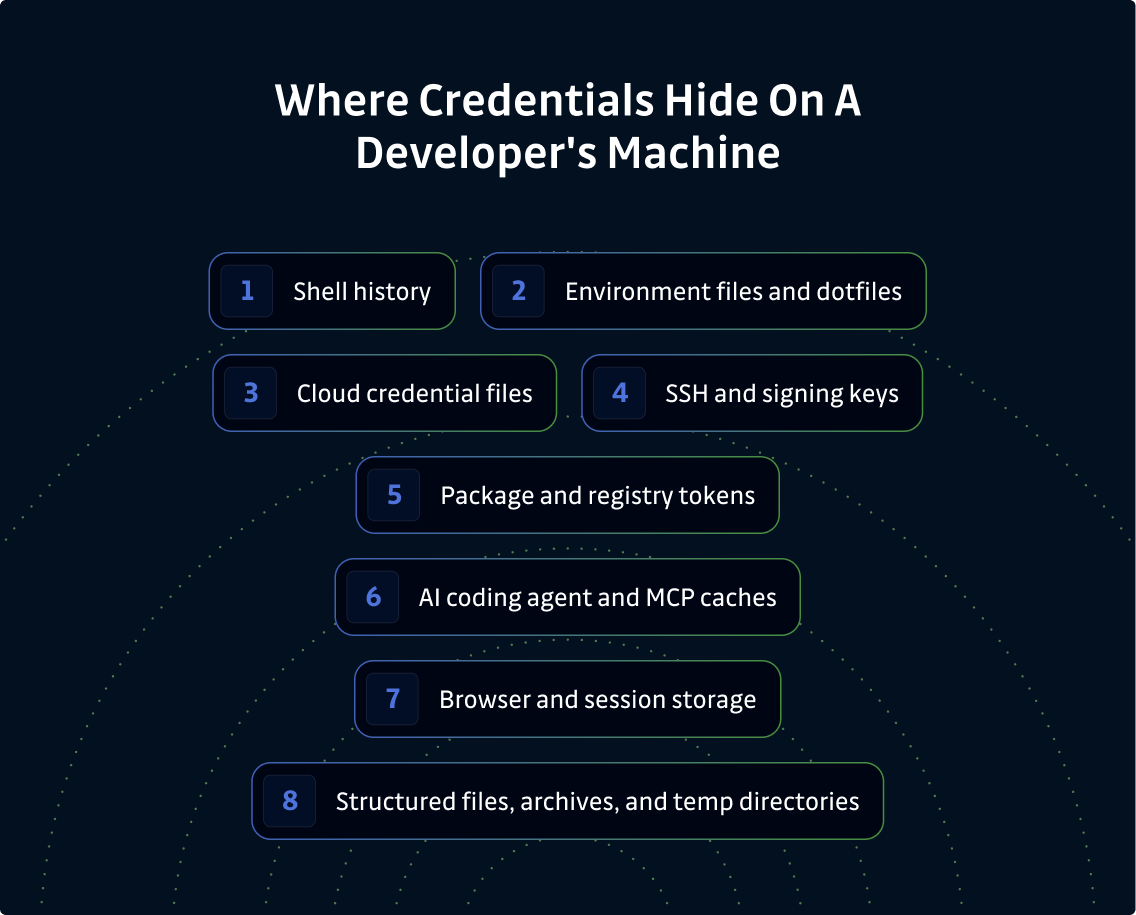
1. Shell history
Files: .bash_history, .zsh_history, fish history files.
API keys, database connection strings, and tokens get pasted into one-off curl and CLI commands, then persist in shell history indefinitely. There is no expiration, no automatic redaction, and no warning that they were stored. Shell history is plaintext, persistent, and one of the very first files infostealer malware reads. It is also one of the most overlooked by security teams, because it feels ephemeral.
2. Environment files and dotfiles
Files: .env, .env.local, .gitconfig, .netrc, and exported variables in .zshrc or .bashrc.
Secrets get copied between projects, duplicated across machines, and rarely rotated. ".env sprawl" has become shorthand for the category, but the problem extends well beyond .env files. Exported variables in shell profiles are equally persistent and sit outside any version-controlled context. These files often hold production credentials at completely predictable paths, outside any repository. For more on how developers end up carrying secrets in these files, see protecting developers' secrets.
3. Cloud credential files
Files: ~/.aws/credentials, ~/.config/gcloud, ~/.azure, Terraform state files, and cached session tokens.
Cloud CLIs write credentials to disk at login: sometimes short-lived session tokens, but just as often static access keys with no expiry. The AWS CLI writes keys to ~/.aws/credentials by default. The Google Cloud CLI stores tokens under ~/.config/gcloud. Azure CLI credentials live in ~/.azure. This is typically the single highest-value target on the machine: direct, legitimately authorized access to production. One stolen key from this layer can translate into cloud account access, S3 bucket enumeration, compute spin-up, and lateral movement across services.
4. SSH and signing keys
Files: ~/.ssh/ private keys, known_hosts, and GPG signing keys.
SSH keys are generated once and reused for years, often without a passphrase. They grant direct access to infrastructure and the ability to sign commits as the developer. A compromised SSH private key is also harder to detect than a stolen API token: there is no API call log showing an unusual access pattern. It just looks like the developer logging in.
5. Package and registry tokens
Files: .npmrc, .pypirc, ~/.docker/config.json, ~/.gem/credentials, Hugging Face tokens, and Cargo tokens.
Package managers write authentication tokens to disk for publish and pull operations. A publish token is supply chain leverage: it can be used to push a malicious version of a package that other teams or downstream users depend on. Docker registry credentials in config.json are a particular blind spot: written automatically at docker login and rarely cleaned up afterward.
6. AI coding agent and MCP caches
Files: Config and cache files for Cursor, Claude Code, and Copilot, plus MCP server configurations that store tokens.
The agent's own auth credentials
Each agent needs a credential to call its LLM service. Claude Code stores its auth token in the OS keyring (macOS Keychain or Linux Secret Service), a higher bar than a plaintext config file. Other tools write tokens directly to home-directory config files. This is the bounded, attributable surface: one credential per tool, in a known location.
The secrets agents encounter and generate during work
The larger exposure is what agents produce while doing their jobs. An agent wiring up an integration may create an API key, store an OAuth token, or provision a service account, then write all of it into conversation history, context persisted to disk, or a temp file. The developer never made that decision. The credential exists because the agent needed it.
Our research says agentic credentials account for more than 40% of secrets found on developer endpoints. That growth is not because developers are storing more: agents are generating and writing secrets without any human in the loop. Some land in well-known, agent-specific directories (.claude/, .cursor/, ~/.continue/), where origin is attributable. Others land in /tmp during task execution, where attribution (agent, another process, or the developer?) is often impossible. Attribution may be incomplete, but credential discovery is not.
MCP servers compound this: they pull vault secrets into local configuration files at runtime, and those copies outlive the task. In 2025, security researchers found over 24,000 unique secrets in public MCP configurations.
AI hooks can intercept secrets before they leave the agent. But secrets that have already reached conversation history or temp files on disk are outside what hooks can catch. That is why the disk surface matters.
7. Browser and session storage
What lives here: saved credentials, session cookies, and OAuth and refresh tokens held in browser profile storage.
Everyday authentication to cloud consoles and SaaS applications leaves persistent tokens in the browser profile. Stolen session tokens allow an attacker to resume an already authenticated session without requiring the password or MFA. This is exactly why infostealer operators sell "stealer logs" rather than raw credentials: a valid session cookie from a browser profile is often worth more than a username and password, because it is already past the authentication gate.
8. Structured files and archives
Files: CSV, SQL, XLSX, PDF, and SQLite exports; .zip and .tar archives; and the contents of /tmp and Downloads.
Data exports and vault-pulled secrets get written to disk "just for a minute" and forgotten. These are invisible to anything that only parses code or known config formats. A secrets scanner that reads .env files will not read a spreadsheet export of database connection strings or a PDF containing API credentials. But an infostealer will, because it reads the filesystem indiscriminately.
How credentials end up on the laptop and stay there
Every aws configure, gcloud auth login, docker login, or npm login writes a credential to disk by design. A key pasted into .env for a local test gets scaffolded into the next project. A vault secret pulled for debugging leaves a local copy nobody explicitly deletes.
And then they stay. The vault policy says rotate every 90 days. The local copy does not know that.
What an attacker actually gets from a developer machine
When an endpoint is compromised, most commonly by infostealer malware delivered through malicious packages, phishing, or trojanized tools, the attacker does not get a login prompt. They get a working set of legitimately authorized credentials across cloud accounts, source control, registries, and SaaS platforms. Infostealers are written to read exactly these files: cloud caches, shell history, SSH keys, browser tokens. Kits now target developer machines specifically because the credential density is that high.
One cached cloud key or registry token can reach far beyond the machine it sat on: production infrastructure, source control, or a package registry used by thousands of downstream consumers.
The hardest question comes after the incident: "What credentials were on this machine, and what do we revoke first?" Most security teams cannot answer quickly because they have never inventoried the laptop. That gap is what turns a containable incident into a prolonged breach investigation.
Bringing the endpoint credential plane under control
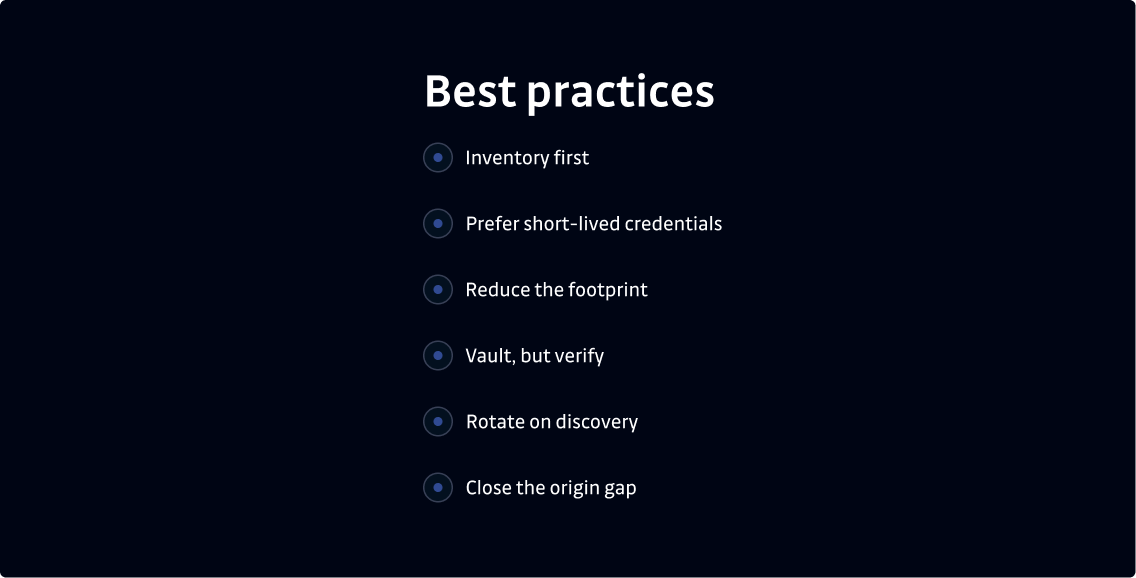
Inventory first. You cannot govern what you cannot see. Start by inventorying credentials across the surfaces mapped above. A repeatable, fleet-wide assessment is the baseline.
Prefer short-lived credentials. Favor SSO, Security Token Service (STS), OpenID Connect (OIDC), and workload identity federation over long-lived static access keys cached on disk. Static keys should be the rare exception, not the default.
Reduce the footprint. Clear secrets from shell history, scope .npmrc and .pypirc tokens narrowly, passphrase-protect SSH keys, and clean up temp exports when the task that required them is done.
Vault, but verify. Secrets managers help only if secrets actually flow through them consistently. Reconciling what is in the vault against what is discovered on endpoints closes the gap between "we have a vault" and "secrets are actually contained."
Rotate on discovery. Treat detection and rotation as a single motion. Prioritize by severity and access scope. Time-to-revoke is the metric: an exposed credential rotated in minutes causes far less damage than one sitting valid for days while an investigation runs.
Close the origin gap. Extend secret scanning to the developer endpoint so the laptop is covered by the same discipline as the repository and the pipeline. Traditional scanning misses the origin: the credential surfaces above are exactly what it cannot see.
For more on why this matters at the workstation level, honeytokens on the developer workstation cover a complementary detection approach.
Auditing the endpoint credential plane
Visibility alone is not a program. You need a governance layer: who owns endpoint credential risk, how often the fleet is assessed, what severity warrants what response, and how findings route into existing incident and ticketing workflows. Tracking fleet coverage (which machines are actually being assessed) is what lets leadership report on progress rather than intent.
GitGuardian Developer Endpoint Protection extends ggshield to scan the developer's filesystem on a schedule, covering shell history, config files, cloud credential caches, AI agent configs, and archives across exactly the surfaces mapped in this article. Each finding is scored by severity and access scope. ggshield runs locally and sends only a hash and metadata, not the secret value or your source files, so the audit does not create a new exposure of its own. It deploys through your existing MDM with no continuous agent.
Developer Endpoint Protection is one capability within the GitGuardian platform, complementing (not replacing) your repository scanning, secrets manager, identity governance and administration, privileged access management, and identity provider. Where EDR watches for malicious processes and behavior, endpoint credential discovery inventories the exposed secrets sitting on the machine. They address different parts of the same problem.
The future of endpoint credential security
Two trends are converging on this surface.
Agentic expansion will make the inventory denser. As AI agents and MCP servers proliferate, the number of credentials landing in local configuration files grows with them. Each new integration is another location traditional scanners do not cover.
Commoditized theft keeps lowering the barrier. Infostealer-as-a-service kits are increasingly developer-aware, targeting the specific paths where cloud credentials, registry tokens, and browser session data accumulate.
The endpoint is becoming a first-class credential surface that deserves the same programmatic treatment as code and cloud.
Treat the laptop like the credential store it is
The developer endpoint is not trusted ground. It is one of the densest, longest-lived, and least-inspected credential stores in the organization: cloud keys, tokens, SSH keys, session cookies, and AI agent caches accumulating across a dozen locations that no Git scanner ever sees.
The teams that map this surface, inventory what is on it, and bring it under the same discovery and rotation discipline they apply to code will dramatically shrink their blast radius when an endpoint is compromised. Those who continue treating the laptop as trusted will keep handing attackers a working set of legitimately authorized keys and a scoping problem that takes days to resolve.
Where are secrets stored on a developer's machine?
Across many locations: cloud credentials, shell history, .env and dotfiles, SSH keys, package-manager tokens (.npmrc, .pypirc), AI agent and MCP caches, browser session storage, and temp exports or archives, almost none of which live in a Git repository.
Can secret scanning find credentials that aren't in Git?
Only if it scans beyond the repository. Pre-commit and CI scanning inspect code and pipelines; credentials stored in local files like ~/.aws/credentials or in shell history require endpoint-level scanning of the high-risk locations where credentials accumulate.
What's the most exposed place credentials hide on a laptop?
Cloud credential caches such as ~/.aws/credentials are usually the highest-value target. They often hold long-lived access keys to production and are a primary objective for infostealer malware.
Do infostealers target developer machines specifically?
Yes. Modern infostealers are written to read exactly the files developers accumulate, cloud caches, shell history, SSH keys, browser tokens, because those credentials grant legitimately authorized access to cloud and source systems.
How long do credentials stay on a developer's machine?
Often months. Most exposed credentials are long-lived and rarely rotated, so they dwell on the endpoint long after the task that created them, which is what makes the laptop such a dense credential store.
Is scanning a developer's laptop for secrets a privacy risk?
It doesn't have to be. Endpoint credential discovery can run locally and transmit only a hash and metadata, not the secret value or your source files, so security sees what to revoke without reading the contents of your machine.
How is endpoint credential discovery different from EDR?
EDR watches for malicious processes and behavior. Credential discovery inventories the exposed secrets sitting on the machine. They're complementary: one addresses the malware, the other removes the credentials the malware is after.
What should I do with credentials found on an endpoint?
Score them by machine, severity, and validity, revoke and rotate the highest-blast-radius ones first, and feed findings into your existing incident and ticketing workflow, treating detection and rotation as a single motion.