Software supply chain security used to feel like a problem that lived somewhere else.
The repository and build system were top of mind. Package registries, continuous integration and continuous delivery pipelines, release automation, cloud platforms, and artifact stores also became the focus of concern. These still matter and need protection, but the attack surface has shifted closer to where developers work every day.
The developer laptop is no longer just the place where code gets written. It is part of the supply chain.
The security implications are easy to underestimate. A modern workstation touches source code, package managers, cloud accounts, registry tokens, secure shell keys, service accounts, build scripts, artificial intelligence coding assistants, terminals, local caches, and environment files. It is where credentials are created, copied, tested, logged, and too often forgotten.
Attackers understand this. They are not only looking for a vulnerable production service or a poisoned build step. They are looking for the access material that lets one system trust another.
We have to update our defense models. Security cannot wait until code reaches a remote repository or a pipeline. By then, a credential may already be in Git history, a model prompt, a local log, a build artifact, or a package install script’s reach.
The control point has to move earlier in the software creation process.
The Common Thread Is Credential Theft
GitGuardian's recent breach research points to a clear pattern across software supply chain attacks: attackers increasingly target the credentials embedded in developer workflows.
In April 2026, we analyzed three supply chain campaigns that affected npm, PyPI, and Docker Hub over a 48-hour period. The ecosystems and techniques varied, but the goal was consistent. Each campaign focused on stealing useful credentials from developer environments or continuous integration and delivery pipelines.
One compromised npm package used a postinstall hook to steal npm publish tokens, then used that access to publish infected versions of packages the victim could reach. A PyPI campaign harvested secure shell keys, cloud credentials, environment variables, and crypto wallets. Across those campaigns, the attacker’s objective was clearly to collect valid access and use it to reach the next system.
This is what makes the problem so damaging.
Developers Are Attractive Targets
A developer may have access to source control, cloud accounts, package registries, artifact stores, staging environments, incident tools, and internal application programming interfaces. A build runner may hold deployment credentials, package publishing tokens, and access to production-adjacent infrastructure. One exposed token can become a bridge across several layers of the delivery process.
That is why credential exposure is different from many other bugs. An attacker does not always need to exploit a software flaw, maintain persistence, or modify production code. Sometimes, authenticated access is enough. Sometimes, a short-lived foothold on a developer machine can uncover a credential with broader reach.
The GitGuardian 2026 State of Secrets Sprawl report makes the scale of the situation clear. We found over 28.6 million new secrets detected in public GitHub commits in 2025, a 34 percent year-over-year increase. Internal repositories are roughly six times more likely than public repositories to contain hardcoded credentials. About 28% of incidents originate entirely outside repositories, in collaboration systems such as Slack, Jira, and Confluence.
The repository is no longer the boundary. If a secret can be found on the machine in plaintext, it is likely to spread elsewhere in plaintext and be usable by anyone who finds it.
The Workstation Now Holds Too Much Context To Ignore
Developer laptops are attractive because they contain context.
They hold source trees, dotfiles, shell history, local environment files, integrated development environment settings, package manager configuration, build artifacts, terminal output, AI agent logs, and temporary debugging notes. Many of these files are invisible during normal review. Many never leave the machine. Some sit in directories that developers rarely inspect.
That makes local exposure difficult to manage with repository-only controls.
A credential can appear in a .env file, get printed into terminal history, land inside a test config, show up in build output, or be copied into an AI prompt during troubleshooting. None of that requires a malicious commit. None of it necessarily triggers a centralized scanner. Yet each moment can create real access risk.
We need, as an industry, to scan the places where credentials are collected outside Git. Project workspaces, dotfiles, build output, and agent folders can all store copied tokens, configuration blocks, troubleshooting output, and cached context. Attackers harvest this local data because it can lead directly to valid access.
The Shai-Hulud data gives that concern weight. Across 6,943 compromised machines, it found 33,185 unique credentials, with at least 3,760 still valid when first checked. That is not a theoretical workstation problem. It is a practical attacker workflow.
Compromise the machine. Search the context. Extract the access. Move on.
The workstation has become a security boundary because so many tools assume the local environment is trusted. Package managers run install scripts. Extensions read project files. Terminals expose environment variables. Local automation touches real systems. AI agents can read files, run commands, and summarize outputs.
Each of those actions may be useful, but each can also become a path for accidental exposure or malicious instruction.
AI-assisted development adds a newer layer to the same problem. AI coding tools now work closer to the developer’s files, terminal, editor, and environment variables. A prompt can contain a credential. A tool can call and read a sensitive file. A generated command can print access material into logs or model context. An agent can combine harmless-looking steps into a risky action.
The exposure surface is no longer just human typing plus code review. It now includes the interaction between humans, local tools, automated agents, and external services. And as we found in our report, more people are using coding assistants, and many of them that do let the agent co-author their commits are leaking twice as many secrets per commit.
Security controls have to meet the workflow where it actually happens.
Earlier Checkpoints Reduce Damage
Traditional supply chain controls still matter. Teams still need source control protections, dependency scanning, secure continuous integration and delivery, artifact integrity, release controls, and production deployment guardrails.
But those controls often fire after the risky moment has already happened.
A developer may have created a local file with a credential. An AI assistant may have received sensitive context. A package install script may have read environment variables. A token may have entered local Git history before it ever reaches a remote repository.
Rotating a credential after it reaches a shared repository can become a full incident response exercise. Someone has to identify ownership, revoke the credential, issue a replacement, check usage, test dependent applications, review access, clean history where possible, and document the event. That work is necessary, but it is expensive.
Catching the same issue while the developer is still editing a file is simpler. Remove it. Replace it with a safe reference. Keep moving.
The strongest model treats credential detection as a continuous developer-side control, not an occasional cleanup task. The tool has to sit where developers already work: in the editor, in Git hooks, in the terminal, and inside AI coding workflows.
Protecting Your Developers' Secrets
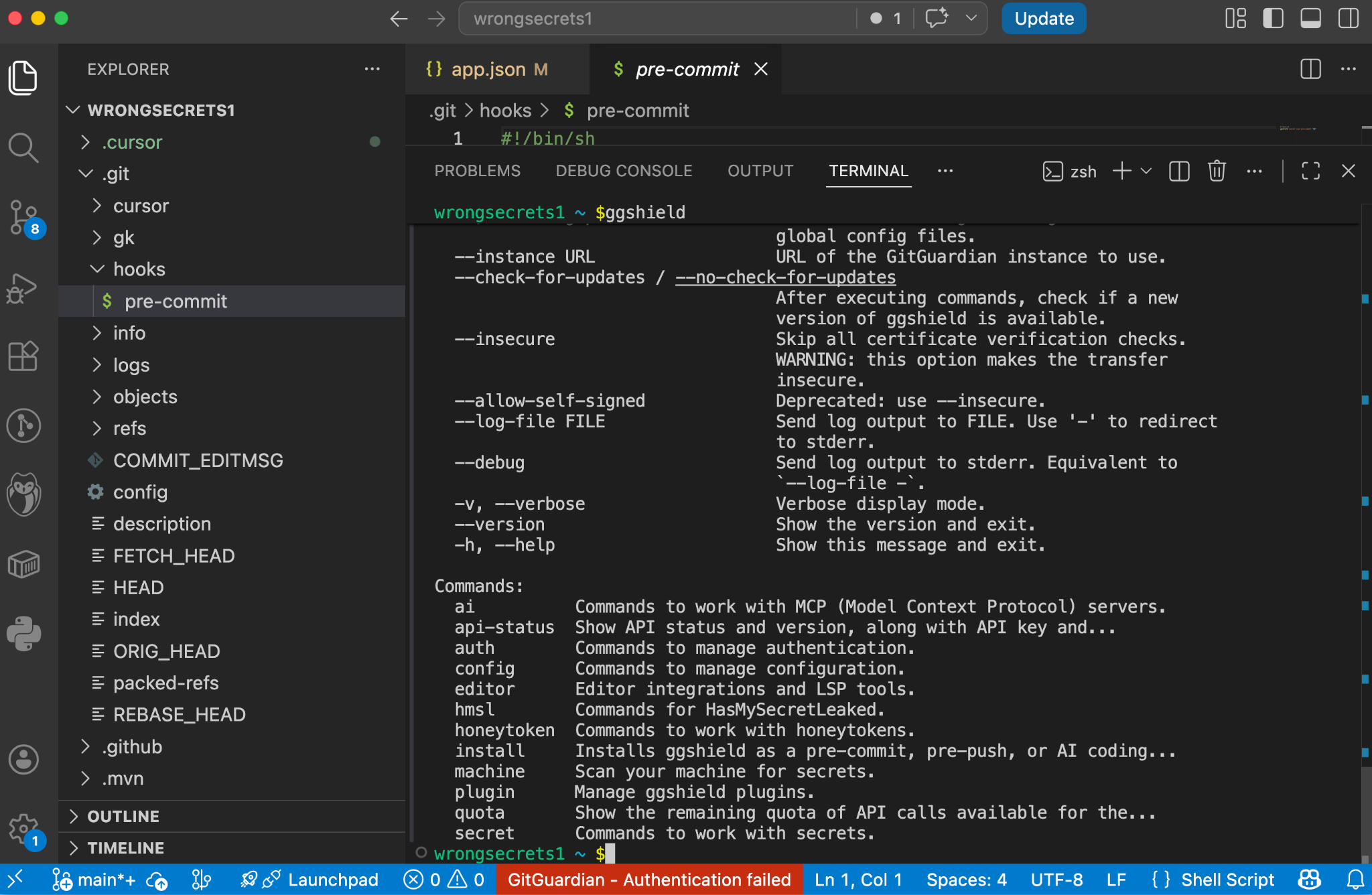
ggshield is the GitGuardian command-line interface for scanning developer workflows. You can run ggshield locally or in continuous integration environments, where it provides guardrails across the software development lifecycle and detects hundreds of types of hardcoded credentials.
A local scan catches problems before code moves into shared infrastructure. A continuous integration scan catches problems after code leaves the laptop. A pre-receive hook can prevent a secret from being pushed to a shared repo or system. Using the same tooling across these points gives teams consistency without forcing developers into a separate security process.
Git Hooks Add Another Layer Of Protection
Using gghsield pre-commit hooks means a scan runs before Git creates a commit. Teams can configure it through the pre-commit framework, install it locally for specific repositories, or install it globally across current and future repositories on a developer workstation.
The global option is important. Not every leak happens in the main codebase. Temporary repositories, test folders, side projects, cloned examples, and one-off experiments all create exposure. A repository-by-repository rollout leaves gaps. A global hook gives the developer machine a broader default.
A pre-push hook catches a later moment. It runs before code leaves the machine for a remote repository. GitGuardian documents local, framework-based, and global installation modes for this control as well. Together, pre-commit and pre-push hooks create two useful gates: one before local history becomes durable, and one before code reaches shared infrastructure.
Finding Secrets On Save
GitGuardian’s VS Code extension uses the bundled ggshield command-line interface to scan code as developers write or modify it. A scan is run automatically on saving a file. Findings are shown instantly and directly inside the editor through code annotations, status bar warnings, and the Problems panel. This extension also works with Cursor, Antigravity, and Windsurf.
Security controls fail when they are too late, too noisy, or too far away from the mistake. A good local control gives feedback in context. It explains what happened. It helps the developer fix the issue before it becomes a ticket, a broken build, or an incident.
Ai Tools Need Guardrails At The Handoff Points
AI coding tools deserve special attention because they change where leakage can occur.
An AI workflow may expose sensitive material before code exists as a file. A developer might paste a credential into a prompt while debugging. An agent might read a local configuration file. A tool call might execute a command that prints environment variables. Output from that command might then move into the model context or local logs.
That is a different path than traditional source code leakage.
GitGuardian’s AI coding tools integration addresses this by placing controls inside the hook systems of tools such as Cursor, Claude Code, and VS Code with GitHub Copilot. The integration scans three stages: prompt submission, pre-tool use, and post-tool use.
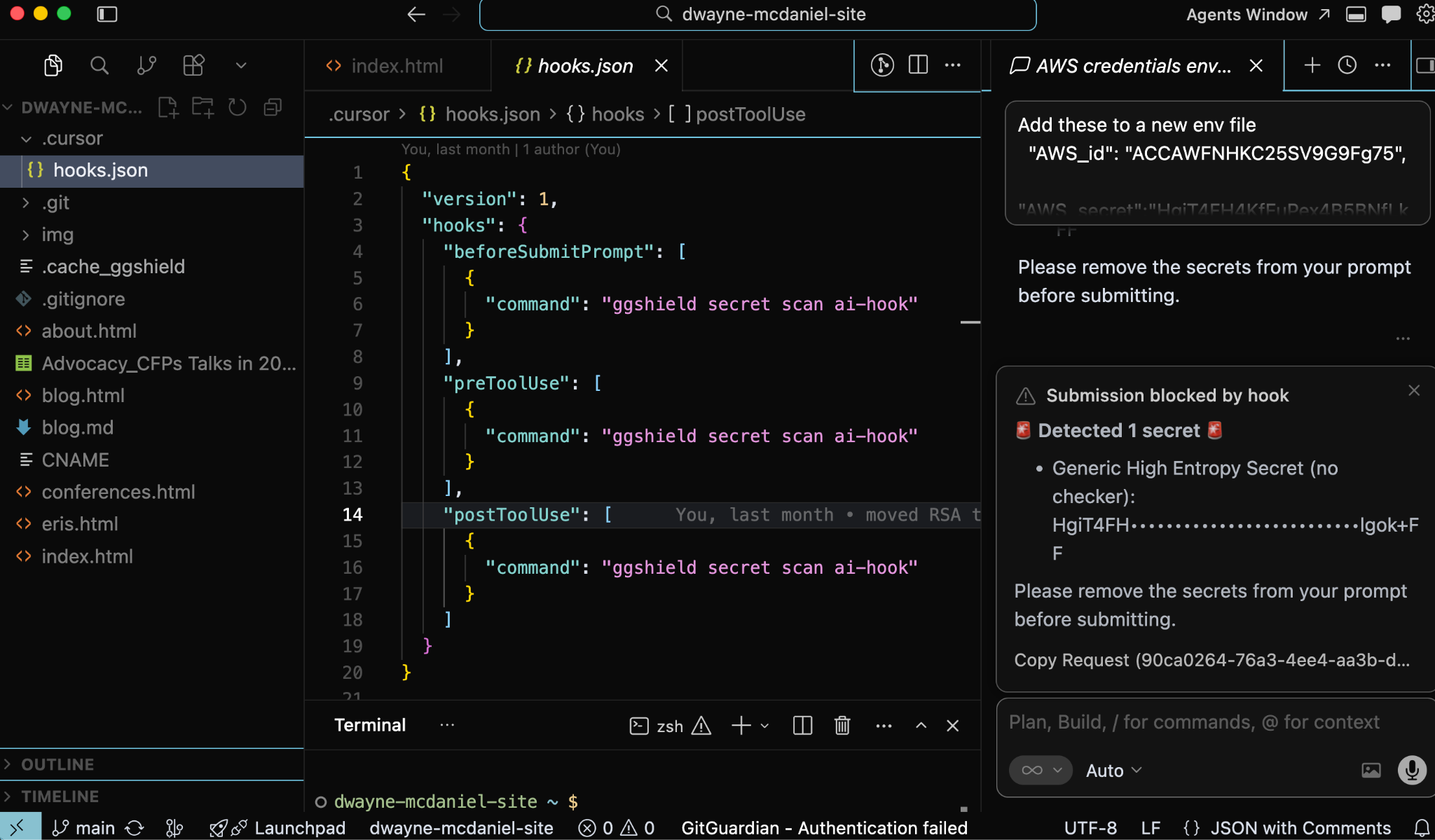
Prompt submission scanning checks content before it reaches the model and blocks the prompt when credentials are found. Pre-tool use scanning checks commands, file reads, and Model Context Protocol calls before execution, blocking risky actions before they run. Post-tool use scanning checks outputs after execution and sends a desktop notification when credentials appear.
That structure fits how agentic tools operate.
The risky moment may be a prompt. It may be a file read. It may be a shell command. It may be the output of a tool the developer did not manually inspect. A repository-only control sees too little of this flow. A hook inside the AI workflow can stop exposure at the handoff point.
The editor catches the issue while the developer writes. AI hooks catch sensitive material before prompts, tool calls, or outputs move it somewhere risky. Git hooks catch credentials before they enter commit history or leave the laptop. Continuous integration and server-side controls provide backup once code reaches shared systems.
Layered Prevention Without Forcing A Separate Workflow
Developer environments are now connected, automated, and increasingly assisted by tools that can act on local context. Security has to account for that reality. Waiting for a remote scan is too late for credential exposure.
The better model is straightforward: find credentials earlier, block them closer to where they appear, and reduce the chance that a developer's laptop becomes the easiest path into the software supply chain.
GitGuardian’s ggshield, IDE extensions, AI hooks, and Git hooks all point toward that model. They bring detection into the places developers already use, rather than asking developers to leave their workflow for security. They reduce the time between mistakes and feedback. They give teams a consistent detection engine across local development, AI-assisted coding, Git workflows, and automation.
The supply chain now includes the workstation.
Treat it that way.