If you work in security or DevSecOps, you already know secrets do not live only where they should, safely in secrets management platforms, aka vaults, such as CyberArk's Conjur Cloud, Delinea Secret Server, and Azure Key Vault.
They leak into Git repos, CI logs, Slack threads, Jira tickets, wikis, and “temporary” config files that never get cleaned up. We unfortunately know this problem is getting worse for most organizations.
The State of Secrets Sprawl 2025 report found a 25% year-over-year increase in leaked secrets on public GitHub. We also reported that secrets are 8x more likely to leak into private repos. Worse yet, 70% of the valid secrets leaked in 2022 remained valid when we retested them in 2025.
The problem is not just that secrets leak. They stick around and grant access to whoever finds them.
The good news is detection has never been better, thanks to GitGuardian's Secrets Detection across code, CI, collaboration tools, and anywhere sensitive values are exposed across any source.
The bad news is that solving the "last mile" challenge is still a challenge for too many teams. Someone still has to handle all the manual steps of properly vaulting the secret, updating the required configs or CI variables, and rotating the secret, all while hoping nothing breaks. Doing that over and over turns into burnout, backlog, and real risk.
GitGuardian’s view is that there has been a missing link between “we found a secret” and “this is safely under control in a Secret Manager.” We call that vital link "Push-to-Vault" and are happy to support it across all leading secret management platforms.
What GitGuardian Push-to-Vault Does for You
Push-to-Vault is the bridge between detection and secure storage. It is a workflow that lets users insert discovered unvaulted secrets directly into their Secret Manager from within the GitGuardian platform. Instead of copying values into a clipboard and juggling tabs, you stay in the incident view, review what was detected, and trigger a controlled flow that moves the secret from being exposed in code or logs to being safely stored at the right vault path.
GitGuardian tracks that remediation for you, so you know which incidents are actually under control and which still need work.
Crucially, this does not introduce a new vault; instead, it helps you make better use of the vaults you already invested in. Under the hood, Push-to-Vault is powered by ggscout, a lightweight tool you run inside your environment. You integrate ggscout with existing Secret Managers such as CyberArk Conjur Cloud, HashiCorp Vault, AWS Secrets Manager, and others.
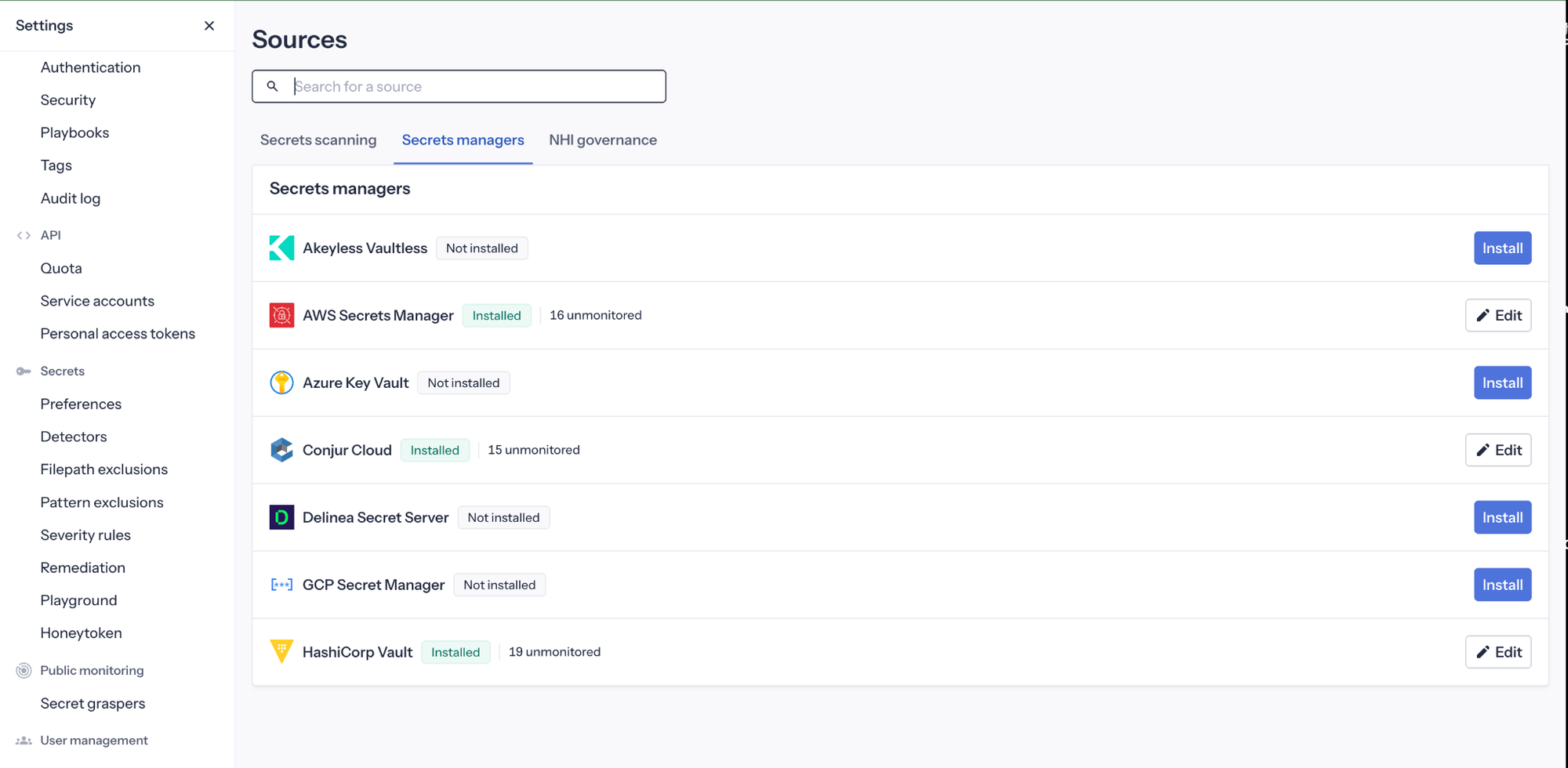
When you Push-to-Vault from an incident, ggscout writes the exposed secret into your chosen vault path. After that, it sends only metadata and hashes back to GitGuardian so the platform can confirm remediation without ever holding the raw values.
Push-to-Vault As Part Of Your NHI Governance Strategy
Push-to-Vault is a key part of GitGuardian’s broader Non-Human Identity Governance story. Secrets, usually in the form of passwords, tokens, or API keys, are the connective tissue for service accounts, workloads, CI pipelines, agents, and every other workload identity that talks to critical systems. If you cannot see and govern those secrets, you cannot really say you understand or control your non-human identities.
GitGuardian’s NHI Governance aims to change that by giving you a real inventory, clear visibility, and end-to-end mapping from sources to consumers. You see which identity uses which secret, where that secret appeared, and how it flows through your environment. The faster a secret is secured in a vault, the sooner you can rotate it without fear of breaking applications or pipelines.
As NHIs multiply and goals shift from “use vaults” to true lifecycle management, this becomes essential. GitGuardian helps you discover secrets and identities, understand hygiene and over-permissioning, and focus effort on vaulting what really matters. Once those secrets are properly stored, you can put regular rotation on autopilot instead of treating it as a one-off project.
Push-to-Vault sits right in the middle of that journey. It does not just patch one leaked key. It turns each incident into an opportunity to bring another NHI under the kind of governance that modern zero trust architectures demand.
Security First: How Push-to-Vault Works
The internal flow for Push-to-Vault was intentionally designed to be secure and straightforward to implement.
First, GitGuardian detects an incident with an exposed, unvaulted secret across one of your monitored sources. That might be a Git commit, a CI log, or a message in a collaboration tool. From there, ggscout pulls the incident details from your GitGuardian instance and uses its sync-secrets capability to write that secret to an integrated Secrets Manager. You decide which vault and which path, and you can standardize that per team, repo, or environment.
Once ggscout writes the value into the vault, it sends only metadata back to GitGuardian so that the platform can mark the incident as vaulted and track remediation end-to-end. Once in the vault, the secret values never leave your infrastructure in clear text. GitGuardian never needs to store or replay your secrets. ggscout runs close to your vaults, while GitGuardian relies on metadata and cryptographic proofs that the secret is now under control.
Tight Control Over Automation
Push-to-Vault is opt-in. ggscout can be configured to read from your vaults without any write access at all, which is a common starting point for teams that want visibility first. When you are ready to enable writes, you can restrict ggscout to very specific locations, such as a dedicated path, a given namespace, or only non-production environments. That way, you give your teams a safer “lane” for automation instead of turning it loose everywhere.
If you need even more assurance, you can run in a more conservative mode, where ggscout operates in a fetch-only posture and produces JSON reports that show what it would write and where. You can review those reports with your platform, security, or audit teams before allowing any actual writes. It is a practical way to bring skeptics along without asking them to take automation on faith.
Just as important, Push-to-Vault is designed to help you avoid dumping everything into the vault and needing to sort it out later. We all know that later never comes. You can embed remediation guidance directly in GitGuardian to lead users down the right paths. Over time, the result is a cleaner, more predictable vault layout rather than simply moving the mess from Git into a secret store.
How Push-to-Vault Changes Day-to-Day Work
Push-to-Vault is all about removing friction. Instead of bouncing between an incident panel, a vault console, a configuration repo, and a runbook, your security and platform teams can move exposed secrets straight into the right Secret Manager path from the GitGuardian dashboard. No juggling user interfaces. No copy-paste. No hoping someone remembers to update a ticket afterward.
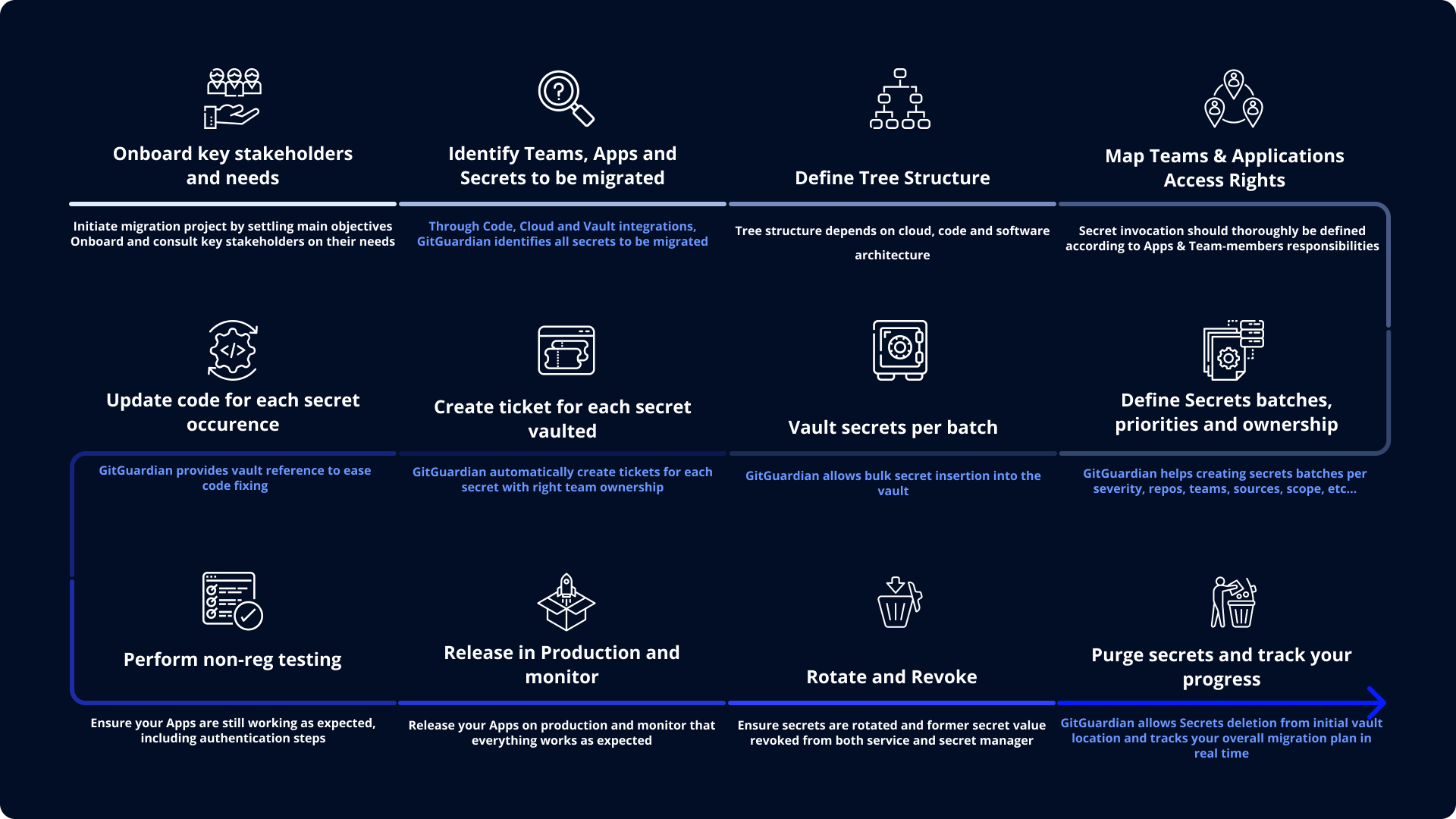
Once a secret is vaulted, you can wire the new path back into the application or pipeline, rotate the value safely, and close the loop with a clean audit trail that shows how it moved from detection to secure storage.
GitGuardian can tag incidents when secrets are already vaulted, so you get a clear split between “under control” and “still floating around unvaulted.” That lines up with revocation workflows where you vault and rotate a new secret, revoke the old one, and then close the incident with evidence attached.
For dev teams, this means no more generic “go fix this” tickets. Engineers get a vault path and a clear reference, saving them time looking up the process and the right vault. Over time, Push-to-Vault nudges your organization toward consistent vault hierarchies instead of random environment files and scattered CI variables.
A Practical Scenario
Let's walk through an example incident in which a production database password is committed to a private repo. With traditional remediation, you would copy the password out, create a vault entry by hand, try to pick the right path, update the configuration, rotate the password, possibly redeploy the application, and hope nothing got missed.
With Push-to-Vault, you start from the incident, push the value into a standard production database path that your team already trusts, wire the app to read from that path, and rotate with confidence. The same pattern holds for an access key pasted into Slack during an incident or a long-lived token hiding in a legacy config file. Speed, safety, and traceability all improve in the same motion.
At the program level, this operational improvement rolls up into better Privileged Access Management and stronger NHI governance. By centralizing where secrets actually live across vaults, you can see duplicate or weak credentials, enforce least privilege more consistently for non-human identities, and move toward a lifecycle-driven secrets strategy instead of a series of isolated cleanups.
Push-to-Vault As Part Of Your Secrets Security Strategy
While Push-to-Vault is an exciting feature, it is one part of a larger approach. Adopting it needs to be part of your overall secrets management and NHI governance plan. If you are new to this journey, we highly recommend first finding out how many secrets are currently leaked and where they live. Until you know that, you don't know what is really at stake for your organization.
Detection gives you that visibility. Once you are ready, though, Push-to-Vault turns that visibility into control. The faster you can move from finding leaked secrets with scanning to vaulting and rotating, the less time an attacker has to turn someone’s mistake into a foothold.
If you are already using GitGuardian to detect secrets, Push-to-Vault is how you turn noisy findings into durable, governed fixes. This is one more way GitGuardian is helping teams get non-human identity under control; in a vault, with automated rotation, and with proper lifecycle governance.
If you are not yet leveraging GitGuardian, we would love to talk to you about fighting secrets sprawl and getting a handle on NHI governance