TL;DR
- Rotation is the last step: Rotating more than 1,000 service credentials across more than 150 applications with zero outages showed that most of the work happens before you change a single password.
- Controls built for people miss service credentials: Service credentials have no human to prompt, no MFA path, often no current owner, and they fail silently. Their copies also spread into scripts, config files, pipelines, and chat.
- Inventory first, then SCALER: Know who uses each account, who owns it, and whether it’s still needed. Then follow six stages in order: Scale, Classify, Assign, Lifecycle, Enforce, and Rotate.

Mayank Sethi
Mayank is a Principal Data Operations Engineer who led the rotation of more than 1,000 service credentials across 150+ applications without an outage. He developed the SCALER framework and presented it at CornCon 12.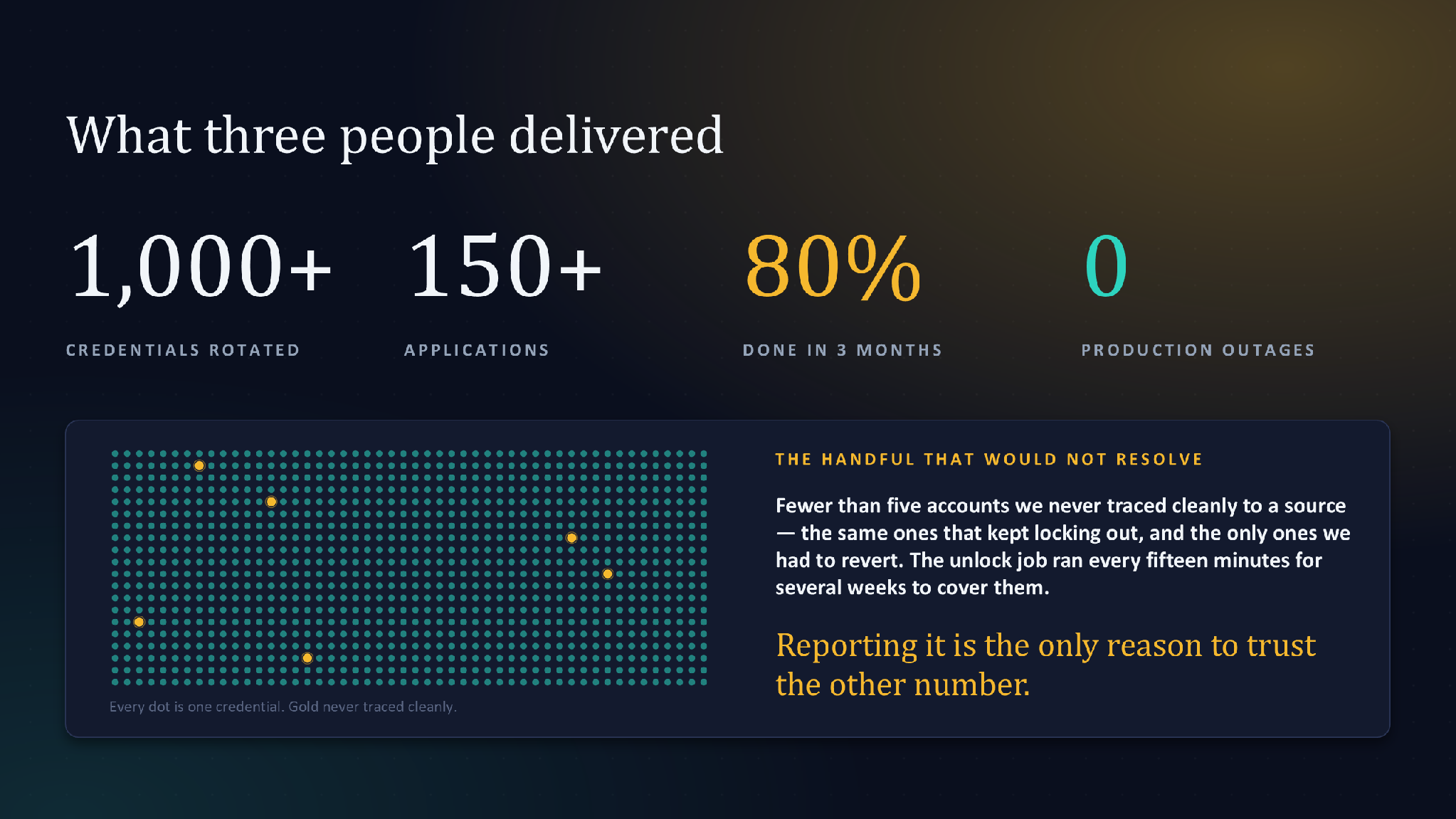
I once led the service account password rotation of more than 1,000 credentials across more than 150 applications. We finished with zero outages. The rotation itself was the easy part. Most of the work happened before we changed a single password.
That order surprises people. Most teams treat rotation as the job. In my experience, rotation is the last step of a longer process. Skipping the earlier steps is how rotation causes outages.
The gap a standard identity review misses
Picture a typical identity review. Multi-factor authentication (MFA) is on for every employee. Single sign-on covers the main applications. Network policies restrict who can reach production. The review passes.
Now ask a different question. How many service accounts exist on that platform? Who owns each one? When did each credential last change? Most teams can't answer with confidence.
The broader data on leaked credentials points the same way. GitGuardian found 28.65 million new hardcoded secrets in public GitHub commits in 2025, up 34% from the year before. When it retested secrets from 2022 in January 2026, more than 64% were still valid. Credentials leak, and then they stay live for years.
Service credentials are the passwords, keys, and tokens that applications, scripts, and pipelines use to talk to each other. Most security controls assume a human user. Service credentials don't have one.
Four ways service credentials differ from user passwords
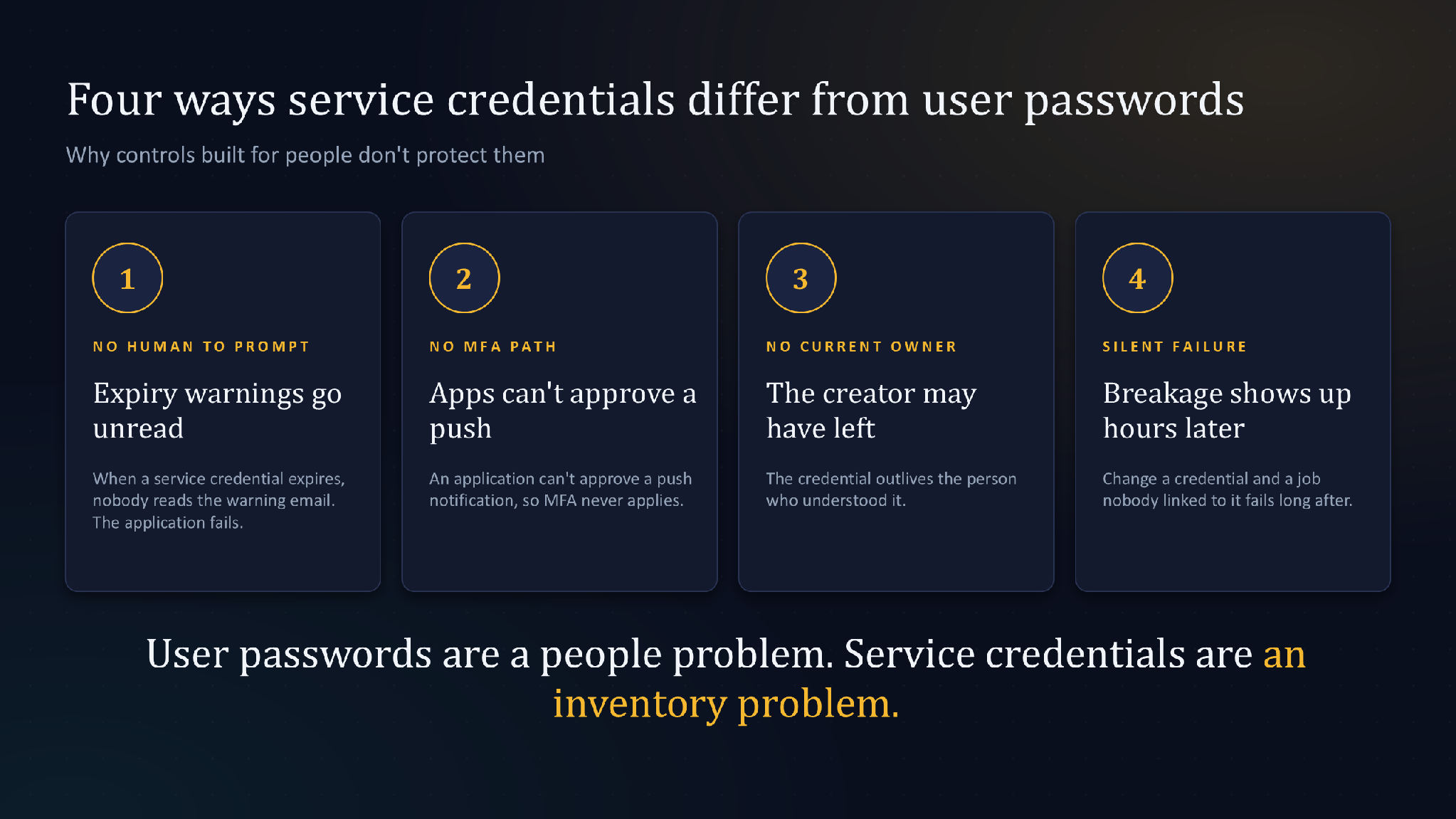
When a user password expires, a person gets a prompt and resets it. If someone steals it, MFA stands in the way. If it stops working, the user notices within minutes and calls the help desk.
Service credentials get none of that support:
- No human to prompt: When a service credential expires, nobody reads the warning email. The application fails.
- No MFA path: An application can't approve a push notification.
- No current owner: The engineer who created the account may have changed teams or left. The credential outlives the person who understood it.
- Silent failure: Change a credential and something can break hours later, in a job nobody linked to that account.
I saw the last one firsthand. Application teams updated the new password in every place they knew about. Then a connection would still fail, from a source nobody could identify. Several systems reached the platform through the same shared network address. The owner had done everything right and still couldn't find the last copy.
After one incident like that, teams hesitate to touch these credentials at all. So the credentials sit unchanged, sometimes for years.
User passwords are a people problem, and prompts, training, and MFA handle most of it. Service credentials are an inventory problem. You solve them by knowing what exists, who uses it, and who answers for it.
Why controls built for people miss machine identities
Single sign-on, MFA, and conditional access all assume a person at a login screen. Service credentials skip the login screen entirely.
They also hold standing access. A service account often keeps the same permissions on its last day as on its first, even after its job shrinks. Nothing forces a change, so the credential stays valid.
And service credentials travel. To get work done, teams copy them into scripts, config files, continuous integration pipelines, and chat threads. GitGuardian found that internal repositories are roughly six times more likely than public ones to contain hardcoded secrets.[1] About 28% of incidents start entirely outside repositories, in tools like Slack, Jira, and Confluence.[1]
The platform itself may be locked down well. Its controls never see the copies scattered across code and collaboration tools.
Two instincts that make it worse
When a team finds hundreds of unmanaged service credentials, two responses tend to show up. Each seems reasonable in the moment, and each makes the problem harder to fix.
The first is to rotate everything immediately. It looks decisive. In practice, it causes the outages you were trying to avoid. Nobody knows which jobs depend on which credential, so each rotation breaks something. After a few incidents, teams stop rotating at all.
The second is to form a working group first. The group drafts a policy, compares tools, and schedules meetings with application teams. Months pass, and the exposure found on day one stays open.
Both skip the same step. The first acts without knowing what exists. The second plans without finding out.
What the inventory has to answer
Before we rotated anything, every service account needed three answers:
- Who uses it? Which applications, jobs, or pipelines connect with it today?
- Who owns it? Which person is accountable for it now?
- Is it still needed? Has anything used it recently?
We didn't have to build most of that from scratch. Application ownership already lived in a configuration database. Account metadata, including last login, already lived on the platform. The missing piece was the join between them. Once we joined the two, most accounts resolved to a named owner automatically.
The third question paid off fastest. We disabled accounts with no login in 90 days instead of chasing their owners. Owners could request re-enablement through a standard service request if they needed it. That shrank the problem before rotation started.
It also had a side effect we didn't plan. Once owners could see the last login date for their accounts, they started asking us to disable the ones they no longer needed.
Platform data is the right starting point because it reflects what is real today. Spreadsheets and documentation drift. But the platform is only half of the inventory. The other half is everywhere its credentials have spread: repositories, config files, pipelines, and chat. Rotate without that half, and the breakage moves downstream.
Six stages, always in this order
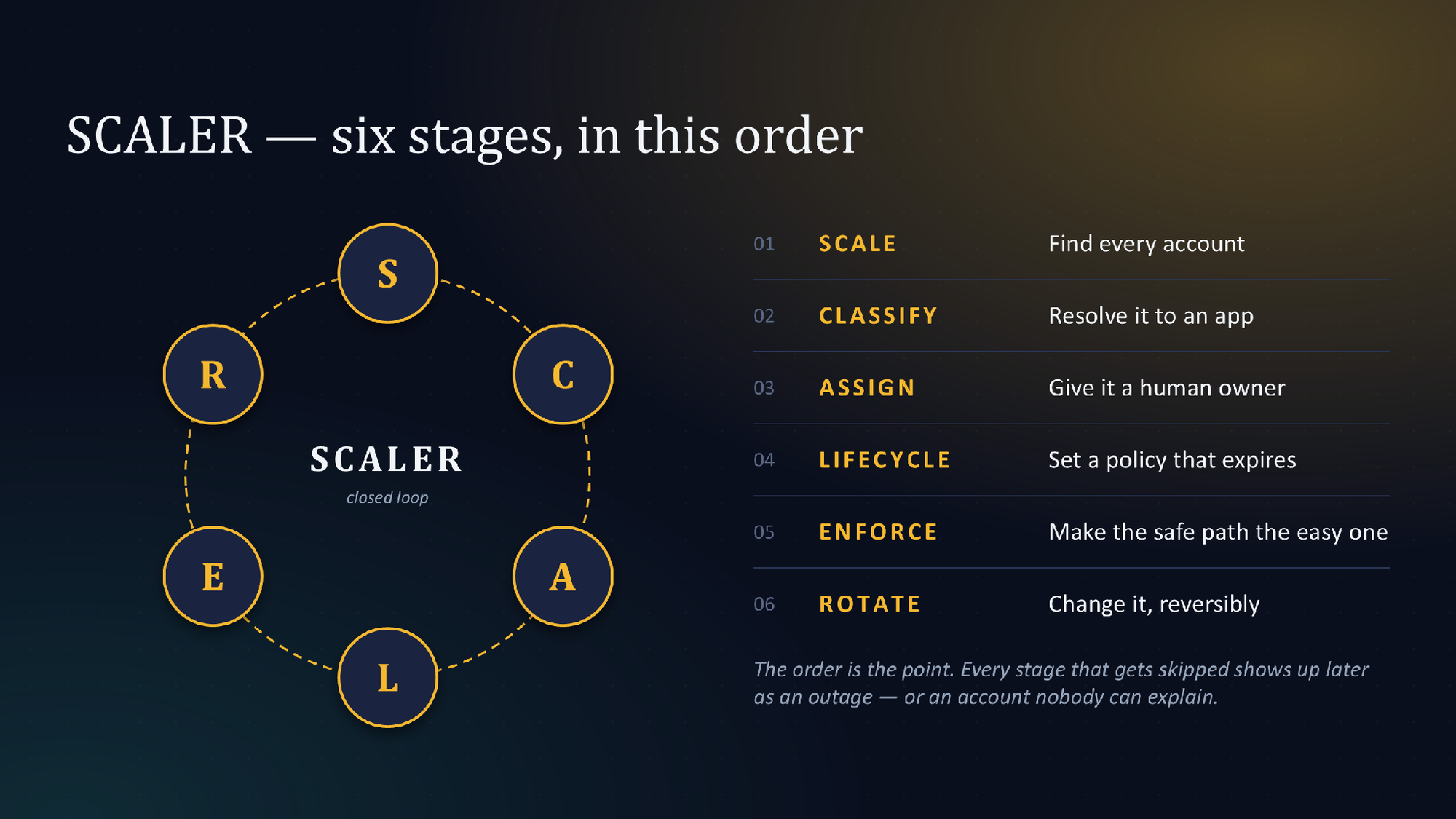
There was no name for what we did at the time. Looking back, it was six stages, always in the same order. I've called it SCALER since, because the order is the part worth keeping.
- Scale: Discover every service account from the platform itself, then find where each credential has spread. Use login history to see what is still active.
- Classify: Tie each account to the application it supports.
- Assign: Give every account a named human owner, and keep ownership current as people move.
- Lifecycle: Set a policy that makes credentials expire, with warnings well ahead of the deadline.
- Enforce: Make the safe path the easy one. Owners rotate through a workflow they already use, without waiting on a central team.
- Rotate: Change credentials in a way you can reverse quickly if something breaks.
Each stage depends on the one before it. You can't assign an owner to an account you haven't found. You can't enforce expiry on a credential nobody owns, because nobody will act on the warning. Skip a stage, and it shows up later as an outage.
Why a revert path made rotation safer
This is the choice many security teams won't like. When a rotation broke something, we let the owner temporarily revert to the old credential.
That sounds like a step backward, so here is the reasoning. Our platform didn't let an account hold two valid passwords at once. With overlapping credentials, you run the old and new side by side until every consumer switches. We had no overlap window.
The shared-address problem from earlier is exactly this case. Without a way back, that failure becomes an outage, and the owner learns to fear rotation. With a way back, it stays recoverable.
Validation belonged to the owners. We could see last login, account status, and connection sources. Only the owner could confirm that their downstream jobs still ran. If validation passed, the expiry policy took over. If it failed, the revert path kicked in.
The revert kept a failed rotation from turning into an outage. It also kept owners willing to rotate the next time.
If I ran this program again, I would keep the first four stages exactly as they were. I would change the authentication method. On platforms that support two active keys, key-pair authentication lets old and new overlap until validation is clean. That removes the need for a revert.
Whatever the credential type, the work still starts with the inventory. The fastest first step is finding where your credentials already live outside the platform.
FAQ
What is a service account?
A service account is an account that applications, scripts, and pipelines use instead of a person. Its credentials (passwords, keys, and tokens) let those systems talk to each other. Most security controls assume a human user, and service accounts don't have one.
What is the difference between a service account and a user account?
When a user password expires, a person gets a prompt and resets it. MFA protects it if it's stolen, and the user notices within minutes if it stops working. A service account has none of that: no one reads the expiry warning, it can't approve an MFA prompt, its creator may have left, and a changed credential can break a job hours later.
Can you use MFA for service accounts?
Not in the usual way. An application can't approve a push notification, and single sign-on, MFA, and conditional access all assume a person at a login screen. Service credentials skip the login screen entirely, so the controls built for people don't protect them.
What are the security risks of service accounts?
Service accounts often keep the same permissions on their last day as on their first, even after their job shrinks. Teams copy their credentials into scripts, config files, CI pipelines, and chat threads, where the platform's controls never see them. Because rotating them can cause outages, they often stay unchanged for years.
What is service account management?
Service account management means knowing what exists, who uses it, and who answers for it. For every account, that means answering three questions: which applications or pipelines use it today, which person is accountable for it now, and whether anything has used it recently.
How do you rotate service account passwords without outages?
Build the inventory first, then rotate. The SCALER method runs six stages in order: Scale, Classify, Assign, Lifecycle, Enforce, and Rotate. On platforms that can't hold two valid passwords at once, a temporary revert path keeps a failed rotation from turning into an outage.
 Dwayne McDaniel

This article is a guest post. Views and opinions expressed in this publication are solely those of the author and do not reflect the official policy, position, or views of GitGuardian. The content is provided for informational purposes; GitGuardian assumes no responsibility for any errors, omissions, or outcomes resulting from the use of this information. Should you have any enquiry with regard to the content, please contact the author directly.
The opinions expressed here are solely those of the author and do not represent the views, positions, or policies of Group 1001 Insurance Holdings, LLC or its affiliates.