The Backend for Frontend (BFF) pattern solves this by placing a server-side layer between your frontend and third-party APIs. The BFF holds the secrets; the frontend never sees them.
For production deployments, use a secrets manager (AWS Secrets Manager, HashiCorp Vault) rather than environment variables to enable rotation and auditing.
A BFF adds infrastructure complexity, but for any API key with financial or administrative implications, the tradeoff is worth it.
Frontends are notoriously leaky environments. Cybernews found in 2022 that 56% of Android apps on the Google Play Store contained hardcoded secrets extractable through basic automation. A similar study in 2025 concluded that iOS apps are not better, with over 815,000 secrets harvested from 156,000+ apps (71% leaking at least one credential).
These studies plainly expose the widespread issue of hard‑coding secrets in production‑deployed frontend code. This article aims to warn developers about this risk and present a simple, reusable pattern for safeguarding their applications: the Backend for Frontend (BFF) pattern.
Before we start, let's be clear on the crucial point: Whether you are building a React Single Page Application (SPA), a mobile app, or a desktop client, if the code runs on the user's device, the user (and potential attackers) can always inspect it. The solution isn't to try and hide the keys better; it's to move them somewhere safe.
Before we dive-in, let's start with a semantic clarification that can help understand why frontends leak secrets.
"Public Clients" vs. "Confidential Clients"
In OAuth terminology, there are two types of clients, with completely different security models:
- Confidential Clients: Applications running on a secure server (e.g., a Node.js backend, Python API) that can securely store secrets (like a CLIENT_SECRET) because end-users don't have access to the server's file system or memory.
- Public Clients: Applications running in an environment you don't control (e.g., browsers, mobile devices). No matter how you obfuscate your code or use .env files during the build process, the final artifact (JS bundle, APK) is distributed to the user. This inherent vulnerability is why hardcoded secrets remain a staple of the OWASP Mobile Top 10.
A common misconception is that using environment variables in a frontend framework (like REACT_APP_API_KEY) secures the key. In reality, during the build process, these variables are embedded directly into the JavaScript strings. Anyone can grep your bundled code or inspect the Network tab in their browser to see the API key being sent in headers.
This is why you should never embed secrets in a frontend application, but instead rely on a lightweight backend service to handle authorized requests on behalf of the frontend.
The Backend for Frontend (BFF) Pattern
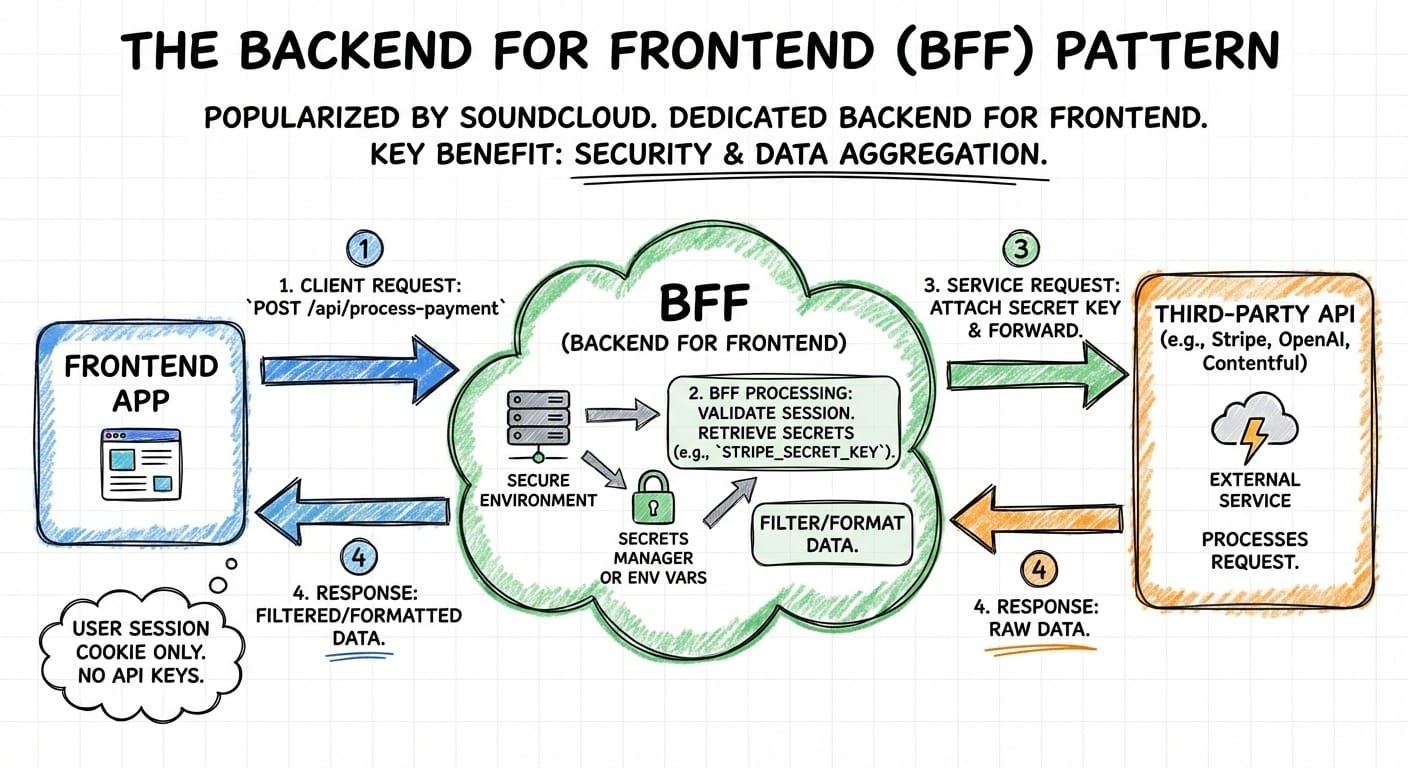
The Backend for Frontend (BFF) pattern (originally popularized by SoundCloud) involves creating a dedicated backend layer specifically for your frontend application. While it solves many problems (like data aggregation), its security benefits are arguably its strongest asset.In a BFF architecture, your frontend never communicates directly with the sensitive third-party API (e.g., Stripe, OpenAI, Contentful). Instead, it talks to your BFF, and your BFF talks to the service:
Here is an example flow to process a payment:
- The frontend sends a request to the BFF (e.g., POST /api/process-payment). No API keys are needed here, just the user's session cookie.
- The BFF validates the user's session. It then retrieves the necessary secrets (e.g., STRIPE_SECRET_KEY) from its own secure server-side environment variables or a secrets manager.
- The BFF attaches the secret key and forwards the request to the external service.
- The service (Stripe) responds to the BFF, which can then filter or format the data before sending it back to the frontend.
How do you deploy it?
There is no single "correct" way to deploy a BFF, but there are two common patterns depending on your team's size and complexity.
1. "Integrated" BFF
For modern web development using frameworks like Next.js, Nuxt, Remix, or SvelteKit, the BFF is often built directly into the frontend project structure. The code lives in the same repository, and uses the same deployment workflow as the frontend code.
With React Server Components (RSC), the server-side logic never even gets sent to the browser bundle. The UI components run in the user's browser (Public Client), while API routes, Server Actions, and Server Components run on a secure Node.js/Edge runtime (Confidential Client). This is your typical Vercel, Netlify, or similar platform deployment.
2. "Standalone" BFF
For mobile apps or complex enterprise systems, a separate backend service is often used. The BFF would live in a separate repository, deployed as a Docker container or Serverless function.
The big advantage is a strict separation of concerns: the BFF can be maintained by a different team, which is convenient for microservices architectures, or when the frontend is a pure SPA (e.g., plain Vite + React) without server capabilities.
This is also the mandatory pattern for mobile apps, since native apps don't have server-side rendering. There are also some specific points to keep in mind for mobile development:
- Session management: Cookies work on mobile but require explicit handling (e.g., CookieJar in OkHttp for Android, HTTPCookieStorage on iOS). The best way is to use short-lived tokens stored in secure platform storage (Android Keystore, iOS Keychain).
- Certificate pinning: Consider pinning your BFF's TLS certificate to prevent man-in-the-middle attacks on the app-to-BFF connection.
- For apps already in the Firebase ecosystem, Firebase Cloud Functions can serve as a lightweight BFF without managing additional infrastructure.
3. Managed Solutions: Serverless BFF
You don't need to manage servers to run a BFF. Cloud providers offer fully managed compute that fits the pattern well, letting you focus on business logic rather than infrastructure logic.
AWS API Gateway + Lambda is the most common serverless BFF stack:
- API Gateway acts as the entry point, handling HTTPS termination, request routing, and optional request validation
- Lambda functions execute your BFF logic: validating sessions, fetching secrets, and calling third-party APIs
- Secrets Manager stores API keys that Lambda retrieves at runtime
- CloudWatch provides logging and monitoring out of the box
This architecture scales automatically and costs effectively nothing when idle (you pay per request, not per hour). For most applications making occasional third-party API calls, the cost is negligible.
Google Cloud offers an equivalent pattern with Cloud Functions or Cloud Run fronted by API Gateway or Cloud Endpoints, pulling secrets from Secret Manager.
When to use serverless vs. containers: Serverless BFFs work well when your API proxying is straightforward and request volumes are moderate or spiky. If you need persistent connections (WebSockets), have consistent high traffic, or require complex request processing, a containerized BFF on ECS, Cloud Run, or Kubernetes may be more cost-effective and flexible.
This brings up a common question: what’s the difference between a BFF and an API gateway?
BFF vs. API Gateway
It's easy to confuse a BFF with an API gateway, as both sit between the client and backend services. However, they serve different purposes:
- An API gateway is a global entry point for all clients (web, mobile, partners) which handles cross-cutting concerns like authentication, rate limiting, and SSL termination. Typically owned by the Platform/DevOps team.
- A BFF is usually specific to one frontend (e.g., the mobile app BFF, the web dashboard BFF). It focuses on data formatting, aggregation, and UI-specific logic. Typically owned by the Frontend team.
In mature architectures, the BFF often sits behind the API gateway: the gateway handles infrastructure concerns while the BFF optimizes the interaction for its specific client.
Implementation: Securing the BFF
Simply adding a Node.js middleware doesn't automatically solve everything. You must ensure the channel between the Frontend and the BFF is also secure.
1. Cookie-Based Sessions over Tokens
Instead of sending a JSON Web Token (JWT) to the frontend to be stored in localStorage (where it is vulnerable to XSS attacks), the BFF should handle authentication and issue an HttpOnly, Secure, SameSite cookie.
- HttpOnly: JavaScript cannot read the cookie, preventing XSS theft.
- Secure: Cookie is only sent over HTTPS.
- SameSite: Mitigates CSRF attacks. Use SameSite=Strict for sensitive actions (the cookie is never sent cross-site), or SameSite=Lax if you need the cookie sent on top-level navigations (e.g., following a link from an email).
2. Proxying API Requests
The BFF acts as a proxy between your frontend and external services. In Next.js, a Route Handler can forward requests while injecting credentials the client never sees:
// app/api/external-service/route.ts
import { NextRequest, NextResponse } from 'next/server';
export async function POST(request: NextRequest) {
  const body = await request.json();
  // Forward the request to the external API with the secret key
  const response = await fetch('https://api.external-service.com/endpoint', {
    method: 'POST',
    headers: {
      'Content-Type': 'application/json',
      'Authorization': `Bearer ${process.env.SERVICE_API_KEY}`, // Secret stays on server
    },
    body: JSON.stringify(body),
  });
  const data = await response.json();
  return NextResponse.json(data);
}
3. Secrets Management: Beyond Environment Variables
Using process.env.API_KEY on your BFF is a starting point, but production deployments need a proper secrets manager. The reason is that sensitive API keys eventually need rotation.
Side note: not all API keys are sensitive. If unsure, ask yourself: does this key cost money, access user data, or grant write permissions?
Whether due to a suspected leak, compliance requirements, or simply good hygiene, you'll need to update secrets without redeploying your application.
This becomes critical during incident response. If a secret detection tool like GitGuardian alerts you to a leaked credential, you need to rotate the key immediately, ideally within minutes, not hours. A secrets manager makes this possible: update the secret in one place, and all consuming services pick up the new value without code changes or redeployments.
In addition, a dedicated secrets manager provides:
- Centralization: Update a secret once, and all services consuming it pick up the change
- Scheduled rotations
- Audit trails (who accessed which secrets and when)
- Access control: Grant the BFF permission to specific secrets without exposing your entire credential store
4. Injecting Secrets During CI/CD
The BFF deployment pipeline must get secrets into the runtime environment without storing them in code or build artifacts. The approach depends on your deployment target:
- For serverless you can reference the secrets manager directly in your function code. The function's IAM role grants read access to specific secrets (no environment variables needed in your deployment configuration).
- For containers (ECS, Kubernetes, Cloud Run): Inject secrets at runtime, not build time. In AWS ECS, use secrets in your task definition to pull values from Secrets Manager or Parameter Store and inject them as environment variables at runtime. In Kubernetes, use External Secrets Operator or native secret volumes. The container image itself should contain no credentials!
- For integrated BFFs (Vercel, Netlify), you should set secrets through the platform's dashboard or CLI (these platforms provide encrypted environment variable storage with their own access controls). Never commit them to your repository, even in a .env.production file!
The principle is the same regardless of platform: secrets should flow from your secrets manager to the runtime environment through a secure channel that your CI/CD pipeline orchestrates but never logs or caches.
Hardening the BFF Layer
Moving secrets to the BFF eliminates frontend exposure, but the BFF itself becomes a security-critical component. A few considerations:
- Rate limiting: Without limits, attackers can abuse your BFF to hammer third-party APIs, running up your bill or triggering rate limits on your vendor accounts. Implement request throttling at the API gateway level or within your BFF code.
- Input validation: The BFF should validate and sanitize all inputs before forwarding requests. Don't blindly proxy user-supplied parameters to external APIs: this can expose you to injection attacks against downstream services.
- Least privilege: Grant the BFF access only to the secrets it needs. If your BFF handles payments and content delivery, use separate secrets for Stripe and your CMS rather than a single credential store with everything.
- Logging and monitoring: Log API usage patterns (without logging the secrets themselves) to detect anomalies. A sudden spike in OpenAI API calls from your BFF might indicate a compromised session or abuse.
- Session validation: Every request to the BFF should validate the user's session before proxying to external services. An unauthenticated BFF endpoint that forwards requests is just a more complicated way to expose your API keys.
Conclusion
Frontend applications are public clients by design. Any secret embedded in browser JavaScript, a mobile app bundle, or a desktop executable is a secret shared with every user and every attacker willing to spend five minutes with developer tools.
The BFF pattern addresses this by placing a server-controlled layer between your untrusted client and the services that require authentication. Combined with a secrets manager for rotation and proper CI/CD practices for deployment, this architecture keeps credentials where they belong: on infrastructure you control.
Is it more complexity than shipping a React app with an API key in the bundle? Yes. But that complexity buys you secrets that rotate, access that audits, and credentials that don't appear in security researcher blog posts about the next batch of leaked API keys.
FAQ
Do I need a BFF for a simple app with one API key?
It depends on the API. For low-risk, read-only APIs (weather data, public datasets), a BFF may be overkill. But if the API key has financial implications (Stripe, OpenAI) or grants write/admin access, implement the BFF. The infrastructure cost is minimal (often free-tier eligible), and a leaked key can cause more damage in minutes than the BFF takes to deploy. The Backend for Frontend pattern provides essential protection for any API key that could result in unauthorized charges or data manipulation.
What happens if the BFF goes down?
The BFF is now in your critical path. Mitigate this with: (1) Serverless deployment—Lambda/Cloud Functions handle availability automatically, (2) Multi-region or multi-AZ deployment for containers, (3) Health checks and auto-scaling to replace failed instances, and (4) Graceful degradation in your frontend to handle BFF unavailability (cached data, disabled features, error states). Proper architecture ensures the BFF becomes a reliable component rather than a single point of failure.
Should I use environment variables or a secrets manager?
For production, use a secrets manager (AWS Secrets Manager, HashiCorp Vault, GCP Secret Manager). Environment variables work for development, but secrets managers provide automatic rotation, audit trails, centralized management, and fine-grained access control. The BFF fetches secrets at runtime, so you can rotate credentials without redeploying. This separation between configuration and secrets is critical for maintaining security at scale and ensuring compliance with security best practices.
Can I use Next.js API routes as a BFF?
Yes. This is the "Integrated BFF" pattern. Next.js (and Nuxt, Remix, SvelteKit) split code at build time, ensuring server-side code never reaches the client bundle. Use API Routes (pages/api/* or Route Handlers) for mutations, webhooks, and third-party API calls requiring secrets. Server Components can fetch data with secrets directly during render for read-only data. Server Actions are ideal for form submissions and mutations in the App Router. getServerSideProps is safe for secrets as it runs only on the server. Edge Runtime caveat: Some secrets managers (like the full AWS SDK) don't work on Edge runtimes, so fetch secrets from a Node.js API route or use Edge-compatible alternatives when deploying to Vercel Edge Functions.
How do I secure the connection between frontend and BFF?
Use HttpOnly, Secure, SameSite cookies for session management instead of storing JWTs in localStorage (which is vulnerable to XSS attacks). The BFF issues the cookie after authentication, and the frontend includes it automatically on every request. This keeps tokens out of JavaScript entirely, preventing them from being accessible to malicious scripts. Cookie-based session management provides a robust defense against common client-side attacks while maintaining a seamless user experience.
What other benefits does the BFF pattern provide beyond security?
Beyond security, a BFF enables: (1) Leaner frontend code—no need to bundle heavy SDKs for every third-party service, reducing bundle size and improving load times; (2) Data aggregation—combine multiple API calls into a single response, reducing network chatter and improving performance; and (3) Protocol translation—expose a clean REST/GraphQL interface even if backend services use gRPC or SOAP. The BFF acts as an abstraction layer that simplifies frontend development while providing flexibility to evolve backend systems independently.
How do I implement a BFF for a mobile app (Android/iOS)?
Mobile apps use the "Standalone BFF" pattern—a separate backend service your app communicates with over HTTPS. Key considerations include: Store session tokens in secure platform storage (Android Keystore, iOS Keychain), not SharedPreferences or UserDefaults; use CookieJar (OkHttp) or HTTPCookieStorage (URLSession) for cookie handling if your BFF uses cookie-based sessions; implement certificate pinning to prevent MITM attacks by pinning your BFF's certificate; and consider Firebase Cloud Functions as a lightweight BFF option if you're already using Firebase. Mobile BFFs require special attention to platform-specific security features.