TL;DR
- The new GitGuardian Wiz integration: GitGuardian now has an integration with Wiz.
- Daily sync: Once a day, GitGuardian sends open secret incidents from GitHub, GitLab, Bitbucket, and Azure DevOps to Wiz as native secret findings.
- Full context: Each finding carries the repository, file, commit, detector, validity, and severity, plus a link back to the incident in GitGuardian.
- Secret stays private: The secret value never leaves GitGuardian. Wiz only receives a hash and metadata.
In a lot of companies, the cloud security team works in Wiz, and the AppSec team works in GitGuardian. Wiz is where cloud risk gets triaged and where the report for the CISO comes from. GitGuardian is where leaked secrets get found and fixed. Until now, the two teams rarely looked at the same thing. So the person looking at an exposed cloud resource in Wiz couldn't see that the AWS key for that same account was committed to a private repo eight months ago and still works.
That gap is what this integration closes. GitGuardian now sends its secret findings straight into Wiz, so leaked credentials sit next to the cloud and identity risk they're connected to. Both teams now look at the same leaked key, each in the tool they already use.
Why secrets belong next to your cloud risk
Attackers don't need to break in when they can log in. Compromised credentials were the most common technique across full breach chains in the Verizon 2026 Data Breach Investigations Report, showing up in 39% of them. And leaked secrets don't go away on their own: of the credentials GitGuardian found valid in 2022, more than 64% still worked in January 2026 (State of Secrets Sprawl 2026).
Wiz is good at showing how cloud resources connect and which issues matter most. GitGuardian is good at finding secrets across code, developer laptops, collaboration tools, and public sources, checking whether they still work, and helping teams fix them. Customers running both GitGuardian and Wiz kept asking the same thing: why do I need two screens to see one problem?
Now they don't.
What GitGuardian sends to Wiz
For every open secret incident in a connected repository, Wiz receives one finding with:
- The repository, file path, and commit where the secret was found.
- The detector that caught it (GitGuardian has 550+ of them).
- Whether the secret is still valid, and when that was last checked, so Wiz can put the keys that still work ahead of every string that only looks like a key.
- The incident's severity in GitGuardian, mapped to a Wiz severity.
- A link back to the full incident in GitGuardian.
If a secret shows up several times in the same repository, Wiz gets the most recent occurrence. The full history stays in GitGuardian.
The secret itself never leaves GitGuardian. Wiz receives a SHA-256 hash of the value and the metadata above, nothing more.
How the sync works
Once a day, GitGuardian sends Wiz the full list of open incidents (triggered or assigned) for each connected source. Wiz keeps a finding open as long as it appears in the latest upload. When your team resolves or ignores an incident in GitGuardian, it drops out of the next sync, and Wiz removes the finding.
Most severities map across directly. For the two Wiz doesn’t have, you decide.
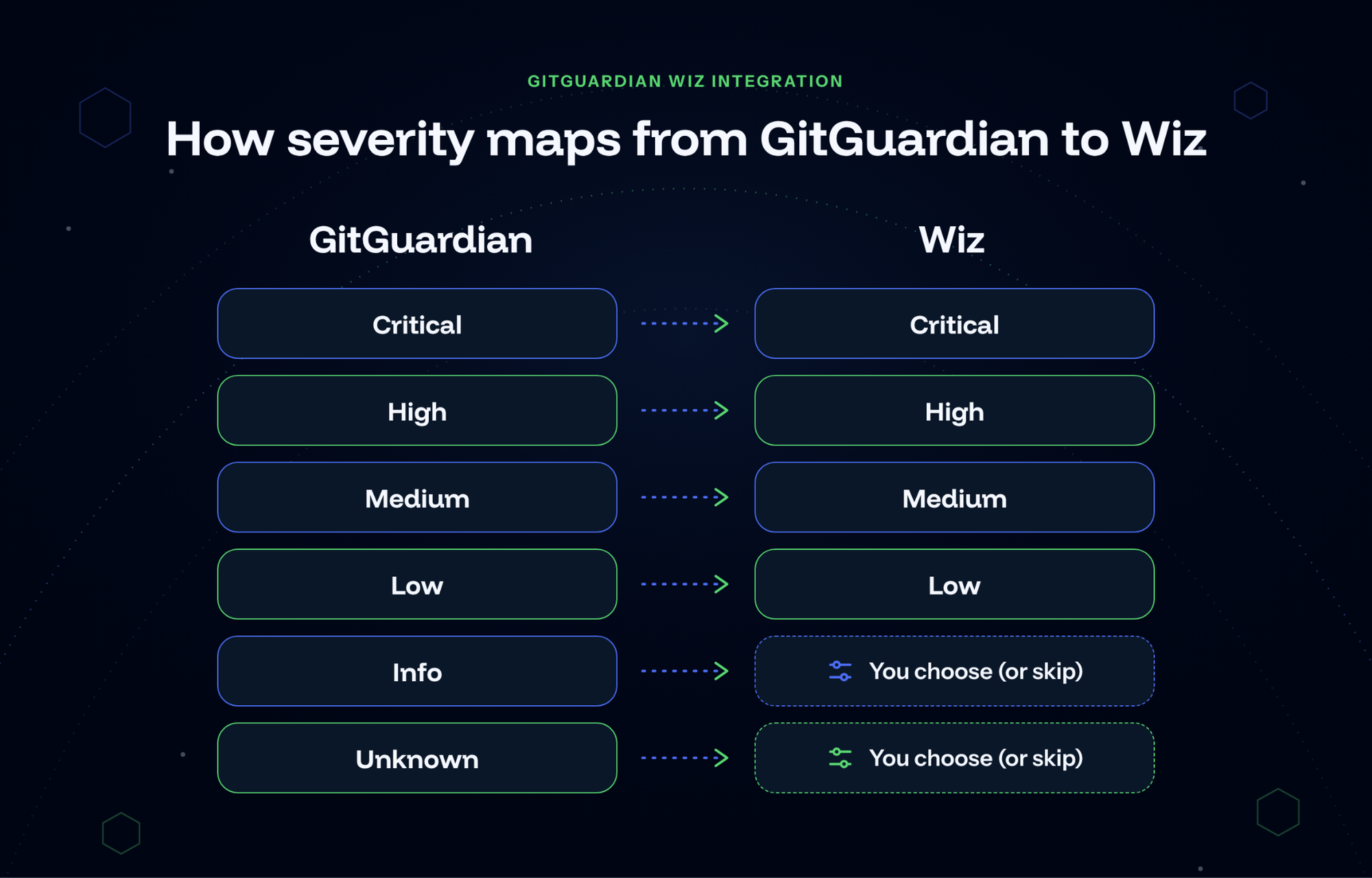
You can change this anytime, and it takes effect at the next sync.
What you get by keeping GitGuardian in the loop
Wiz shows you where a leaked secret sits in your cloud risk picture. GitGuardian’s secret scanning finds it, proves whether it still works, and gets it fixed. That means 550+ detectors with validity checks that tell you which keys are live, remediation workflows like similar-incident grouping and playbooks, and prevention at commit time with ggshield, so fewer secrets land in your code and other assets in the first place. Every finding in Wiz links back to its incident, so going from "we should look at this" to "this is fixed" takes one click.
GitGuardian also covers places outside your repositories, like Slack, Jira, Confluence, and developer machines. Those findings stay in GitGuardian, because the integration only sends incidents from version control sources.
How to set up the GitGuardian Wiz integration
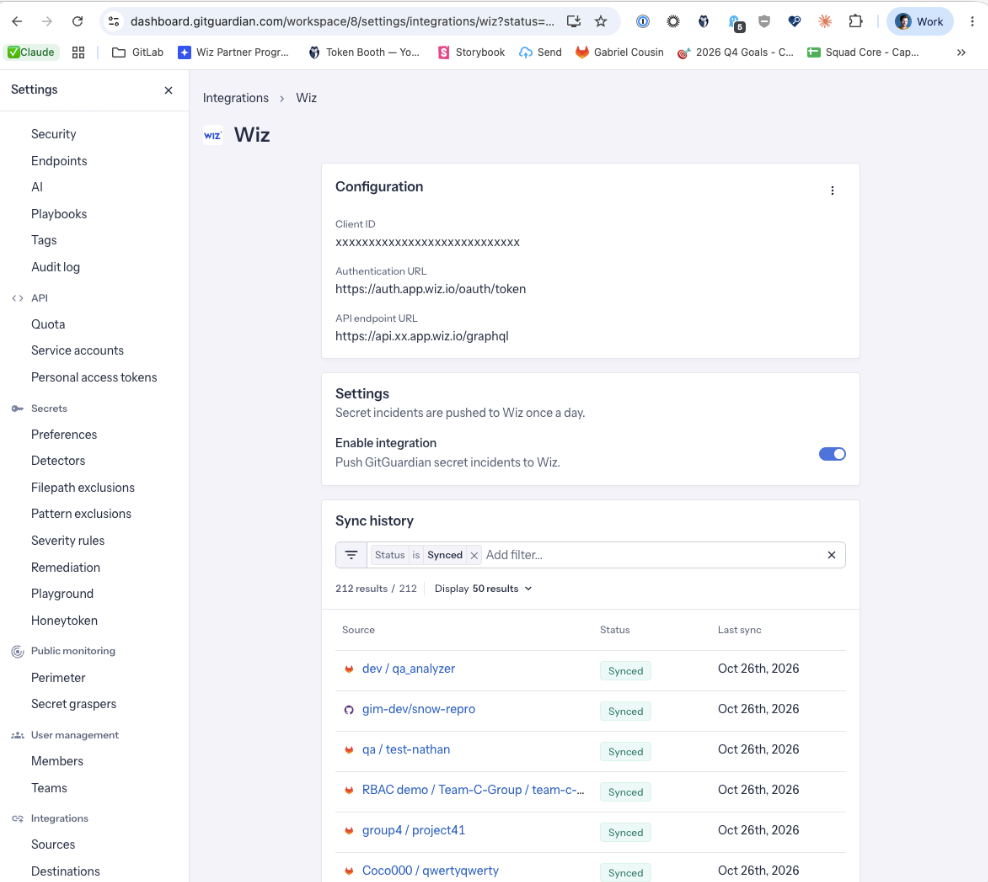
You'll need a Wiz user who can add integrations. You don't need to create a service account first, because the GitGuardian integration in Wiz creates one for you.
- In Wiz, open the GitGuardian integration page. Wiz gives you a Client ID, a Client secret, an Authentication URL, and an API endpoint URL.
- In GitGuardian, go to Settings > Integrations > Wiz and click Configure.
- Paste the four values and choose how to map Info and Unknown severities.
- Click Add integration.
Your first findings show up in Wiz within 24 hours. You can pause or resume the sync from the same settings page at any time.
One tip: start from the GitGuardian integration page in Wiz rather than creating a token yourself in Wiz settings. A token you create manually won't have the permissions the sync needs.
The full details are in the GitGuardian Wiz integration docs.
Good to know
- New findings can take up to 24 hours to show up in Wiz, and resolved ones can stay for up to 7 days.
- Some findings may be skipped at first. If Wiz doesn't support a GitGuardian detector yet, findings from it are held back until Wiz adds it. That usually takes a few days and clears on its own.
- Custom detectors and Gerrit aren't supported, and findings without a file path are skipped.
Try it
If you already use GitGuardian and Wiz, you can connect them today in a few minutes. If you use Wiz and want to see what's hiding in your repositories, book a demo and we'll show you both together.
FAQ
Does GitGuardian integrate with Wiz?
Yes. The GitGuardian Wiz integration sends open secret incidents from your version control sources to Wiz once a day as native secret findings. Each finding links back to the incident in GitGuardian.
Does Wiz receive the secret value?
No. The secret value never leaves GitGuardian. Wiz receives a SHA-256 hash of the value plus metadata: repository, file, commit, detector, validity, and severity.
Which sources sync to Wiz?
Only version control sources: GitHub, GitLab, Bitbucket, and Azure DevOps. Findings from Slack, Jira, Confluence, and developer machines stay in GitGuardian. Custom detectors and Gerrit aren't supported.
How often does GitGuardian sync findings to Wiz?
Once a day. New findings can take up to 24 hours to appear in Wiz, and resolved ones can stay visible for up to seven days.
 Soujanya Ain
 Soujanya Ain